ST – SuperTap Delay
Normal and Multi-tap Delays
A delay line replays a copy of the original signal after a certain amount of elapsed time. Combining this
delayed signal with the original can create extraordinary rhythmic and harmonic effects. Early delay imple-
mentations included the analog bucket brigade and tape delay types. Digital delays have opened up many
possibilities due to their flexibility, ease of use, and sonic clarity. Replaying multiple signals delayed by dif-
ferent times with the original is called a multi-tap delay.
SuperTap offers some of the most widely used and sought after effects found in delay technologies.
SuperTap’s maximum delay is 1.2 s (without modulation) and the taps can be placed anywhere within that
time. These taps are called feed forward: all are mixed at the output. A feedback control routes the delayed
audio back to the input, enabling complex looping and rhythmic effects.
SuperTap Controls
Pan Graph
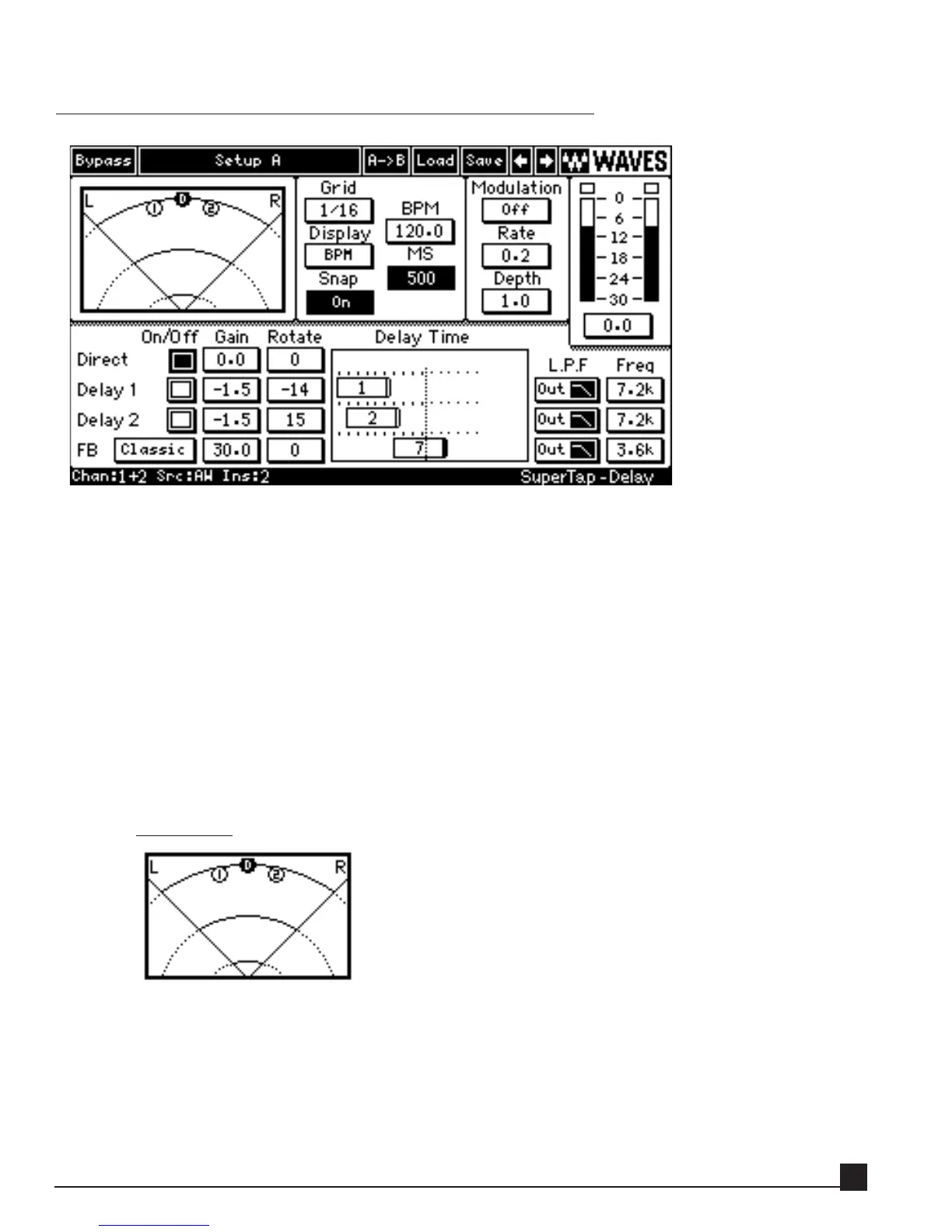
The Pan Graph shows the location and amplitude of each tap in the stereo field. SuperTap works
with mono and stereo inputs and uses the term Rotation to describe the signal location in the stereo
field. Drag a Pan Graph marker to change Gain and Rotate parameters at the same time, or adjust
the Gain and Rotate controls in the Tap Controls separately for each tap. Horizontal movement
changes the Rotation value (-45º to 45º), and vertical movement alters the gain (0 to -24 dB).
Y56K User Guide
59


 To Next Page