Operation
Driving the vehicle 7.3
107
[en] | 05/2019 | 1000408123 | 4080T Basic Line | Operator’s Manual
7.3
Driving the vehicle
7.3.1
Selecting a drive mode
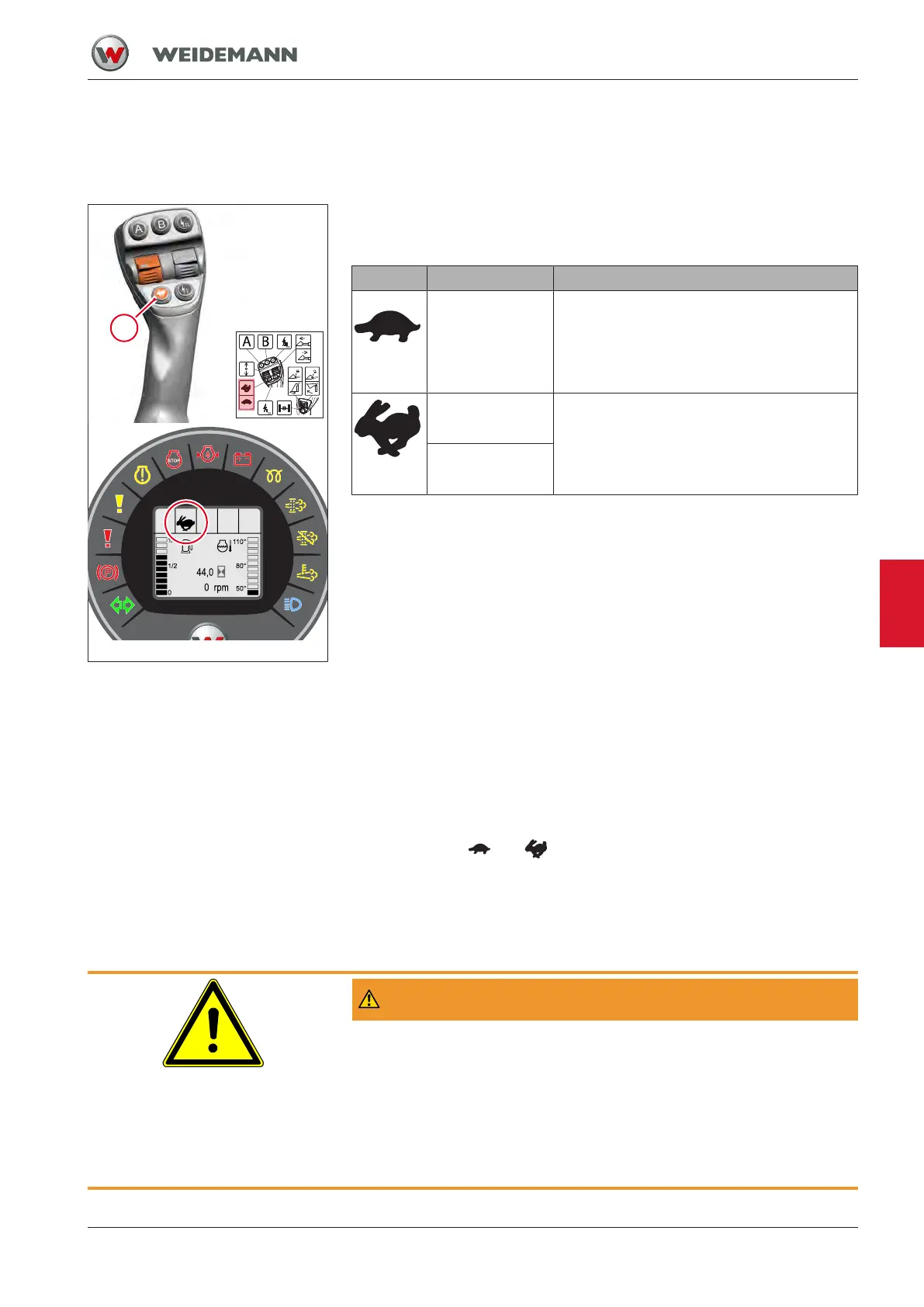
Fig.84: Switch for drive modes
The vehicle has two drive modes. The maximum speed depends on the
engine speed selected.
Symbol Drive mode Recommended activity
Crawler gear:
• 0 – 7km/h
For work requiring precise speed adjust-
ment
High speed:
• 0 – 20 km/h
For long transport distances
Option:
• 0 – 30 km/h
30 or 40 km/h version
Vehicles with a design-induced maximum speed of more than 20 km/h
have special requirements for the operator and the owner. A different
driving license may be required for the operator. The owner must comply
with the vehicle's insurance obligation.
Furthermore, there may be an obligation to register the vehicle for public
road traffic and an obligation to affix license plates to the vehicle.
The responsibility for meeting these requirements and obligations lies
solely with the owner of the vehicle.
Changing drive mode
▪ Press button 1.
ð The drive mode changes from crawler gear to high speed, or from
high speed to crawler gear.
ð Symbols
and appear in the display.
When restarting the vehicle, the last selected drive mode is automatically
switched on.
7.3.2
Selecting a travel direction
WARNING
Accident hazard when changing drive direction during vehicle
travel!
Changing the drive direction while driving for the vehicle immediately
changes the drive direction to the opposite direction. This may result in
accidents that could result in serious injury or death.
► Do not change the drive direction while driving.
► First stop the vehicle completely, then select the drive direction.
7


 To Next Page