Operation
Operating the front hydraulic connections 7.9
137
[en] | 05/2019 | 1000408123 | 4080T Basic Line | Operator’s Manual
7.9.3
Standard hydraulic connections in continuous operation
NOTICE
Damage due to overheating of the hydraulic system!
When continuous operation is switched on and no attachment is connec-
ted, the hydraulic system overheats very quickly.
► Always bring the switch for continuous operation to the zero position
when continuous operation is not required.
With this function the hydraulic connections can be operated in continu-
ous operation. The scroll wheel then does not need to be operated con-
tinuously. This function is required for certain attachments that have a hy-
draulic oil motor that must be supplied with a continuous flow of oil, e.g.
sweeping brushes.
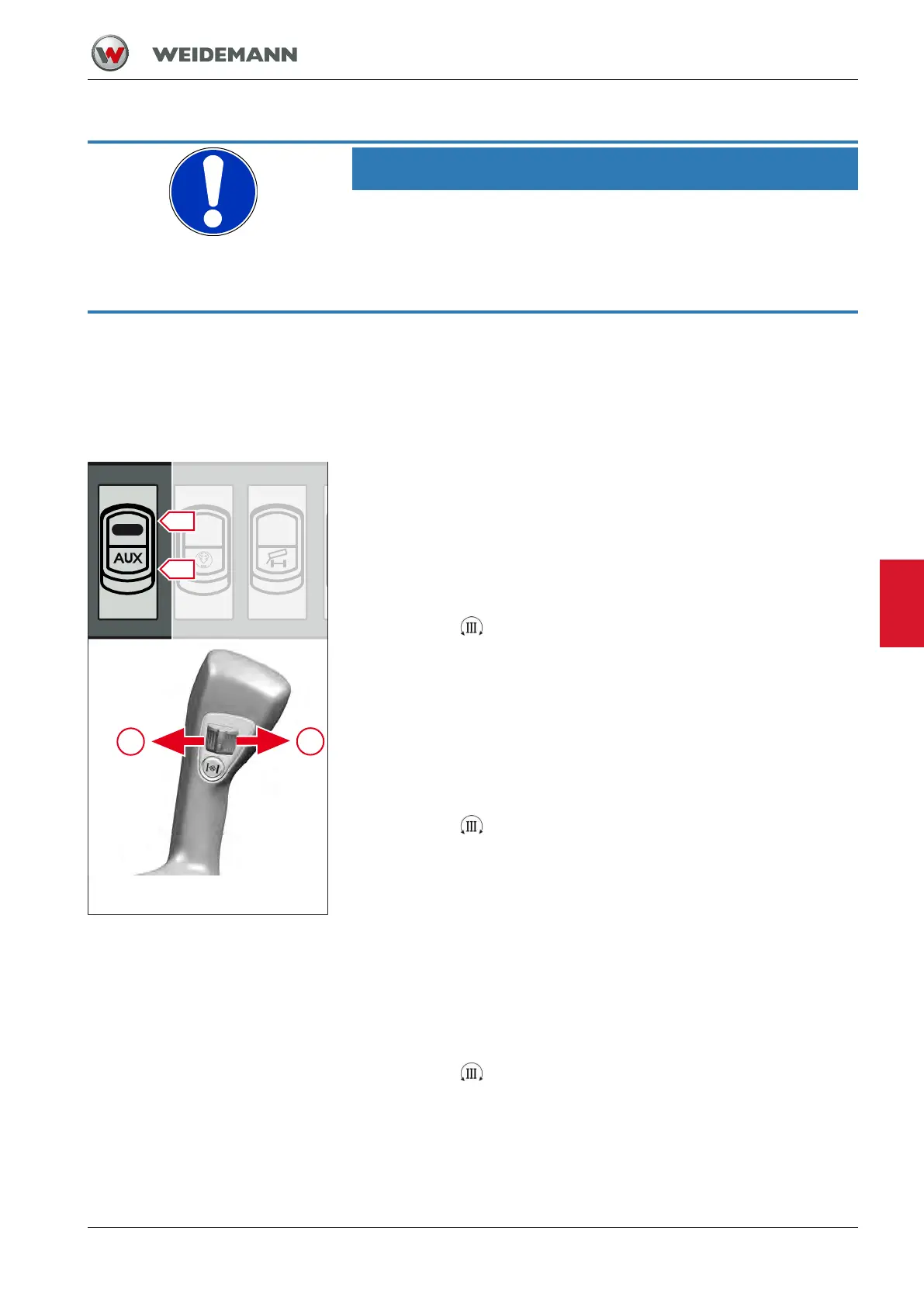
Fig.124: Operation of continuous
operation third control circuit
Continuous operation of the hydraulic connections by
operating the scroll wheel
The continuous operation of the hydraulic connections is activated with
the switch in the switch panel in the side console.
1. Press lock S in switch downwards and move switch to position I.
2. Move the scroll wheel in direction A and release it.
ð Symbol
illuminates in the display.
ð Continuous operation is switched on. Hydraulic connection A is pres-
sure side, hydraulic connection B is return flow.
If necessary, the continuous operation of the hydraulic connections can
also be switched to the right-hand hydraulic connection.
1. Push the lock in the switch downwards and move the switch to posi-
tion I.
2. Move the scroll wheel in direction B and release it.
ð Symbol
illuminates in the display.
ð Continuous operation is switched on. Hydraulic connection A is re-
turn, hydraulic connection B is pressure side.
Switch off continuous operation of hydraulic connections
If continuous operation is to be interrupted only briefly, proceed as fol-
lows:
ü Continuous operation is switched on.
1. Leave switch in position I.
2. Move the scroll wheel in direction A and release it.
ð Symbol
illuminates in the display again.
ð Continuous operation is disabled.
▪ Move the scroll wheel again in any direction.
ð Continuous operation is enabled again.
7


 To Next Page