Commissioning
Indications in the display 6.3
89
[en] | 05/2019 | 1000408123 | 4080T Basic Line | Operator’s Manual
6.3.2
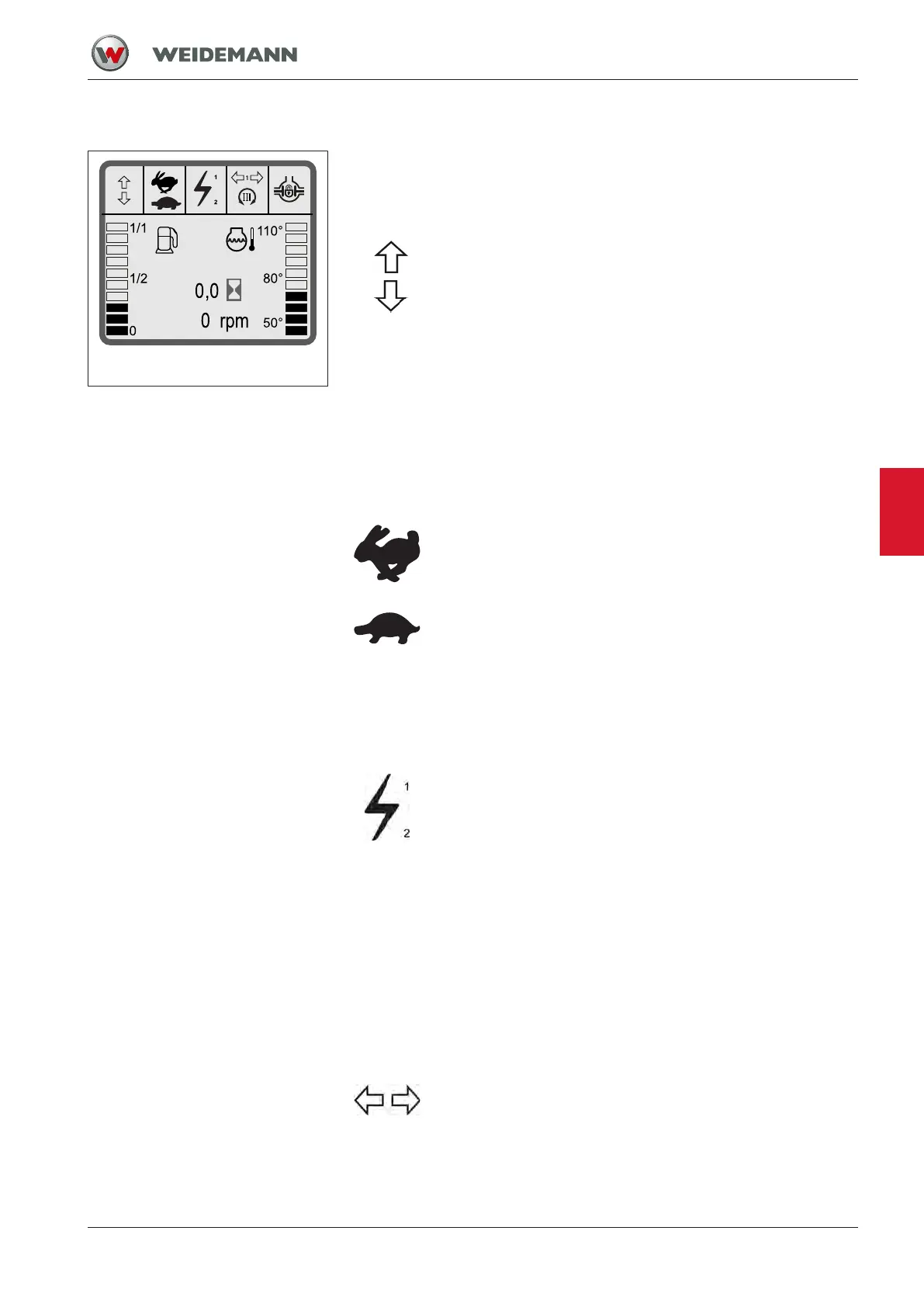
Reading information on the display
Fig.70: Overview of the information
in the display
Control lights serve as a source of information. The symbols in the dis-
play indicate various operating states.
The display lights up after switching on the ignition for the self-test.
Travel direction indication
A symbol illuminates depending on the travel direction se-
lected.
• No symbol is displayed in the display when the ignition
is switched on.
• When the drive direction scroll wheel is actuated, the
display shows the selected drive direction.
– Symbol 1 is displayed during forward drive direc-
tion.
– Symbol 2 is displayed during backward drive direc-
tion.
– No symbol is displayed in neutral position.
Travel mode Indication
A symbol illuminates depending on the travel mode selec-
ted.
• The travel mode last selected appears in the display
when the ignition is switched on.
• When the travel mode control push-button is pressed,
the display shows the selected travel mode.
– Symbol 1 appears if the high speed travel mode is
selected.
– Symbol 2 appears if the crawler gear travel mode is
selected.
Display for electrical connection
This position is only used for the option "Loader unit plug
receptacle".
• No symbol is displayed in the display when the ignition
is switched on.
• When the push-buttons for the electrical connection are
pressed, the display shows the symbol.
– When the push-button for electrical function 1 is
pressed, the symbol is displayed together with the
number 1.
– When the push-button for electrical function 2 is
pressed, the symbol is displayed together with the
number 2.
Display for trailer turn signal
• No symbol is displayed in the display when the ignition
is switched on.
• Symbol flashes when the turn signal is switched on and
the trailer is connected.
6


 To Next Page