KCU116 Board User Guide 66
UG1239 (v1.2) September 28, 2018 www.xilinx.com
Chapter3: Board Component Descriptions
Power On/Off Slide Switch SW1
[Figure 2-1, callout 30]
The KCU116 board power switch is SW1. Sliding the switch actuator from the off to on
position applies 12VDC power from the 6-pin mini-fit power input connector J52. The green
LED DS2 illuminates when the KCU116 board power is on. See KCU116 Board Power System
for details on the onboard power system.
CAUTION! Do NOT plug a PC ATX power supply 6-pin connector into J52 on the KCU116 evaluation
board. The ATX 6-pin connector has a different pinout than J52. Connecting an ATX 6-pin connector
into J52 damages the KCU116 evaluation board and voids the board warranty.
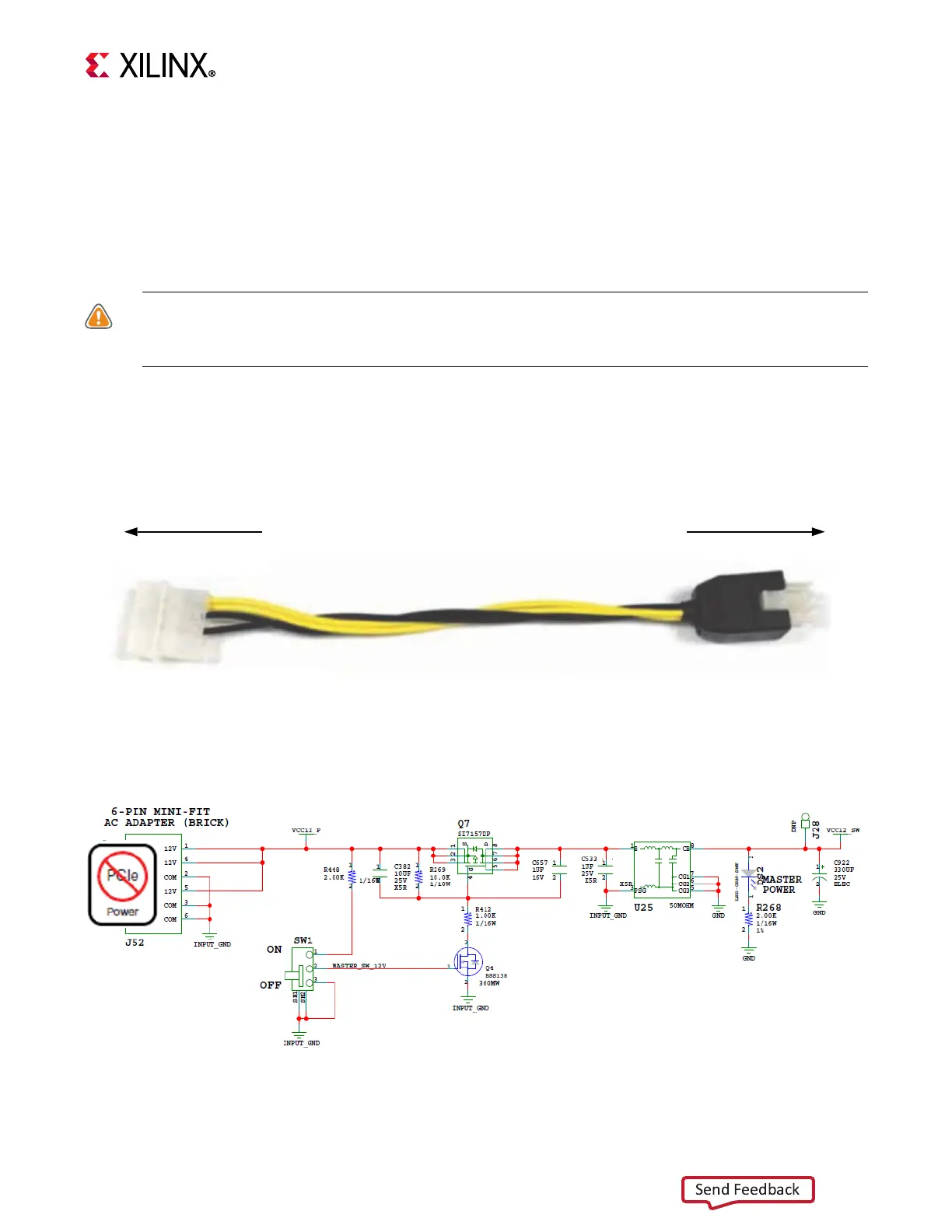
The KCU116 evaluation kit includes the adapter cable shown in Figure 3-26 for powering
the KCU116 board from the ATX power supply 4-pin peripheral connector. The Xilinx part
number for this cable is 2600304, and is equivalent to the Sourcegate Technologies part
number AZCBL-WH-1109-RA4. See [Ref 35] for ordering information.
Figure 3-27 shows the power connector J52, power switch SW1, and indicator LED DS2.
X-Ref Target - Figure 3-26
Figure3‐26: ATX Power Supply Adapter Cable
To ATX 4-Pin Peripheral
Power Connector
To J52 on KCU116 Board
X18419-120916
X-Ref Target - Figure 3-27
Figure3‐27: Power On/Off Switch SW1








 To Next Page