KCU116 Board User Guide 79
UG1239 (v1.2) September 28, 2018 www.xilinx.com
Chapter3: Board Component Descriptions
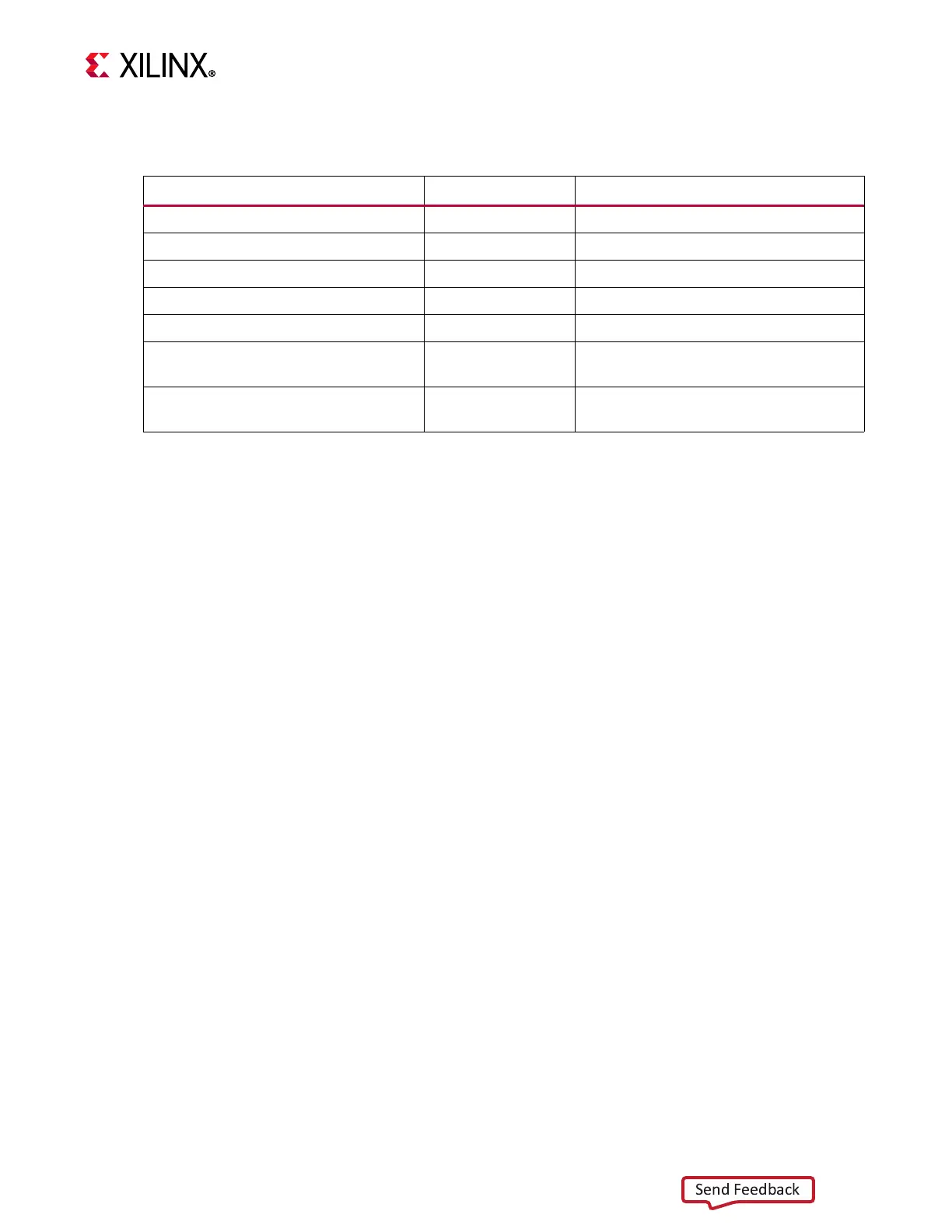
Table 3-28 describes the SYSMON header J93 pin functions.
For more details on SYSMON, see the UltraScale Architecture System Monitor User Guide
(UG580) [Ref 20].
System Controller
[Figure 2-1, callout 36]
The KCU116 board includes an onboard Zynq® SoC multiprocessor XC7Z010 (U161) with
system controller firmware. A host PC resident graphical user interface for the system
controller (SCUI) is provided on the KCU116 website. The SCUI can be used to query and
control select programmable features such as clocks, FMC functionality, and power systems.
The KCU116 website also includes a KCU116 System Controller Tutorial (XTP465) [Ref 16]
and KCU116 Software Install and Board Setup Tutorial (XTP464) [Ref 17]. A summary of the
steps are:
1. Ensure the Silicon Labs VCP USB-UART drivers are installed on the host PC. See Silicon
Labs CP210x USB-to-UART Installation Guide (UG1033) [Ref 15].
2. Download the SCUI host PC application.
3. Connect the micro-B USB cable to the KCU116 board USB-UART connector (J164).
4. Power-cycle the KCU116 board.
5. Launch the SCUI.
Table3‐28: SYSMON Header J93 Pinout
Schematic Net Name J93 Pin Number Description
NC 1,3 No connect
SYSMON_DXP, SYSMON_DXN 2,4 Access to thermal diode
SYSMON_AGND 5,6 Analog ground reference
SYSMON_VREF 7 REF3012 U64 1.25V
SYSMON_VCC 8 Filtered V
CCAUX
1.80V
SYSMON_VN, SYSMON_VP 9,10
FPGA dedicated analog input channel
for SYSMON
VCCINT_VIN_R_P/N 11,12
MAX15301 U47 V
CCINT
series 0.002Ω
R36 IR-drop taps








 To Next Page