port1.17 309 1350 0 0 0 0
port1.23 186 186 0 0 0 0
5.2.10 Set load balance function rules
[Syntax]
port-channel load-balance type
no port-channel loac-balance
[Parameter]
type : Rules to specify the forwarding destination interface
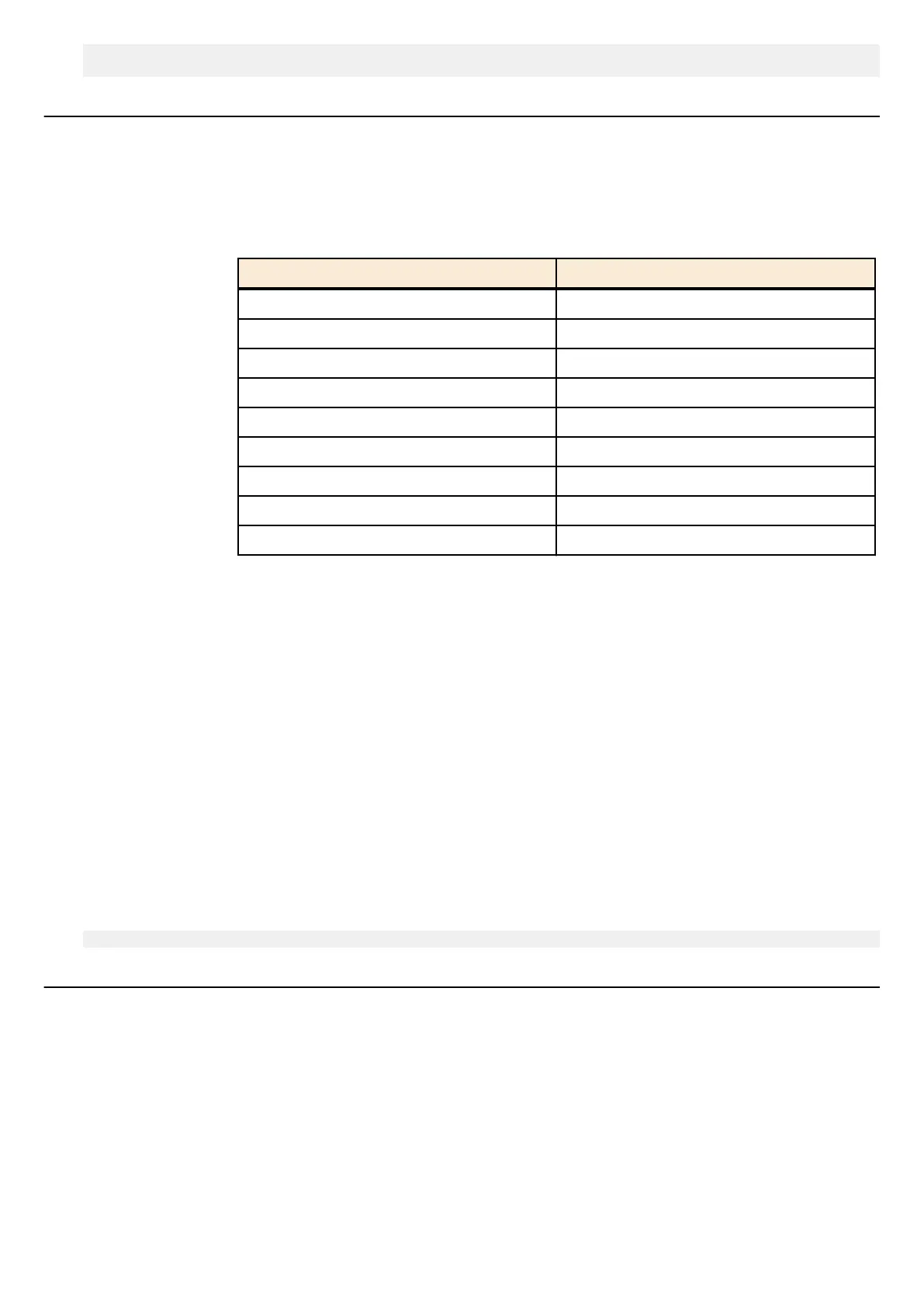
type Description
dst-ip Destination IPv4/IPv6 address
dst-mac Destination MAC address
dst-port Destination TCP/UDP port number
src-dst-ip Source and destination IPv4/IPv6 address
src-dst-mac Source and destination MAC address
src-dst-port Source and destination TCP/UDP port number
src-ip Source IPv4/IPv6 address
src-mac Source MAC address
src-port Source TCP/UDP port number
[Initial value]
port-channel load-balance src-dst-mac
[Input mode]
global configuration mode
[Description]
Sets rules to specify the forwarding destination interface of the load balance function.
If this command is executed with the "no" syntax, the setting returns to the default.
[Note]
This command is a system-wide setting.
In the case of a frame that is not an IPv4/IPv6 packet, the forwarding destination interface is determined according to the
forwarding source and destination MAC addresses, regardless of the rules that were specified.
[Example]
With the load balance function, set the system to determine the forwarding destination interface based on the transmission-
source and destination IPv4/IPv6 address.
SWR2311P(config)#port-channel load-balance src-dst-ip
5.2.11 Show protocol status of LACP logical interface
[Syntax]
show etherchannel status [link-id] [summary | detail]
[Keyword]
summary : Abbreviated display
detail : Detailed display
[Parameter]
link-id : <1-127>
LACP logical interface number
130 | Command Reference | Interface control



 To Next Page