The basic commands related to moving between command input modes are described below. For commands that move from
global configuration mode mode to individual configuration mode, refer to "individual configuration mode."
• exit command
• logout command
• enable command
• disable command
• configure terminal command
• end command
2.4.2 individual configuration mode
individual configuration mode is the overall name for the mode in which you can make detailed settings for specific items such
as LAN/SFP port, VLAN interface, and QoS. To enter individual configuration mode, issue the command for transitioning to
the respective mode from global configuration mode.
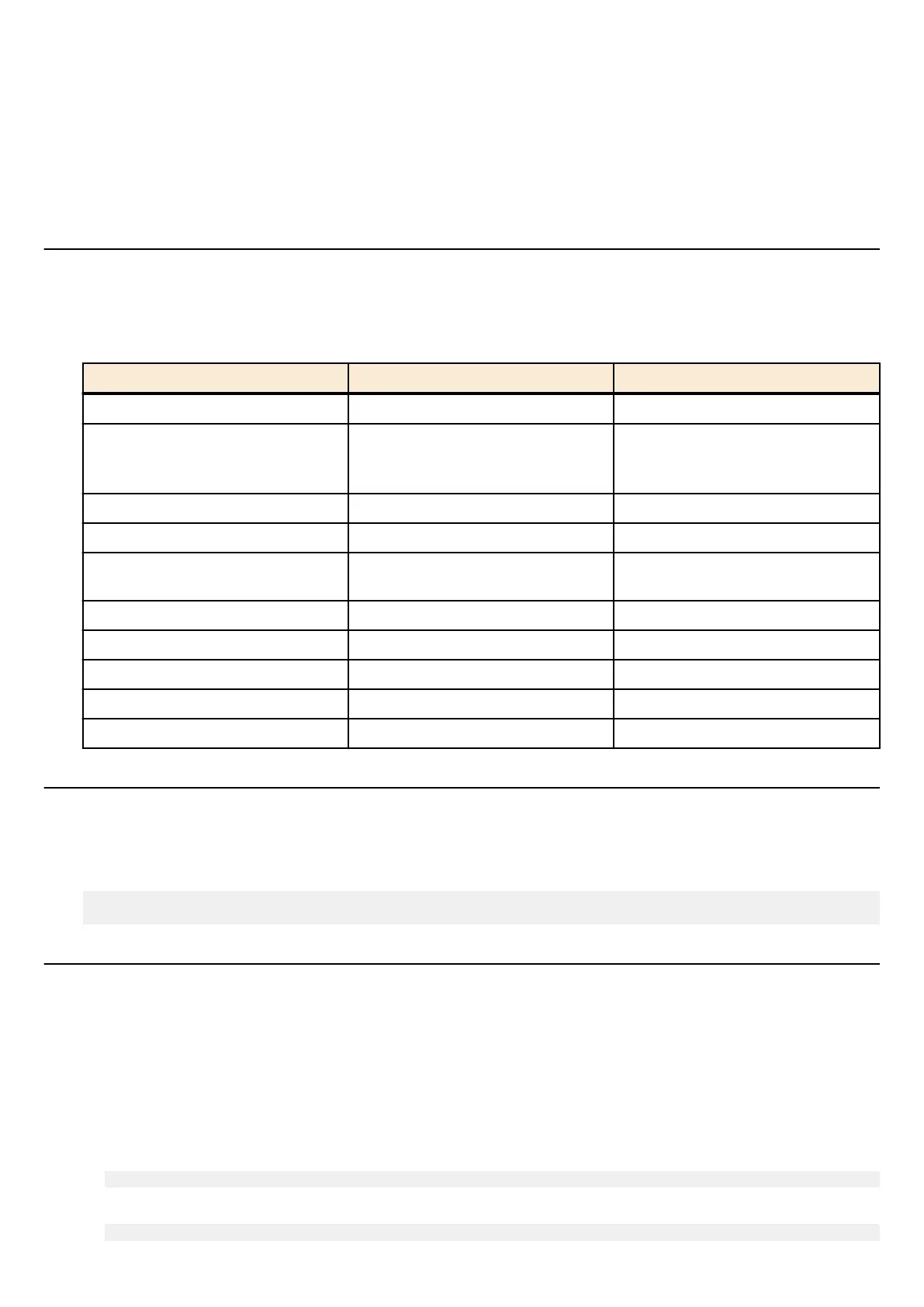
On SWR2311P, individual configuration mode contains the following modes. Some of the modes within individual
configuration mode have a hierarchy. For example, policy map mode → policy map class mode.
individual configuration mode Transition command Prompt
interface mode interface command SWR2311P(config-if)#
line mode line con command
line vty command
SWR2311P(config-line)#
VLAN mode vlan database command SWR2311P(config-vlan)#
VLAN access map mode vlan access-map command SWR2311P(config-vlan-access-map)#
MST mode
spanning-tree mst configuration
command
SWR2311P(config-mst)#
class map mode class-map command SWR2311P(config-cmap)#
policy map mode policy-map command SWR2311P(config-pmap)#
policy map class mode class command SWR2311P(config-pmap-c)#
L2MS mode l2ms configuration command SWR2311P(config-l2ms)#
LLDP agent mode lldp-agent command SWR2311P(lldp-agent)#
2.4.3 Command prompt prefix
he command prompt prefix indicates the host name. In the default state, the host name is the model name "SWR2311P". This
indication can be changed by using the hostname command to specify the host name. In cases where multiple SWR2311P units
are used, management will be easier if separate names are assigned to each switch.
Changing the host name
SWR2311P(config)# hostname Switch-012
Switch-012(config)#
2.4.4 Executing commands of a different input mode
Because the commands that can be used on the SWR2311P differ depending on the mode, you must transition to the mode in
which a command can be executed before you execute that command. The do command is provided as a way to avoid this
requirement.
By using the do command you can execute priviledged EXEC mode commands from any configuration mode. This allows you
to reference the current configuration or save settings from any configuration mode without having to transition to priviledged
EXEC mode.
However, since the completion function cannot be used with do, you must enter the command that follows either in its full
spelling or in its abbreviated form.
•
Entry in full spelling
SWR2311P(config)#do show running-config
•
Entry in abbreviated form
SWR2311P(config)#do sh ru
Command Reference | How to use the commands | 19



 To Next Page