9Alarm
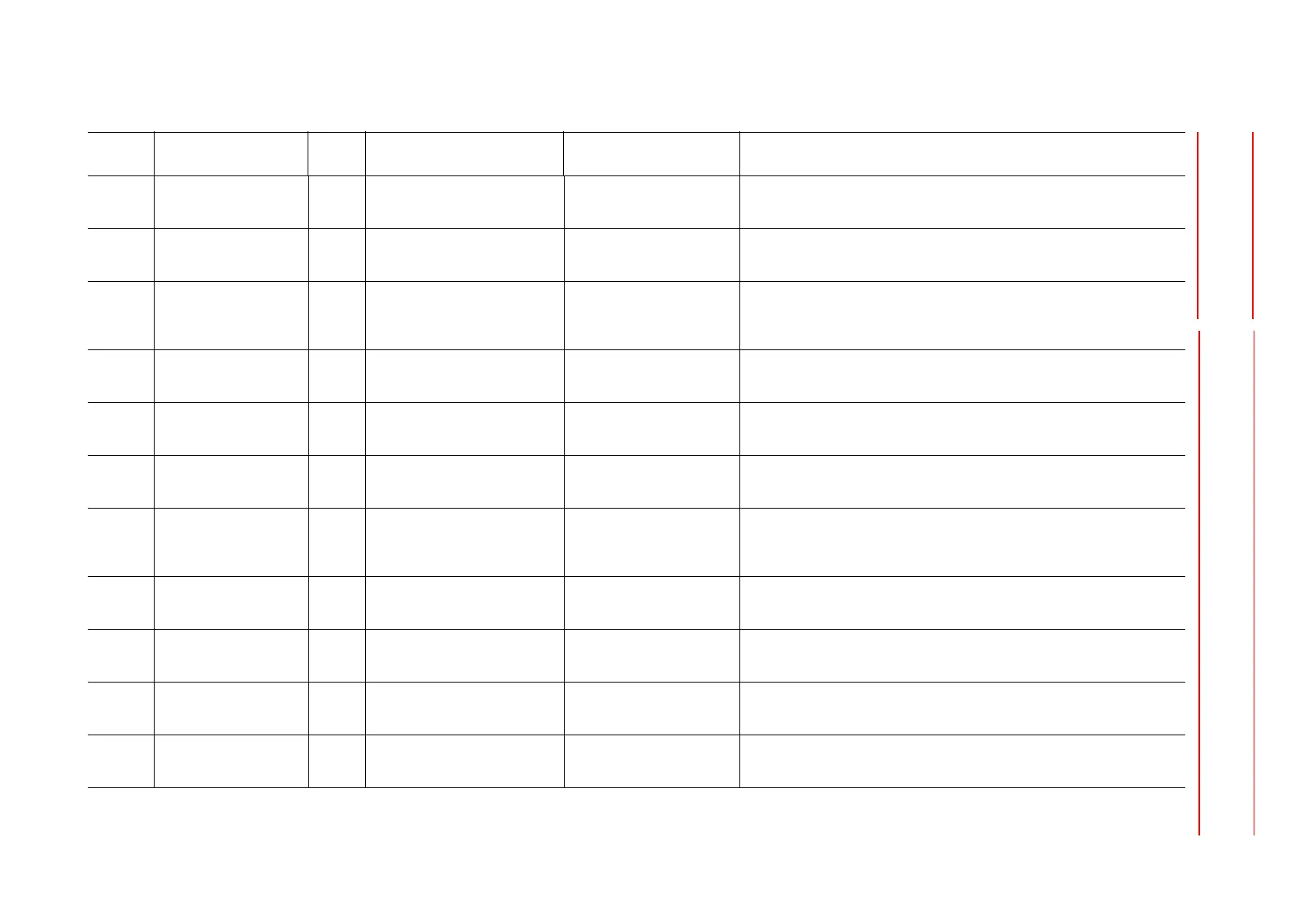
DX100 9.4 Alarm Message List
9-10
converter unit failure (1)Turn the power OFF then back ON.
(2)If the alarm occurs again, replace the controller. Save the CMOS.BIN before
replacement to be safe.
Main CPU board failure (1)Turn the power OFF then back ON.
(2)If the alarm occurs again, replace the controller. Save the CMOS.BIN before
replacement to be safe.
21 COMMUNICATION
ERROR (SERVO)
50 The communications CPU for the
Servo control board #1 detected
an error when the control power
turned ON.
Setting error (1)Turn the power OFF then back ON.
(2)If the alarm occurs again, replace the controller. Save the CMOS.BIN before
replacement to be safe.
Connection failure (1)Turn the power OFF then back ON.
(2)If the alarm occurs again, replace the controller. Save the CMOS.BIN before
replacement to be safe.
Servo control board failure (1)Turn the power OFF then back ON.
(2)If the alarm occurs again, replace the controller. Save the CMOS.BIN before
replacement to be safe.
Main CPU board failure (1)Turn the power OFF then back ON.
(2)If the alarm occurs again, replace the controller. Save the CMOS.BIN before
replacement to be safe.
51 The communications CPU for the
Servo control board #2 detected
an error when the control power
turned ON.
Setting error (1)Turn the power OFF then back ON.
(2)If the alarm occurs again, replace the controller. Save the CMOS.BIN before
replacement to be safe.
Connection failure (1)Turn the power OFF then back ON.
(2)If the alarm occurs again, replace the controller. Save the CMOS.BIN before
replacement to be safe.
Servo control board failure (1)Turn the power OFF then back ON.
(2)If the alarm occurs again, replace the controller. Save the CMOS.BIN before
replacement to be safe.
Main CPU board failure (1)Turn the power OFF then back ON.
(2)If the alarm occurs again, replace the controller. Save the CMOS.BIN before
replacement to be safe.
30 ROM ERROR 1 The CPU-201R system program
is damaged.
Software operation error
occurred
(1)Turn the power OFF then back ON.
(2)If the alarm occurs again, replace the controller. Save the CMOS.BIN before
replacement to be safe.
Alarm
Number
Alarm Name
Sub
Code
Meaning Cause Remedy










 To Next Page