2.4. Battery Installation
A brand new Z5 will be delivered with its rechargeable battery detached. To power on and
properly charge the Z5, install the provided rechargeable battery and connect the AC/DC
adapter. Follow the steps described in this section to properly install the rechargeable
battery to the Z5.
Caution
⚫ Improper battery use may cause fire, explosion, or other hazards.
⚫ If the battery is removed due to impact, heat, submersion, or other damage, there is
a risk of explosion. Keep away from children and animals.
⚫ Do not allow the battery’s contacts to touch things like necklaces, coins, or electric
conductors. Do not give any impact with sharp objects. There is a risk of explosion.
⚫ Use only the approved battery and charger. Using an incompatible battery or
charger may cause device malfunction or other damage, such as fire.
⚫ When you are not using the device for a long period, take out the battery and keep
the device and the battery in a dry, cool place. Also, charge the battery at least once
a year. If you keep it without charging for a long time, it may cause device
malfunction.
<Required Tools>
⚫ Z5 Base unit
⚫ Z5 Battery
⚫ Mini (+) Screwdriver
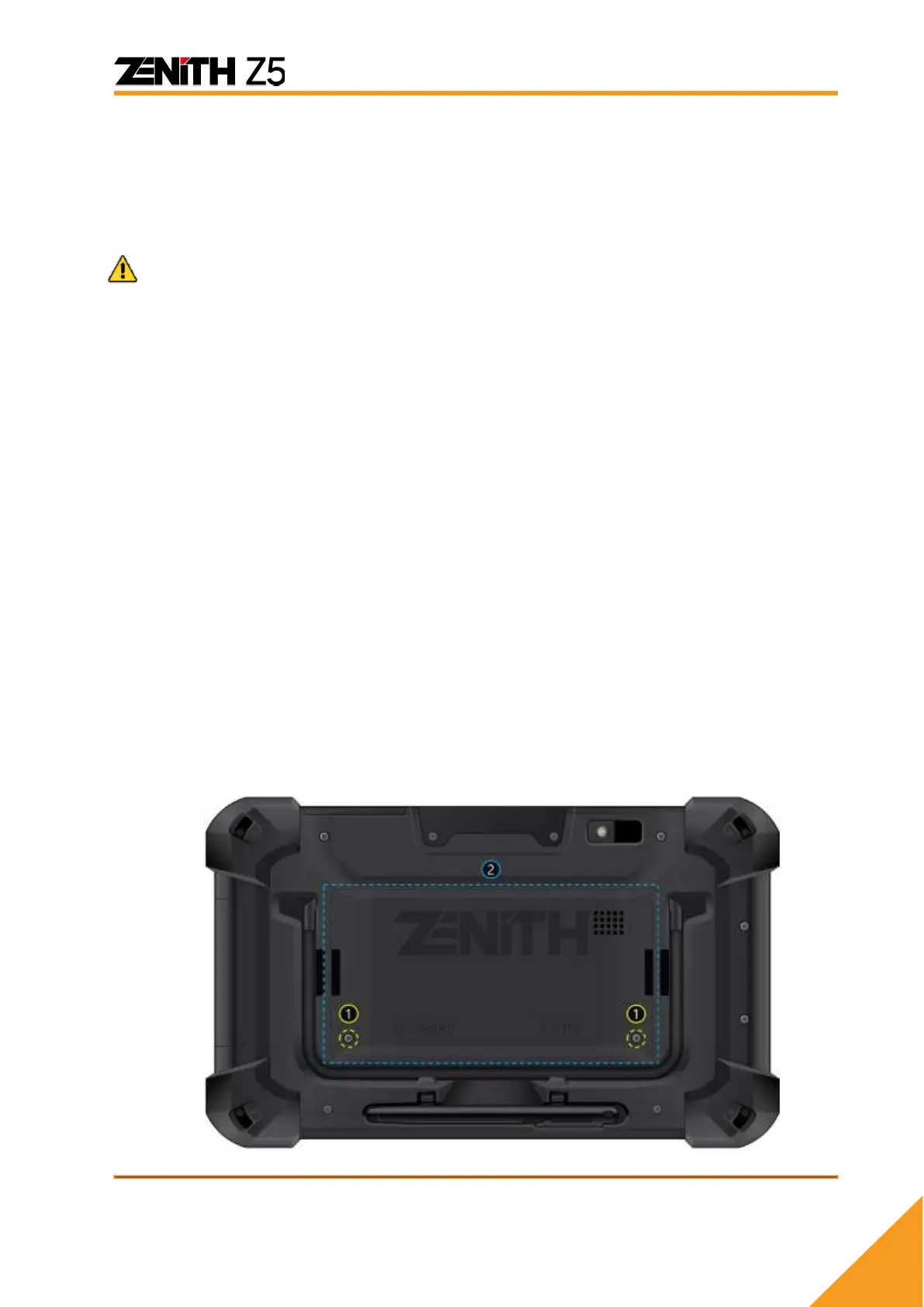
A. Remove the battery cover (2) by untightening 2 screws (1) located lower end of the
cover.



 To Next Page