Chapter 8. Configuring Units
146 3ware Serial ATA RAID Controller User Guide
Setting Continue on Source Error During
Rebuild
For 9000-series controllers, the Continue on Source Error During Rebuild
policy is available for units which are redundant. (For units which are not
redundant, this option is not shown on the screen.) When this policy is set,
ECC errors are ignored when they are encountered during a rebuild. When
this policy is not set, a rebuild will abort upon encountering an ECC error and
the unit will be set back to Degraded.
Since enabling this option could result in the loss of some source data in the
event of source errors, select this option only if you want to ensure that a
rebuild will complete successfully without manually intervention. If the
rebuild fails and
Continue on Source Error During Rebuild is not selected,
then you have the option to start a rebuild manually. It is recommended that a
file system check be executed when the rebuild completes.
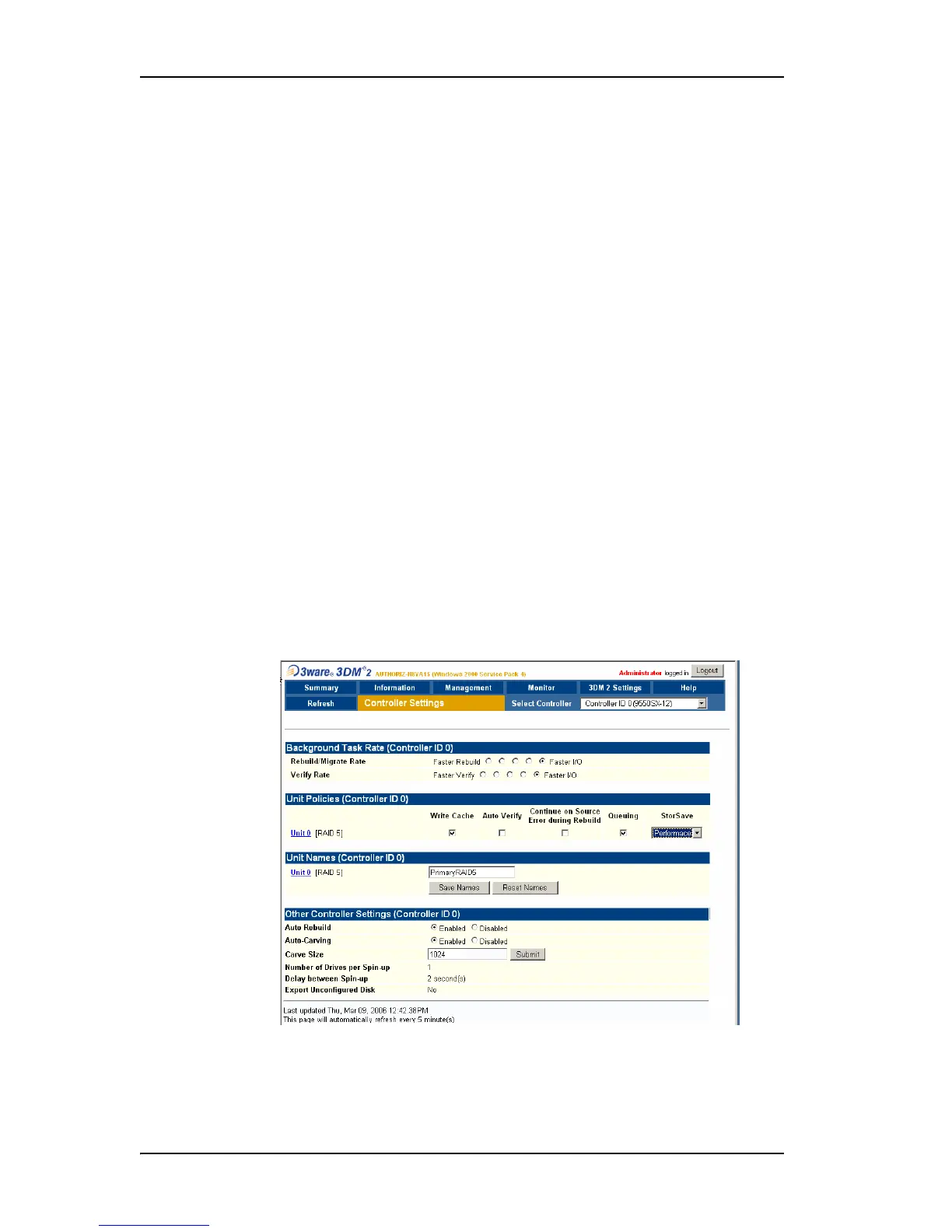
To set the Continue on Source Error During Rebuild policy in 3DM
1 Choose
Management > Controller Settings from the menu bar in 3DM.
2In the
Unit Policies section of the Controller Settings Page, check the
boxes to select the policies you want to be in effect for each unit
The page refreshes, and a message at the top confirms the change you
have made (Figure 63).
Figure 63. Setting Unit Policies in 3DM



 To Next Page