Chapter 10. Maintaining Your Controller
206 3ware Serial ATA RAID Controller User Guide
Using the Update Utility With Multiple
Controllers
When your system has multiple 3ware RAID controllers installed, the update
utility lets you update the firmware on any or all of the installed controllers.
To update the firmware on multiple controllers
1 Follow steps 1 through 5 above, under “Updating the 3ware Driver and
Firmware Under Windows” on page 201.
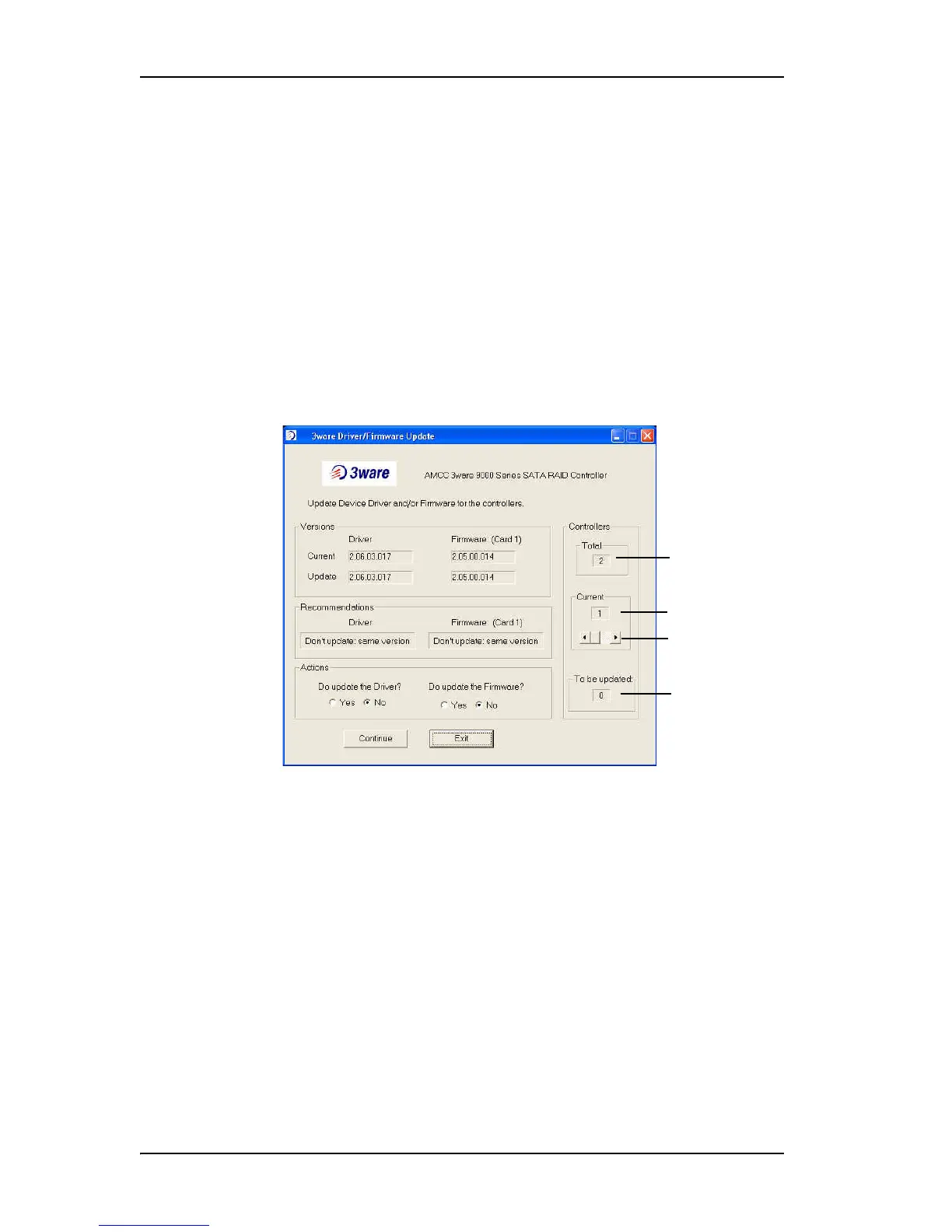
When the 3ware Driver/Firmware Update dialog box appears, it lists the
number of controllers in your system, shows available updates for the
device driver, and available firmware updates for the first controller.
.
Figure 81. Update Utility Showing Available Drivers
2 Use the scroll arrows under “Current” Controller to see firmware
recommendations for each controller on your system.
3 For each controller, review the option for whether the firmware should be
updated, and change it if appropriate.
4 Continue with step 6 above, in the procedure “Updating the 3ware Driver
and Firmware Under Windows.”
Number of
controllers
Current controller
Scroll arrows to
change controllers
Number of
controllers that will
be updated.



 To Next Page