DATABASE MENU ACTWinPro
I/O Modules
The I/O Module is an 8 Input/8 Output device that allows the ACT3000 and
ACT2000 to be used in applications where signalling to other equipment is
required. Examples of this are elevator control, alarm systems, CCTV switching
and general monitoring.
A maximum of 4 I/O modules maybe connected to any single controller, giving
control of up to 32 relays and 32 inputs per ACT2000/ACT3000. The I/O module
is wired to the controller on the same RS-485 network as the Door Stations. The
I/Os are addressed using its dipswitch and start at address 1. Check the wiring
diagram at the back of this manual. All programming is done from ACTWinPro.
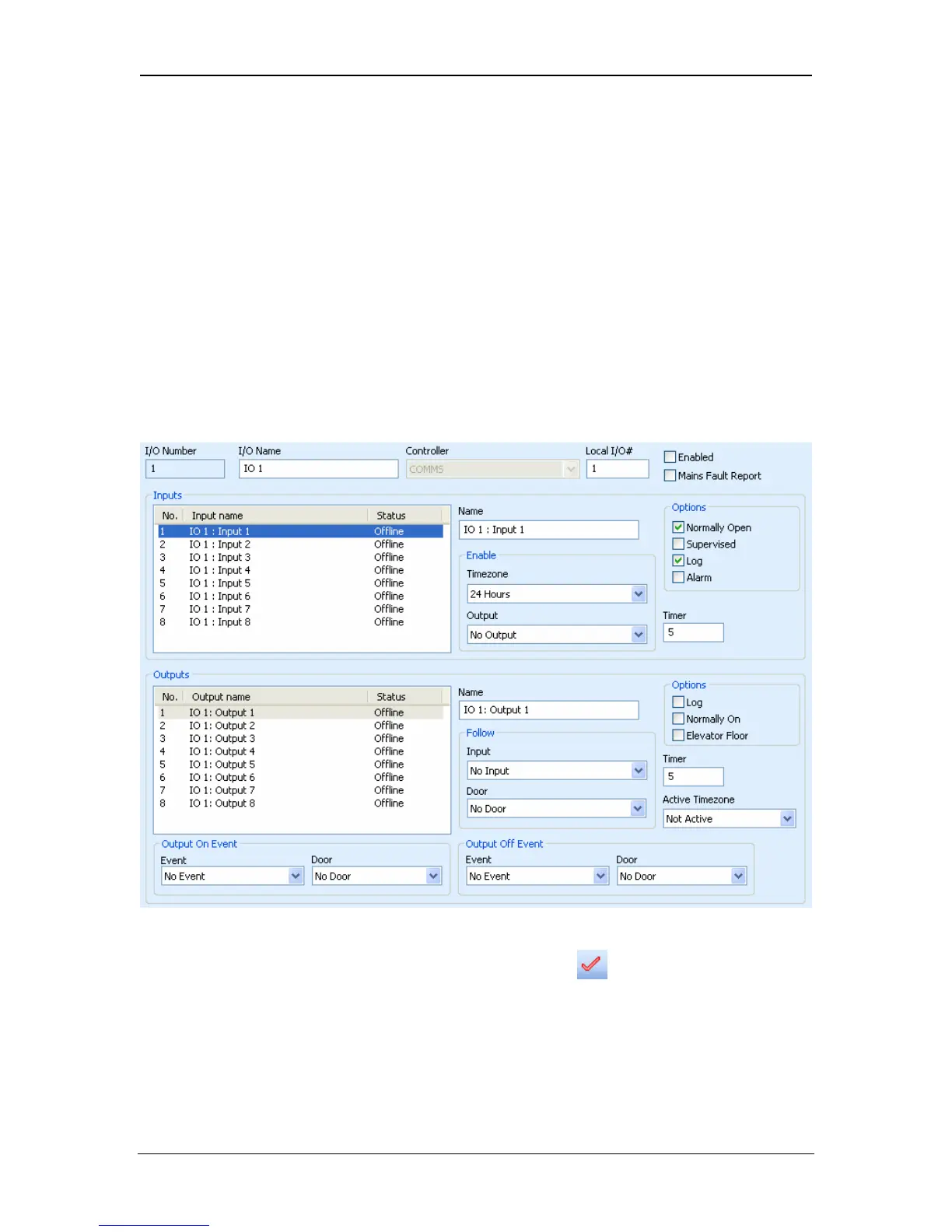
Give the IOModule a name and assign it a controller and the local I/O number.
This number must be the same as the dipswitch setting on the IOM. Remember
to tick the Enabled box. Finally, click the Accept icon .
The inputs section of the screen allows each input to be assigned its own name.
This is the name that will appear in the log when the input changes state.
Inputs can be enabled by timezone and when an output is on. While the input is
enabled, it can be logged (if the Log tick box is checked) or it can generate an
Alarm when it goes active.
Page 67 Access Control Technology



 To Next Page