EXPLORING ACTWIN ACTWinPro
System Overview
ACTWinPro is a database driven application that communicates directly with the
ACT family of access controllers. Each database item is viewable from the
Database menu option. Database records are added, deleted etc. from the
Records menu option or from the toolbar. If a change is made to the database,
the change must be sent to the connected controllers. This is done by
downloading the database to the controllers. If ACTWinPro is already on-line,
database changes are automatically sent to the controllers.
The controllers must be connected to a PC which will communicate information
stored in the database to the controllers. It will also retrieve log and status events
to update the PC display.
Doors are assigned to controllers and controllers are assigned to locations. The
doors and controller numbers must match the numbers assigned to the physical
door stations and controller units during installation.
Users or cardholders are assigned a user group. The user group consists of
timezones and doorgroup combinations. These combinations determine which
doors the user is allowed through and at what times.
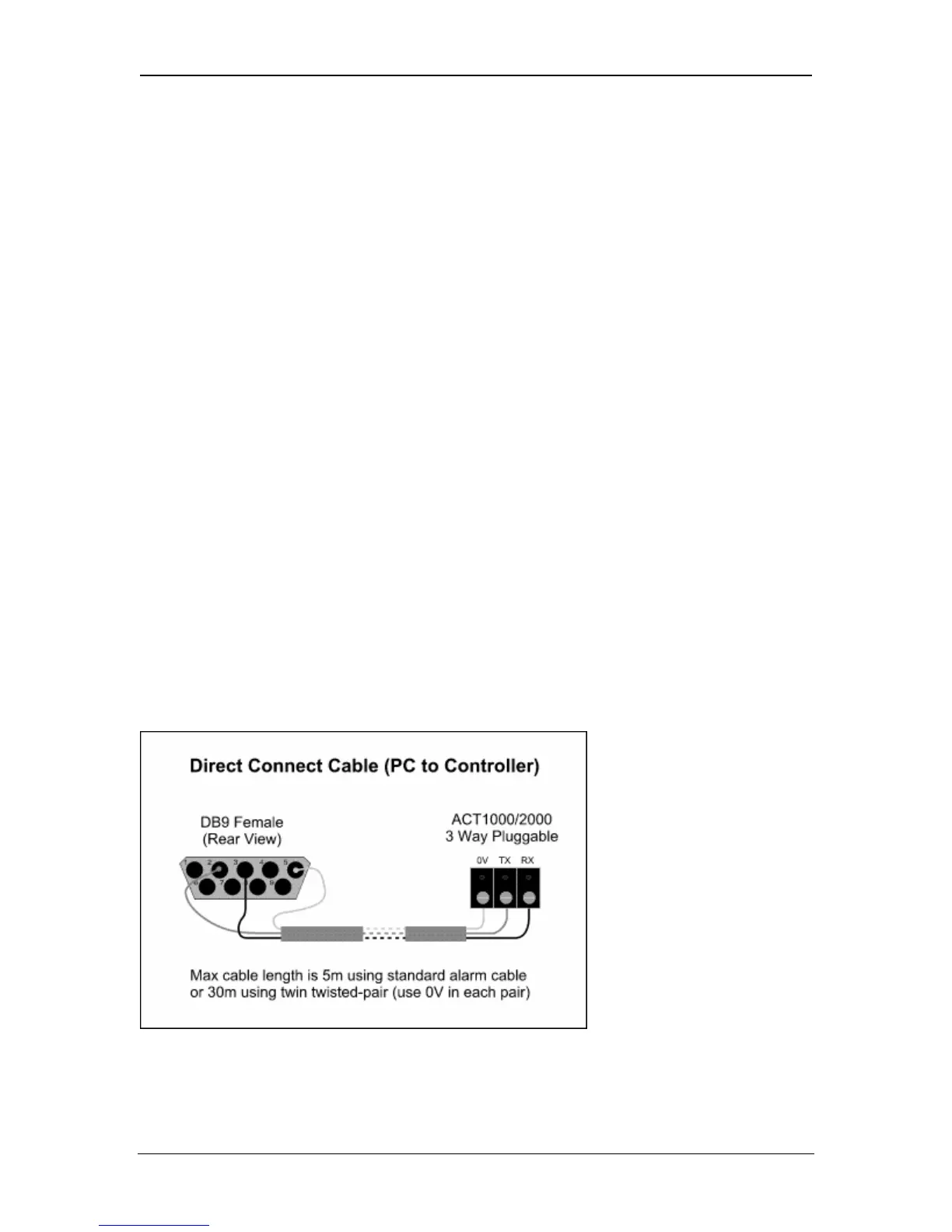
Connecting directly to one controller
Connect the direct connect cable to the connector marked SERIAL/PRINTER
RX/TX/0V of the controller, which is then connected to the serial port (usually
COM1) of the PC.
Page 19 Access Control Technology



 To Next Page