MNR-310 System Administrator’s Manual
59
Login
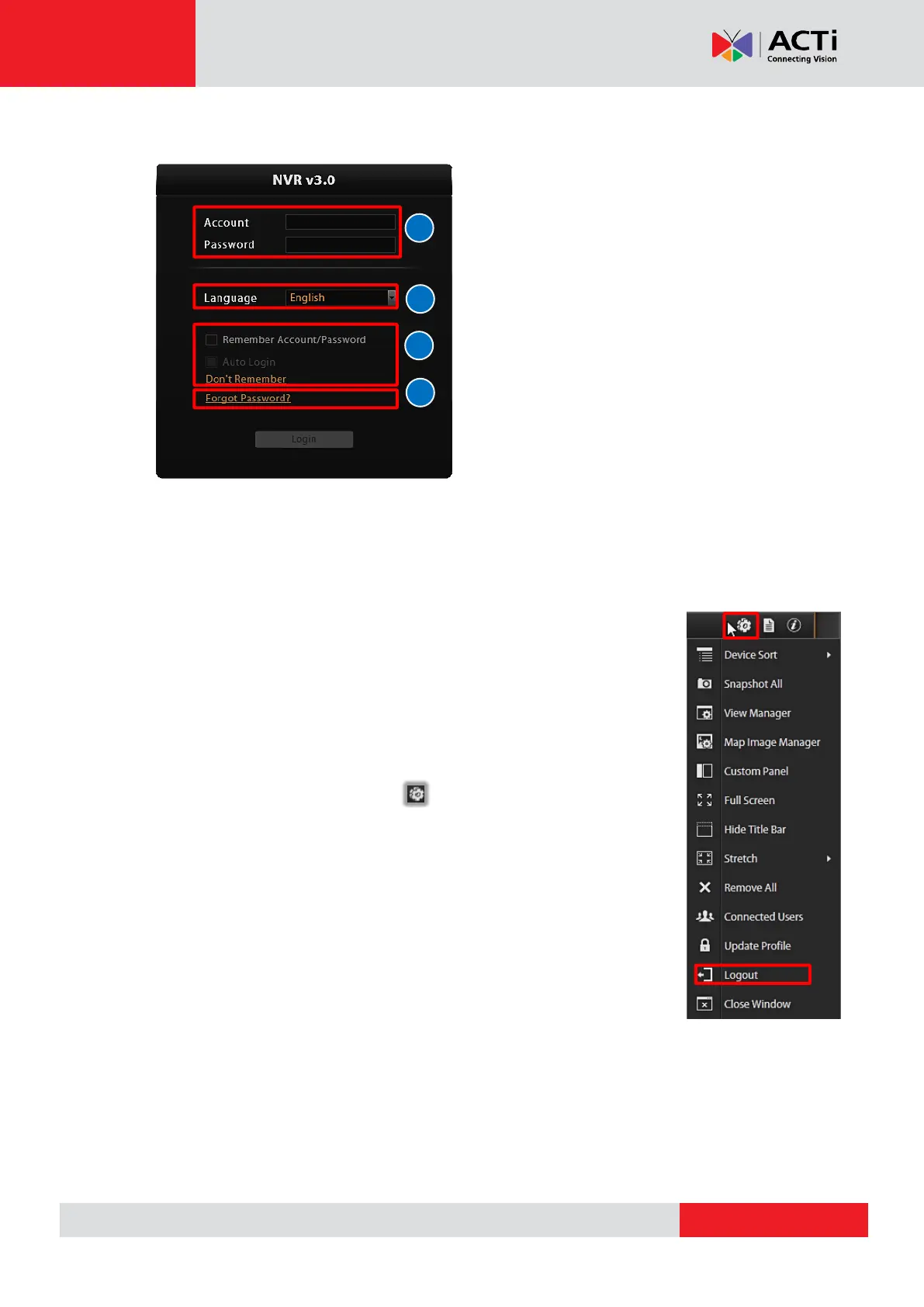
A. Enter Account & Password
Account (non case-sensitive):
Admin (default)
Password (case-sensitive):
123456 (default)
B. Change UI language
To change UI language, select the desired
language from “Language” dropdown list.
C. Remember Account/Password
To have the server remember your Login Account and Password in the future, check
“Remember Account/Password”. Click “Don’t Remember” will clear your input text and
reset to default.
To directly enter the main page every time you log in, check “Remember
Account/Password” then “Auto Login” to skip the Login page. If your
computer may be accessed by someone without proper authority,
please DO NOT use either of these functions.
To cancel auto-login, on title bar, click “Logout” to return to login page,
and this function will be disabled.
D. Retrieve the Forgotten Password
Please refer to E. Retrieve the Forgotten Password on page 52.



 To Next Page