MNR-310 System Administrator’s Manual
79
Scenario B:
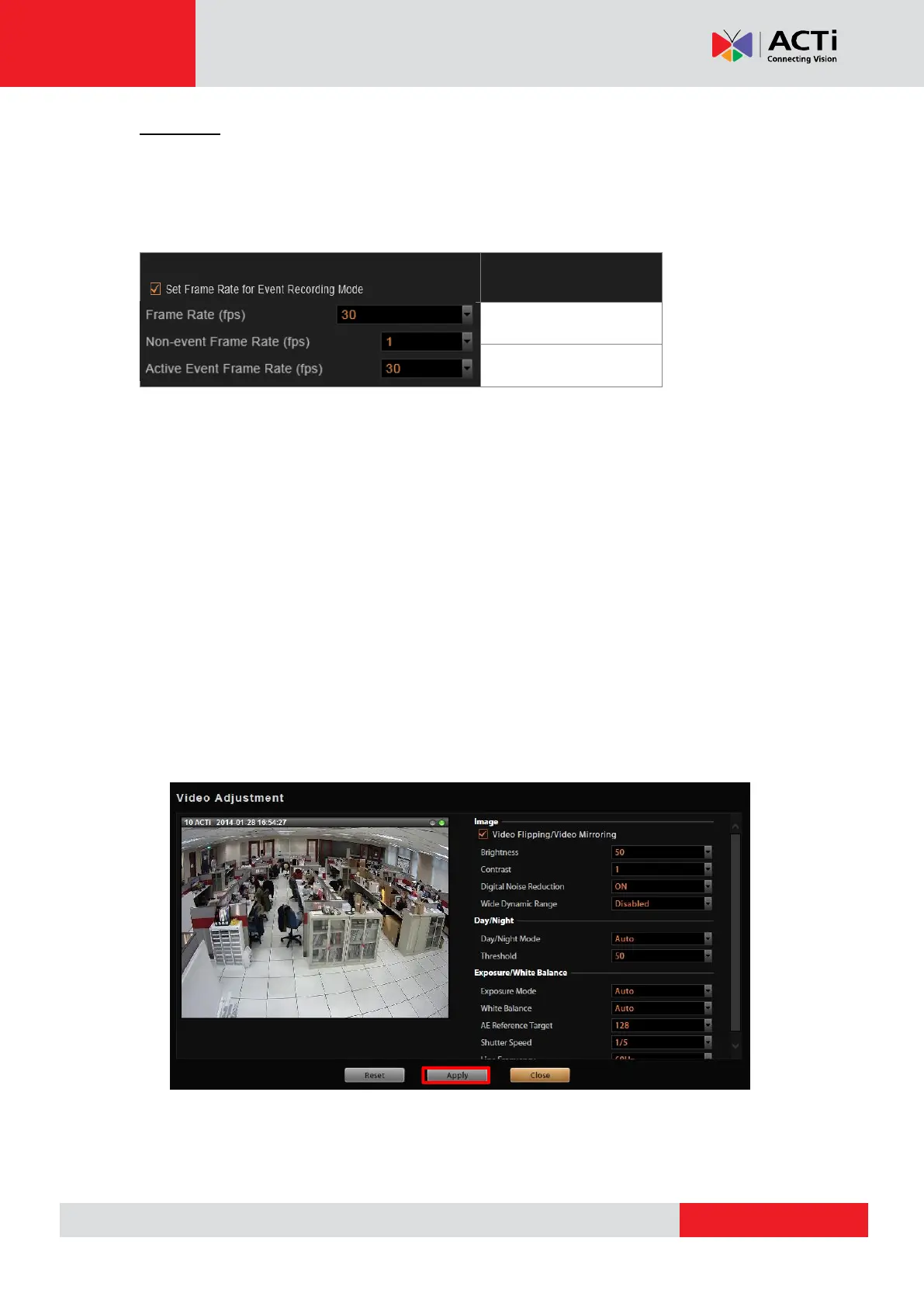
You would like the system to record 24/7, and the non-event recording to be kept at a very low
frame rate. Please set the event and schedule recordings at different frame rate, you will need
to enable “Set Frame Rate for Event Recording Mode”, and set the “Non-event Frame Rate”
and “Active Event Frame Rate”.
Fine-tune the Image
When monitoring your cameras, it is essential to make the images as similar to the real scene
as possible. The default settings of the camera are usually sufficient for most environments,
but you may also make adjustments in case it is required to do so. For devices that support the
configuration of properties related to image, day/night mode, or exposure/white balance
settings, you may directly modify them and save your changes to the device using the NVR 3.0
system. The options available may vary depending on the device.
To start, click “Video Adjustment” on Device Video tab. Each field is only available when the
device supports this property for modification. If the device is in Dual Mode, the video you get
in this window will always be Stream 1. After setting up the desired value for the field, click
“Apply”.



 To Next Page