Chapter 2 Dispensing to SpectroCHIP Arrays34
USG-CUS-059 Rev05MassARRAY® Nanodispenser RS1000 v2.1 User Guide
For Research Use Only. Not for use in diagnostic procedures.
Selecting setup
parameters
Tap the setup tab on the Method screen.
Specify the SpectroCHIP Array positions
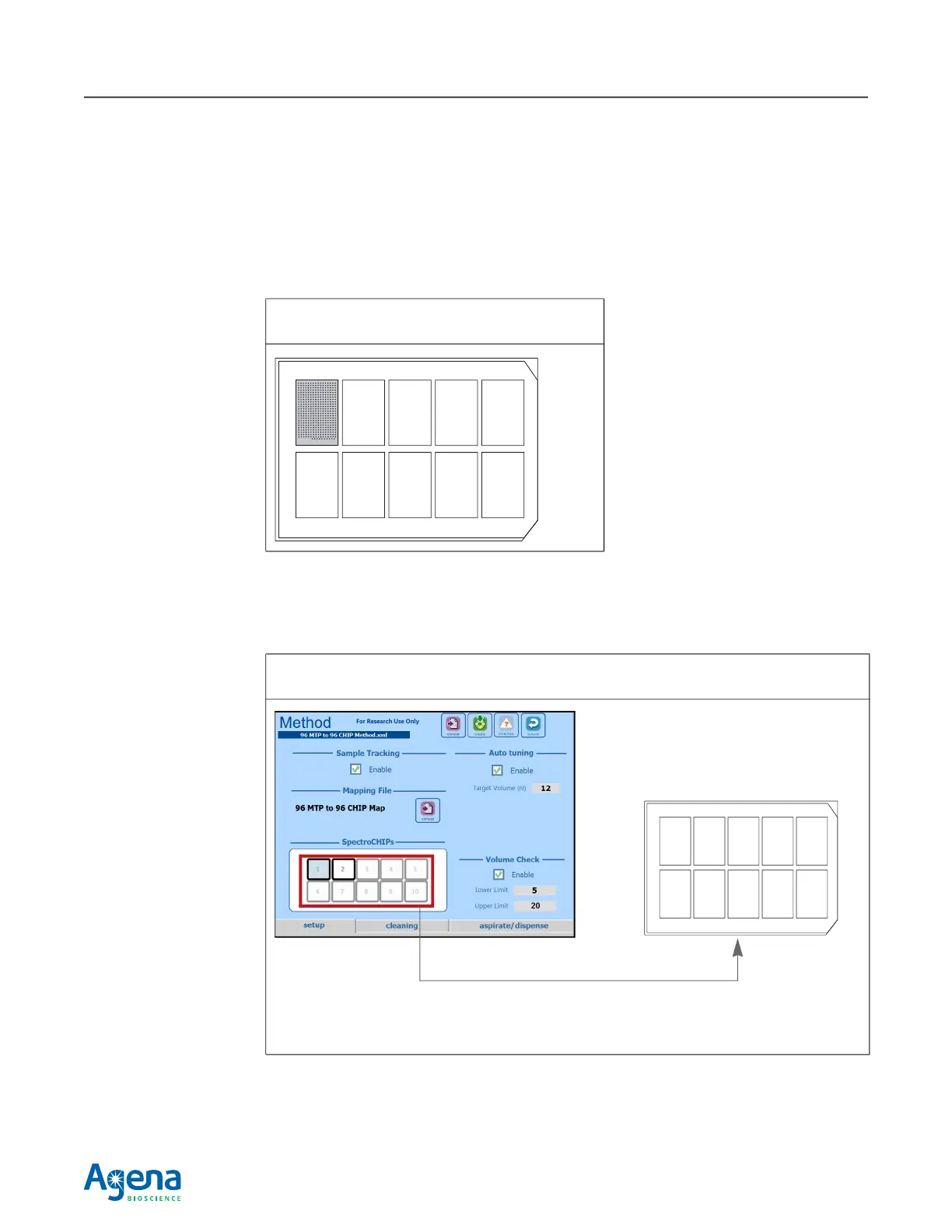
The instrument deck accepts a standard SCOUT plate which holds the SpectroCHIP
Arrays that will receive analyte and/or calibrant. The standard SCOUT plate has ten
SpectroCHIP Array positions (Figure 2.17).
You must specify the positions on the SCOUT plate that contain SpectroCHIP Arrays.
To specify SpectroCHIP Array positions, tap each SpectroCHIP Array position that will be
used (Figure 2.18).
A selected position is colored blue. To remove a selected position, tap it again.
Figure 2.17 SCOUT Plate
SpectroCHIP Array in position 1.
Figure 2.18 Method Screen, setup tab
In this example, SpectroCHIP Array position 1 is selected.
Standard SCOUT plate
SpectroCHIP Array
SpectroCHIP Array
positions in this
diagram correspond
to SpectroCHIP Array
positions in the
standard SCOUT
plate.


 To Next Page