Page 33
Making HELICOPTER Selection Options
Choose the HELI Swashplate Type that suits your helicopter. There are three basic Swashplate Types available:
Normal - In this conguration the swashplate does not control pitch. It only controls right, left, fore, and aft cyclic. Usually the
servos are installed 90º apart but do not mix with collective to control pitch. This conguration is generally used for xed-pitch
helicopters or helicopters that have a completely separate control system to control collective pitch.
3-Point CCPM - In this conguration the cyclic and collective controls are mixed. The servos that control the swashplate are
installed either 120º to 140º apart, depending on the conguration.
4-Point CCPM - In this conguration the cyclic and collective controls are mixed. The servos that control the swashplate are
installed 90º apart. A total of three or four servos can be used, depending on the conguration.
SYSTEM MENU
WARNING There are a number of different Swashplate Types available. Make sure that the Swashplate Type you choose
matches exactly the Swashplate Type used by your helicopter. Refer to your helicopter's Operating Manual for more information.
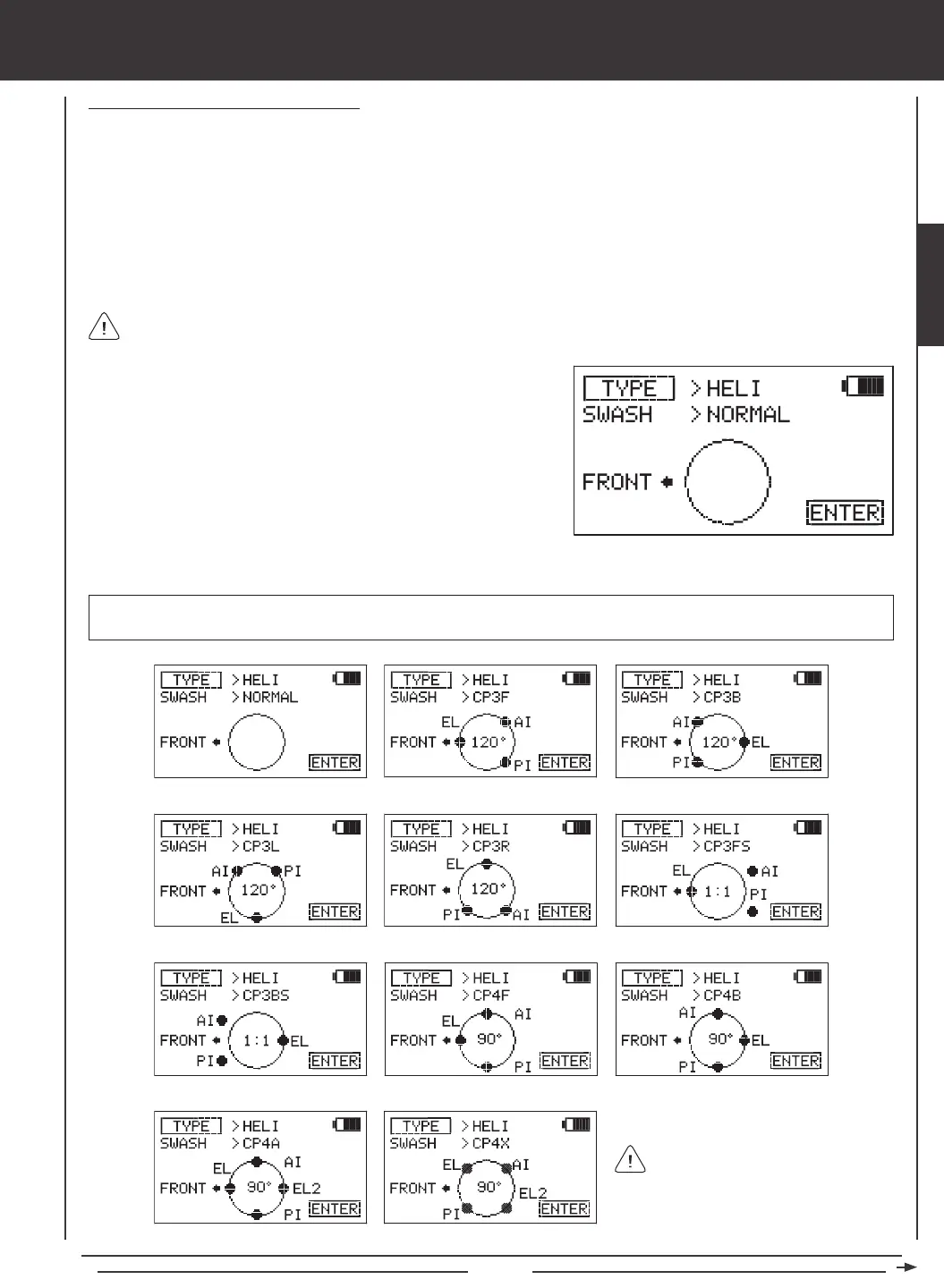
The following Swashplate Types are available for Model Type HELI. The
diagrams display the swashplate geometry, the number of servos used, and the specic placement of those servos.
120º, 90º, and 1:1* refers to the
physical relationship and geometry
of the servo placements on the swashplate.
> NORMAL: Non-CCPM > CP3F 120º with 3 Servos > CP3B 120º with 3 Servos
> CP3L 120º with 3 Servos > CP3R 120º with 3 Servos > CP3FS 1:1* with 3 Servos (2 Offset)
> CP3BS 1:1* with 3 Servos (2 Offset) > CP4F 90º with 3 Servos > CP4B 90º with 3 Servos
> CP4A 90º with 4 Servos > CP4X 90º with 4 Servos *1:1 is sometimes referred to as 140º.
Channel Assignments will change based on the selection options chosen. To verify which channel slots to plug your servos
into, navigate to the CH ASSIGN menu after saving your Model Type selection options. For more information, see page 44.
1) While in the TYPE menu and the cursor in the >AERO or >GLID
position, press the YES/+ or NO/- keys to highlight >HELI.
2) Press the Navigation Pad
56
to highlight the SWASH selection.
3) Press the YES/+ or NO/- keys to change the SWASH selection option.
SYSTEM


 To Next Page