Page 23
Tamper Resistant (Locked) Feature
You can use the tamper resistant feature to prevent accidental button pressing. Simply
wake up the pump and press and hold the Up and Down arrow buttons at the same time
until the screen reads “Locked”. This locks the pump keys. To unlock the pump, wake up
the pump so the screen reads “Locked” and press and hold the up and down buttons at the
same time until the screen display wakes up.
Basic Display Screens
Verify Screen
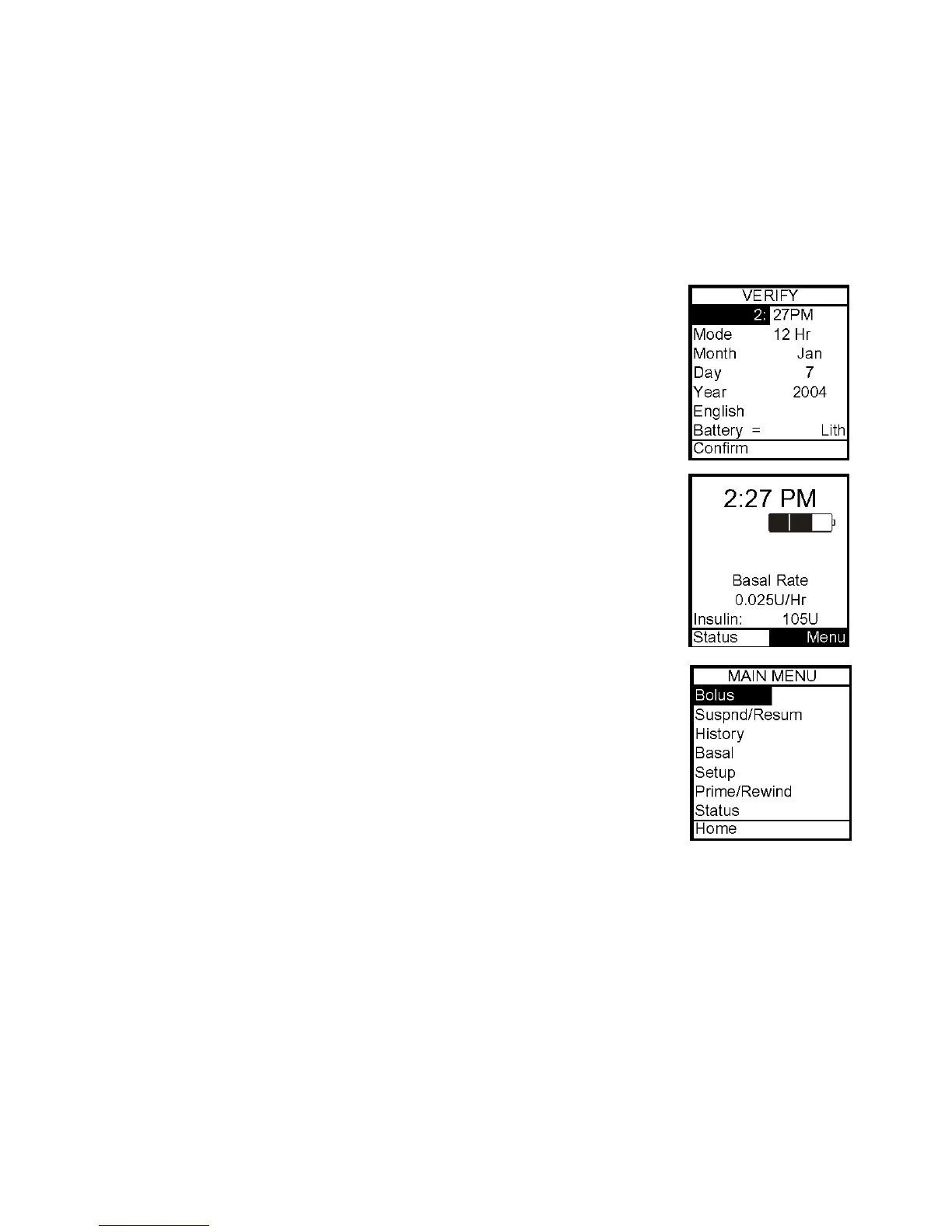
When you insert a battery, this is the first screen you see after the
Animas logo screen. From here you can verify the settings for time,
date, language and battery type.
Home Screen
Once you have your pump set up, the Home screen is the first screen
that is displayed when you “wake up” your pump. Press any button to
wake up your pump. The Home screen shows the time of day, a battery
life indicator, if you have an extended bolus or temp basal currently
active, current basal rate amount and how much insulin remains in
your cartridge. You access the Main Menu from here or you can take a
shortcut to the Status menu. After a set amount of time with no
button presses, the pump display screen will “time out” to conserve
battery life. When the pump times out, the screen display is blank.
The battery life indicator is shaded to show approximate battery life
remaining.
Main Menu Screen
This screen shows all Main Menu options.
Bolus
This selection takes you to the Normal Bolus screen. If you have
activated Advanced Bolus features, the Bolus Menu will be displayed.
Here you can select bolus options, program and activate your bolus
dose. Consult your healthcare team for your personal settings for calculations of food and
correction boluses.
Suspend/Resume
The Suspend function stops all insulin deliveries and Resume restarts basal delivery.
History
This option allows you to review history of boluses, total daily dose (TDD), alarms, primes,
suspend and basal information.
4



 To Next Page