Page 75
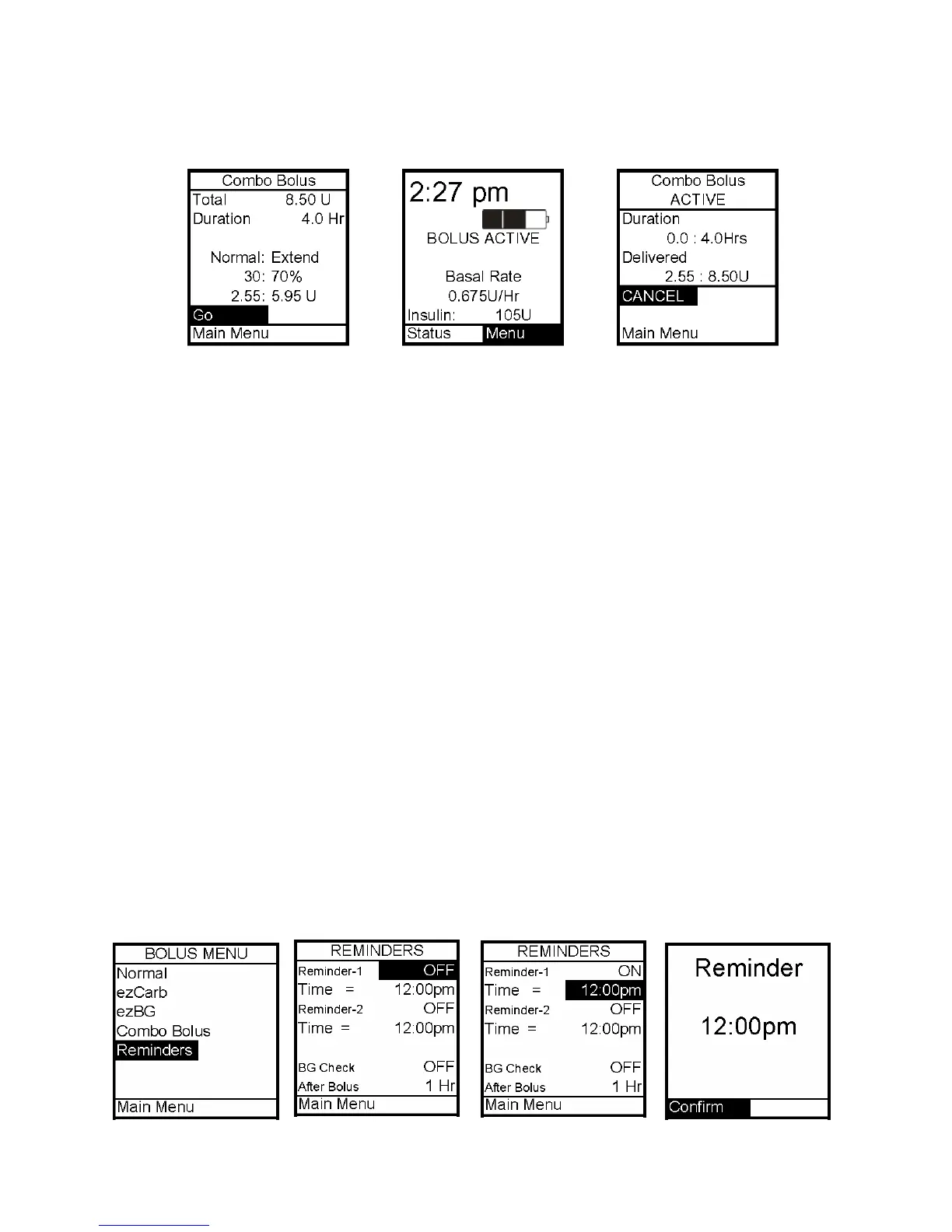
6. Scroll to Go and press OK to activate. The Home screen shows Combo Bolus active.
To cancel an active Combo Bolus from the Bolus Menu, select Combo. Details of the active
Combo Bolus will be displayed.
Scroll to Cancel and press OK to cancel the Combo Bolus.
Note: If you Suspend the pump, any active Combo Bolus will also be canceled and the screen
display will alert you. Combo Bolus is also canceled when you change the battery and/or
prime.
Reminders
This feature allows you to set personal reminders. You can set two bolus reminders for
times of day and one reminder to check BG at a certain time after a bolus. Confirm the
Reminder by pressing OK. Once you’ve confirmed the Reminder, you will not be alerted
again.
Bolus Reminders
1. From the Bolus Menu, select Reminders. Press OK.
2. Reminder 1 field will be highlighted with a flashing cursor to indicate Edit mode. Use
the Up/Down arrows to turn on or off. Press OK to confirm and exit Edit mode.
3. The Time field for this reminder will be highlighted. Press OK to activate Edit mode.
Use the Up/Down arrows to enter the time you wish a reminder to sound (or vibrate, if that
is the setting you selected in the Setup Sound Menu). Press OK to confirm your setting and
exit Edit mode.
4. Repeat for the Reminder 2.
12



 To Next Page