Page 55
Chapter 11 Advanced Features – Setup and Activation
Now you’ve made it through the basics! Your 2020 offers many advanced features that you
may find helpful in managing your diabetes. Consult with your healthcare team to
determine which advanced features are appropriate for you.
This chapter tells you how to set up and turn on the advanced features. Chapter 12 covers
how to use each advanced feature.
You can also use your computer and ezManager software to upload settings for Advanced
Setup. Refer to the ezManager User Guide included with the software.
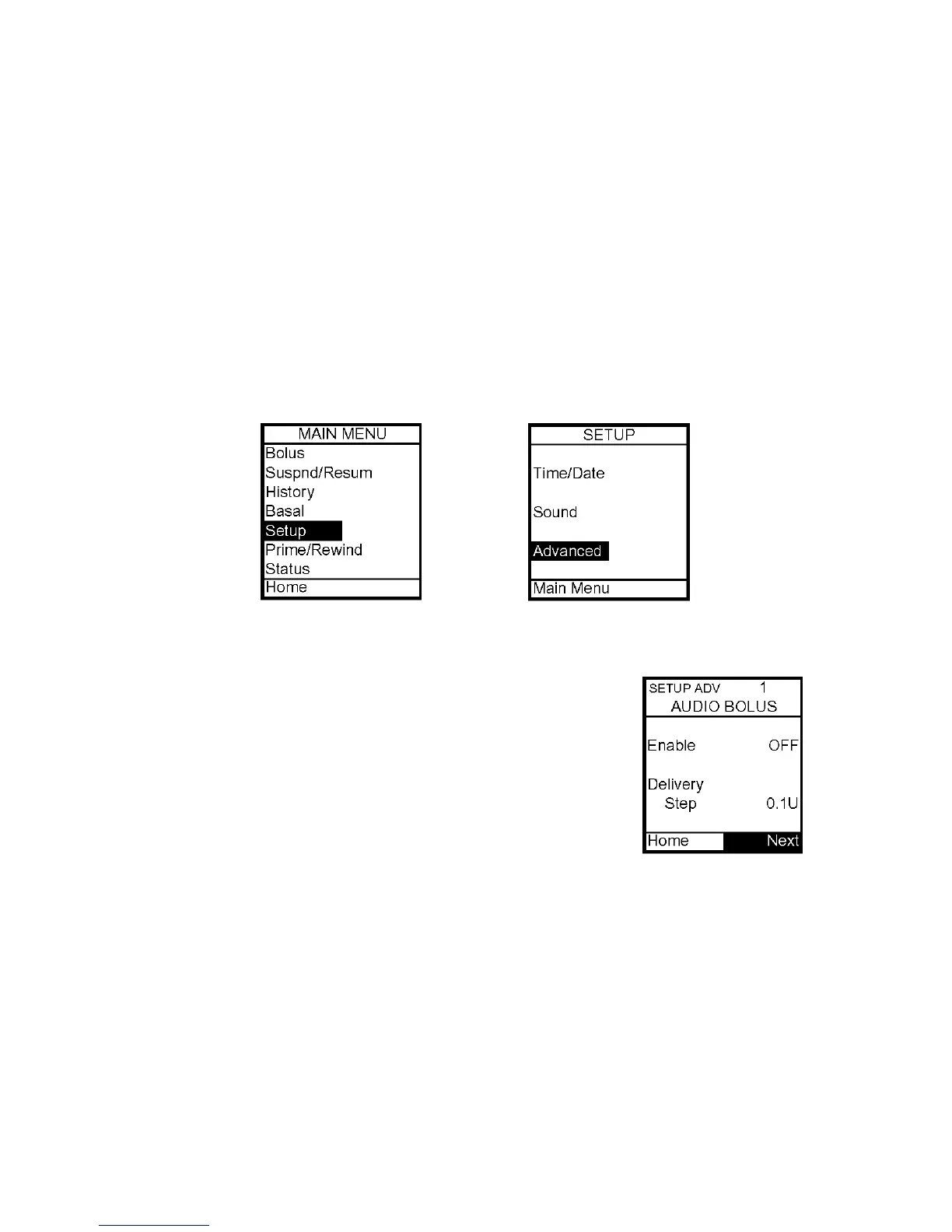
From the Setup Menu, select Advanced and press OK.
Setup Advanced 1 – Audio Bolus Feature
This screen allows you to:
• Turn Audio Bolus on or off
• Select the Audio Bolus delivery step size
o 0.1, 0.5, 1.0, 5.0 Units
1. Use the Up/Down arrows to scroll to the desired field.
2. Press OK to change to flashing cursor for Edit mode.
3. Use the Up/Down arrows to change to desired setting.
4. Press OK when setting is made.
Note: If Audio Bolus is activated, the shortcut to ezBolus will be deactivated. You can still
give a Normal Bolus via the Main Menu.
To move to the next Setup Advanced screen, scroll to the bottom of the screen and
highlight Next. Press OK.
To return to the Home screen, scroll to Home and press OK. For more information, see
Chapter 12, Using Advanced Features.
11



 To Next Page