Page 32
Priming the Pump and Infusion Set
These steps must be followed in order.
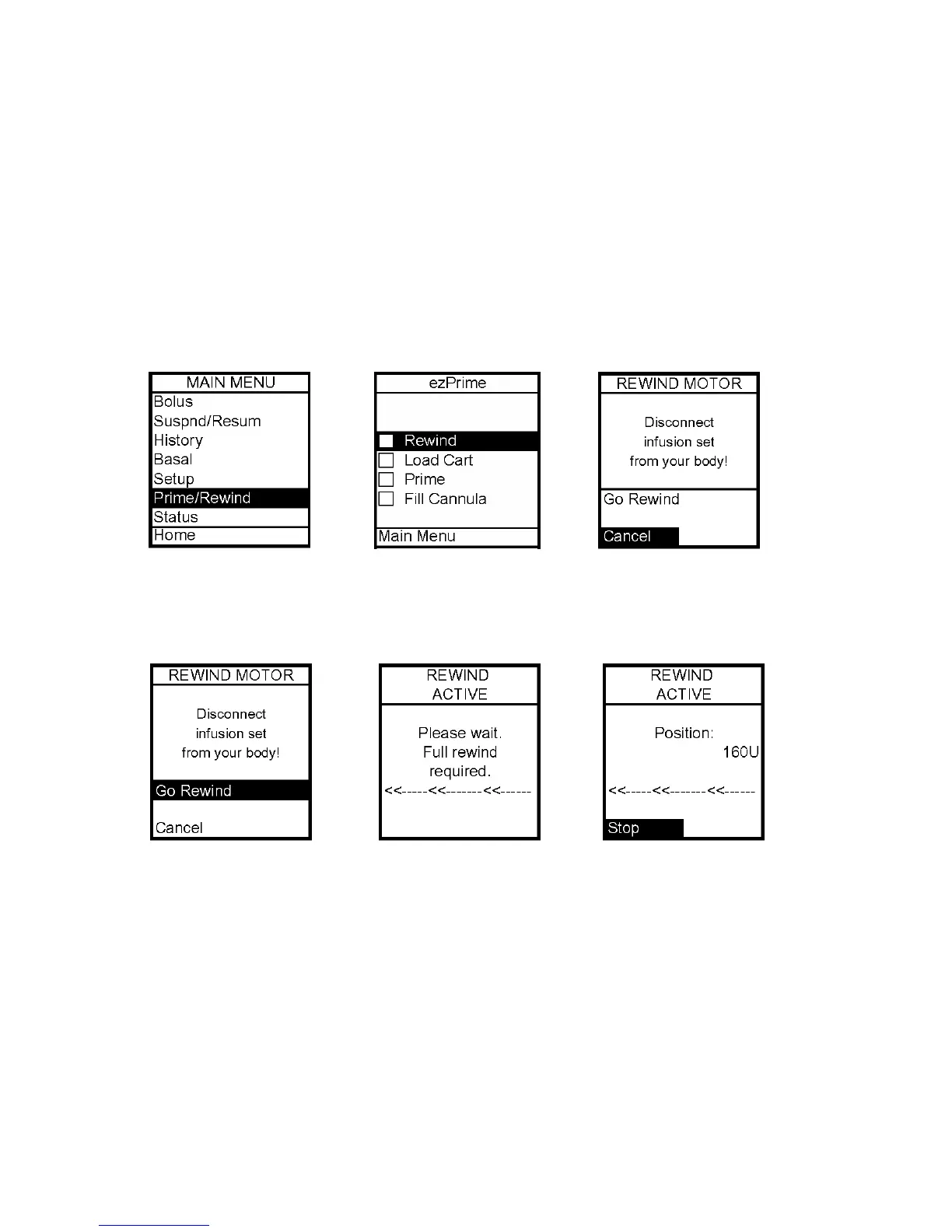
Note: As each step is completed, the checkbox on the ezPrime menu will be shaded.
Never prime tubing or tighten the cartridge cap while the infusion set is connected
to your body. Doing so while the infusion set is connected to your body can result
in unintended delivery of insulin, which can result in serious injury or death.
1. Make sure you are disconnected from the pump.
2. From Main Menu, select Prime/Rewind.
3. On ezPrime Menu, Rewind is highlighted. Press OK. The Rewind Motor screen is
displayed.
4. Scroll up to Go Rewind. Press OK. The pump will rewind the piston rod.
5. When the rewind action is complete, the Rewind Complete screen is displayed. The
pump will beep once to let you know the rewind is complete.
Note: If using a partially filled cartridge, you can select Stop during the Rewind Active
function to stop the rewind at the position desired. Periodically, the pump is required to do a
Full Rewind and will not offer the option of selecting the Stop position. A Full Rewind is
always required when a battery is inserted.
6. Insert your filled cartridge.
7. Secure cartridge compartment cap to pump by turning in a clockwise motion until finger
tight but do not over tighten.
5



 To Next Page