Page 35
Chapter 6 Using the Normal Bolus Feature
Your 2020 offers several advanced bolus options, which can be activated from the Setup
Advanced Menu. The bolus feature allows you to program an insulin delivery to cover food
eaten or high blood glucose. You and your healthcare team can determine which features
are best for you. See Chapter 11, Advanced Features.
This chapter covers the basics of a Normal bolus, which is used to cover food you’ve eaten
and to correct high blood glucose.
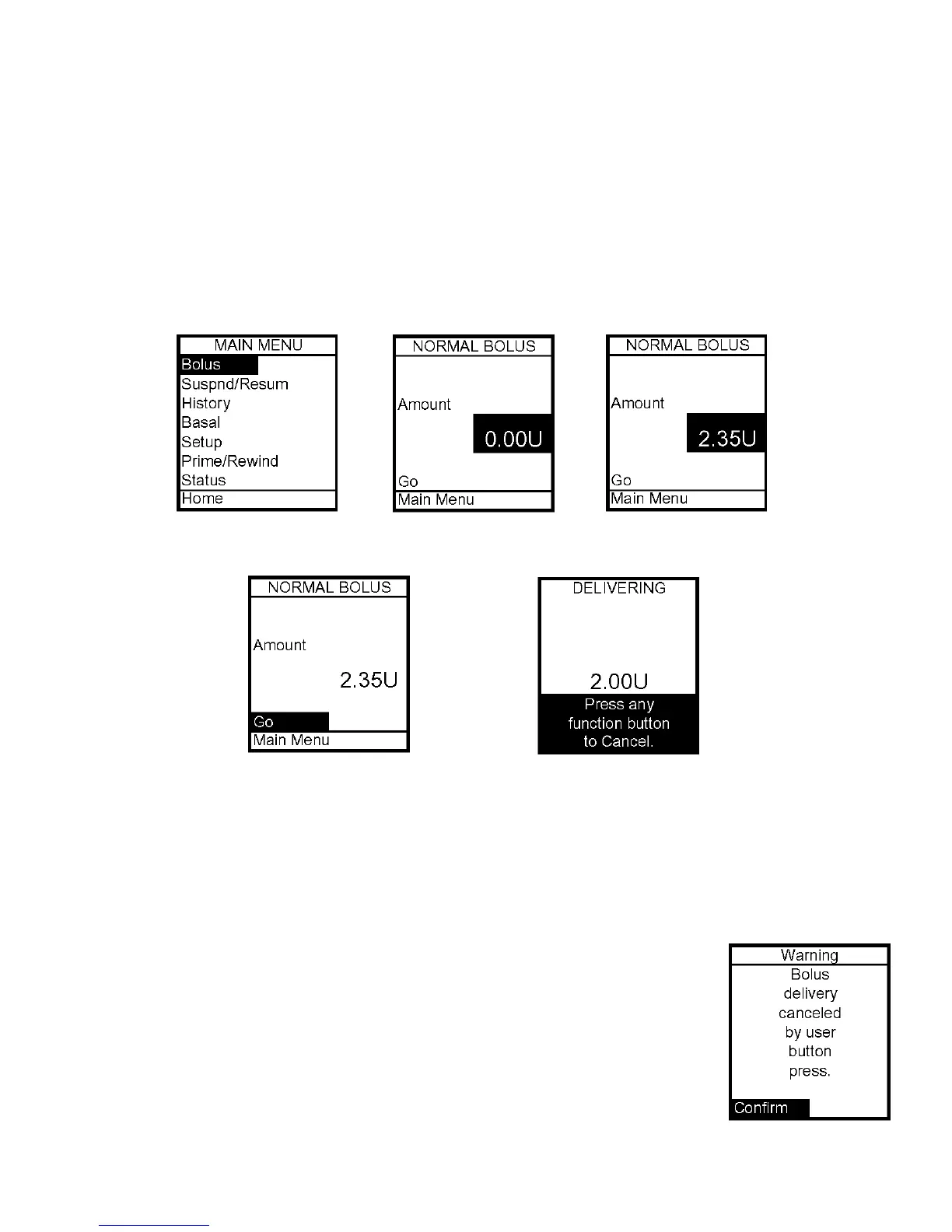
1. From the Main Menu, select Bolus.
2. The cursor will flash over the amount field to indicate that it can be edited. Use the
Up/Down arrows to enter desired bolus amount. Press OK.
3. Go is highlighted. Press OK to deliver the bolus.
4. The Delivering Bolus screen is displayed. If you have activated the Normal Bolus sound
in the Setup Sound Menu, the pump will beep to confirm start of delivery, as well as when
delivery is complete.
During a bolus delivery, you can stop delivery at any time by pressing any
button on the front panel of the pump. The Warning screen shown here
will be displayed. Confirm the Warning by pressing OK and check your
Bolus History for the amount delivered.
Note: You can check when you last gave a bolus by looking in History or
Status. These features are covered later.
6



 To Next Page