Page 47
Chapter 9 History Feature
Your 2020 stores important records for your review. You can access your pump’s history and
view it directly on the pump screen or download it onto your computer using ezManager.
Refer to the User Guide included with the software.
The pump stores these records indefinitely, even when batteries are removed. The pump
stores basal rates, boluses, alarms and settings.
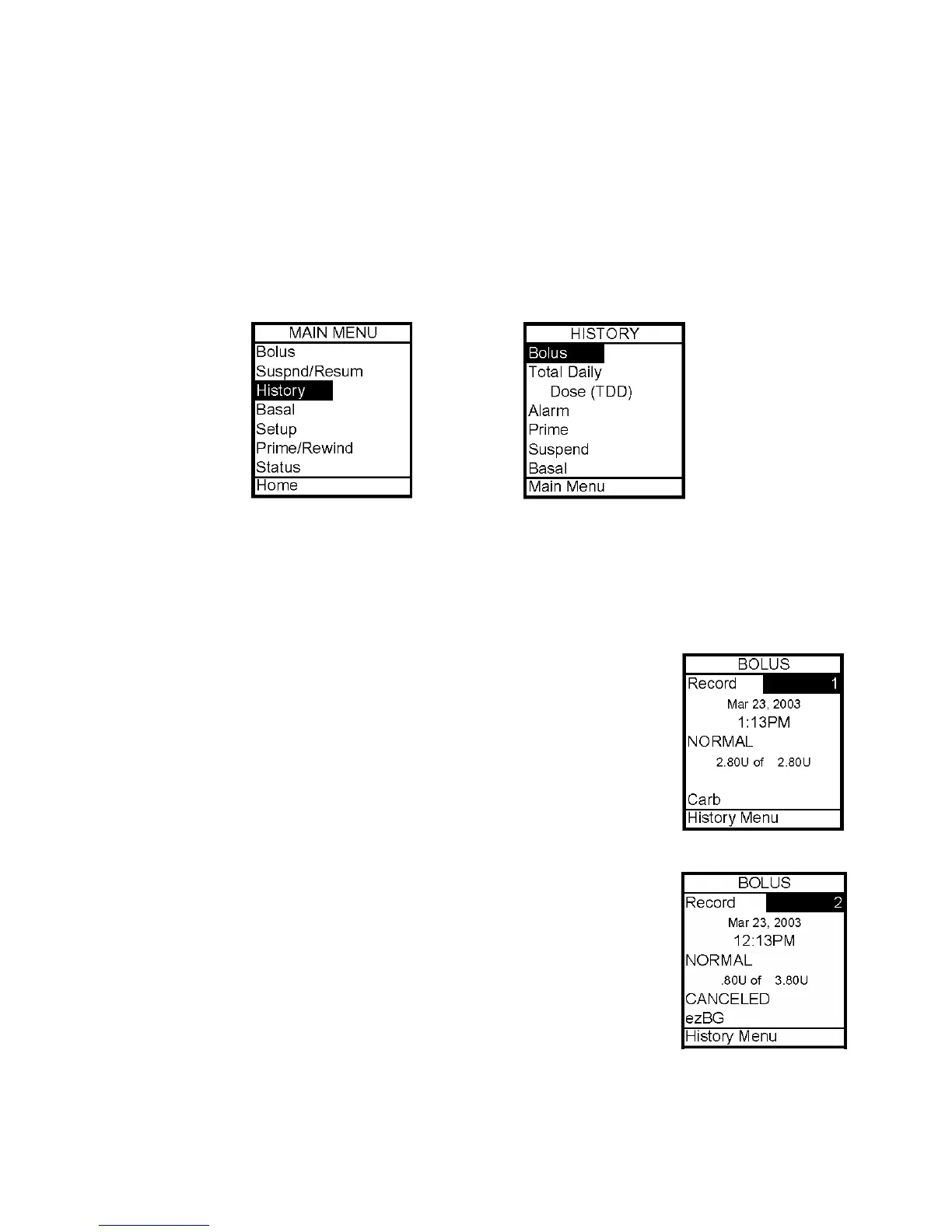
From the Main Menu, select History. The History Menu is displayed.
Bolus History
Your 2020 displays the last 500 Bolus records. Note: BG values and carb values are not
displayed on your 2020 however when you download your pump history with ezManager, the
BG and carb values (500 total) will be displayed on the ezManager reports.
1. From the History Menu, select Bolus. This screen displays the following:
• Bolus Record number
• Date of bolus
• Time of bolus
• Type of bolus delivered
o Normal
o Combo
If Carb, Active, Canceled
o BG
o Carb
o Audio
• Amount of bolus
• How much of programmed amount was delivered
2. Scroll up to highlight the record field. Press OK to activate Review
Mode (indicated by flashing cursor).
3. Record 1 indicates the most recent record. Use the Up/Down
arrows to scroll to other records.
4. When finished reviewing, press OK to exit Review Mode.
5. History Menu is highlighted. Press OK to return to History Menu.
9



 To Next Page