Page 49
Prime History
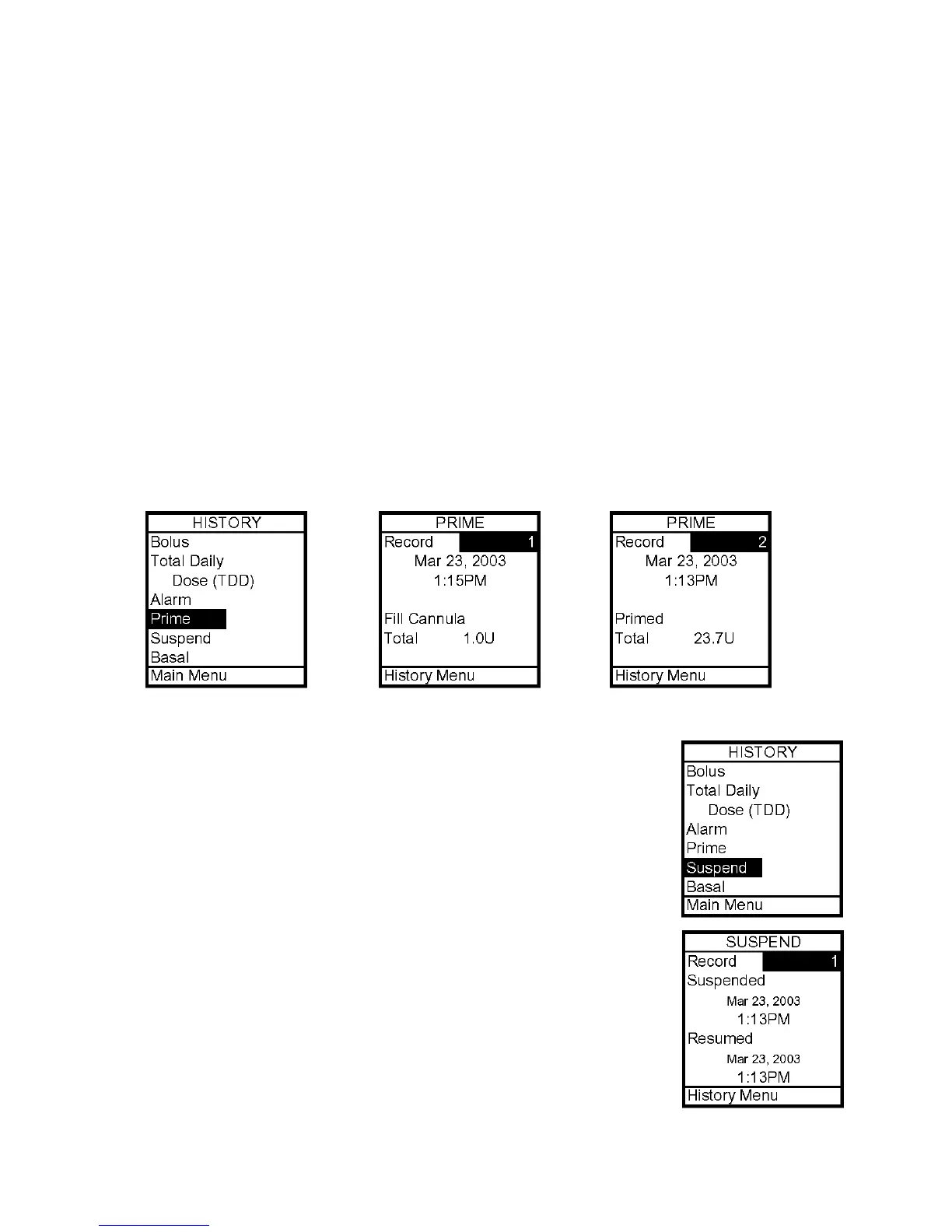
Your 2020 displays the last 60 Prime records.
1. From the History Menu, select Prime. The screen displays the following:
• Record number
• Date of prime
• Time of prime
• Amount of prime
2. Scroll up to highlight the record field. Press OK to activate Review Mode (indicated by
flashing cursor).
3. Record 1 indicates the most recent record. Use the Up/Down arrows to scroll to other
records.
4. When finished reviewing, press OK to exit Review Mode.
5. History Menu is highlighted. Press OK to return to History Menu.
Suspend History
Your 2020 displays the last 30 Suspend records.
1. From the History Menu, select Suspend. The screen displays the
following:
• Record number
• Date and time pump delivery was suspended
• Date and time pump delivery was resumed
2. Scroll up to highlight the record field. Press OK to activate Review
Mode (indicated by flashing cursor).
3. Record 1 indicates the most recent record. Use the Up/Down
arrows to scroll to other records.
4. When finished reviewing, press OK to exit Review Mode.
5. History Menu is highlighted. Press OK to return to History Menu.
9



 To Next Page