Page 67
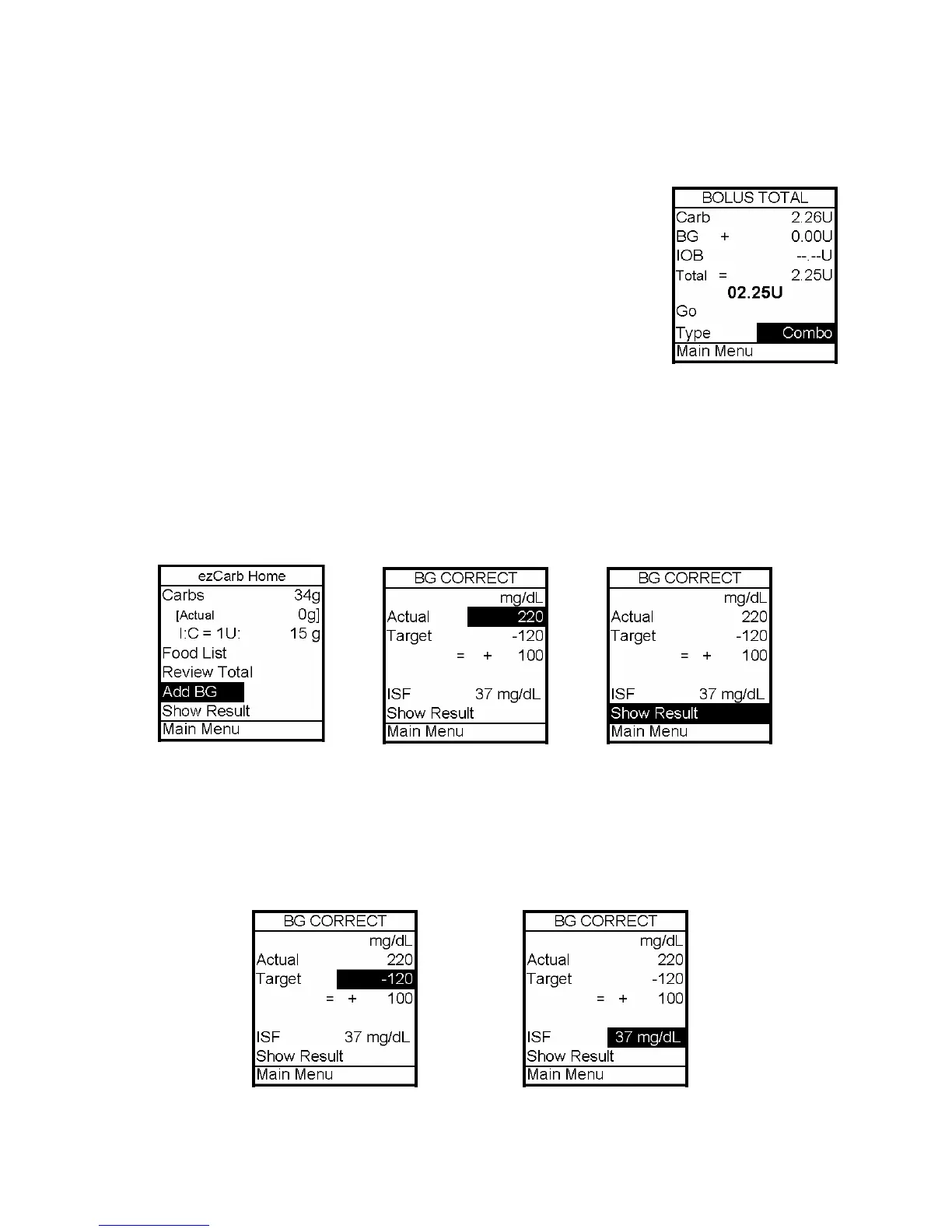
7. If you wish to give a Combo Bolus, scroll to the Type field and press OK to edit.
8. Use the Up/Down arrows to select bolus type: Normal (default)
or Combo. Press OK.
9. Go is highlighted. Press OK.
Note: If you select the Combo Bolus option, the Combo Bolus menu
will be displayed. See this chapter, Combo Bolus.
Adding a BG Bolus to ezCarb
1. On the ezCarb Home screen, enter the number of carbs. Press OK.
2. Add BG is highlighted. Press OK. The BG Correct screen is displayed.
3. The Actual field is highlighted and flashing to indicate Edit mode. Use the Up/Down
arrows to enter your BG value. Press OK. Show Result is highlighted.
4. Check that the BG target and Insulin Sensitivity Factor (ISF) are correct.
a. If they are correct, press OK with Show Result highlighted.
b. If they are not correct, scroll up to highlight the fields and press OK. Use the
Up/Down arrows to adjust the values. Press OK to exit Edit mode. Scroll down to
Show Result. Press OK.
12



 To Next Page