Page 72
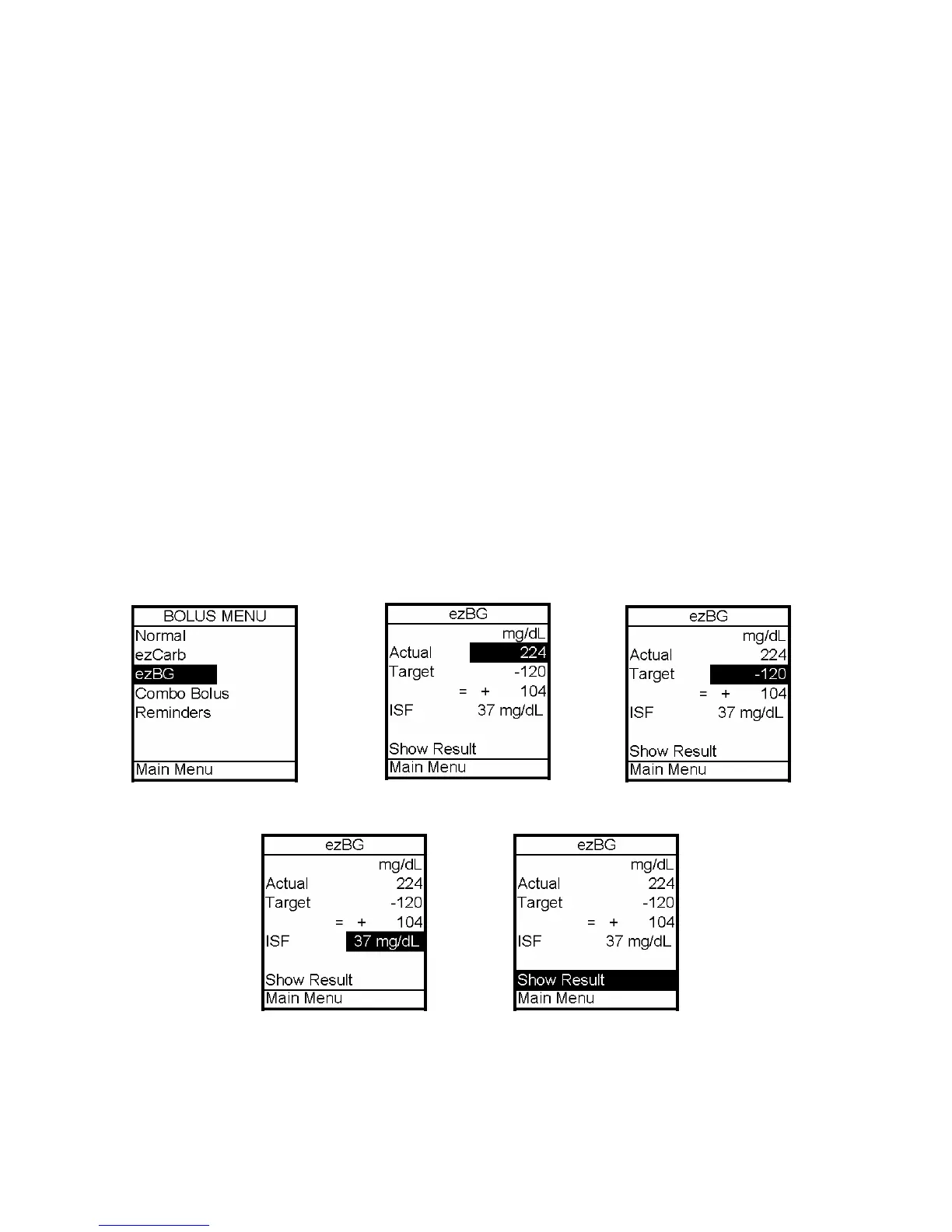
ezBG
This feature allows you to enter your BG reading and your 2020 will calculate a correction
bolus based on the Insulin Sensitivity Factor and BG Target Range for the current time of
day. If the Insulin on Board (IOB) feature is activated, your 2020 will calculate a reduced
dose for high BG correction boluses that you can review.
1. From the Bolus Menu, select ezBG. Press the OK button.
2. The Actual field will be highlighted and flashing to indicate Edit mode. Use the
Up/Down arrows to enter your actual BG reading. Press the OK button to confirm the entry
and exit Edit mode.
3. Check to be sure the Target BG amount and Insulin Sensitivity Factor (ISF) are correct.
Your healthcare team will give you these values. If you need to edit these fields, scroll up
to highlight the field and press OK to activate Edit mode. Use Up/Down arrows to change
target. Press OK to confirm and to exit Edit mode.
4. Show Result is highlighted. Press OK.
12



 To Next Page