Page 66
Entering Carbs Manually (no food database)
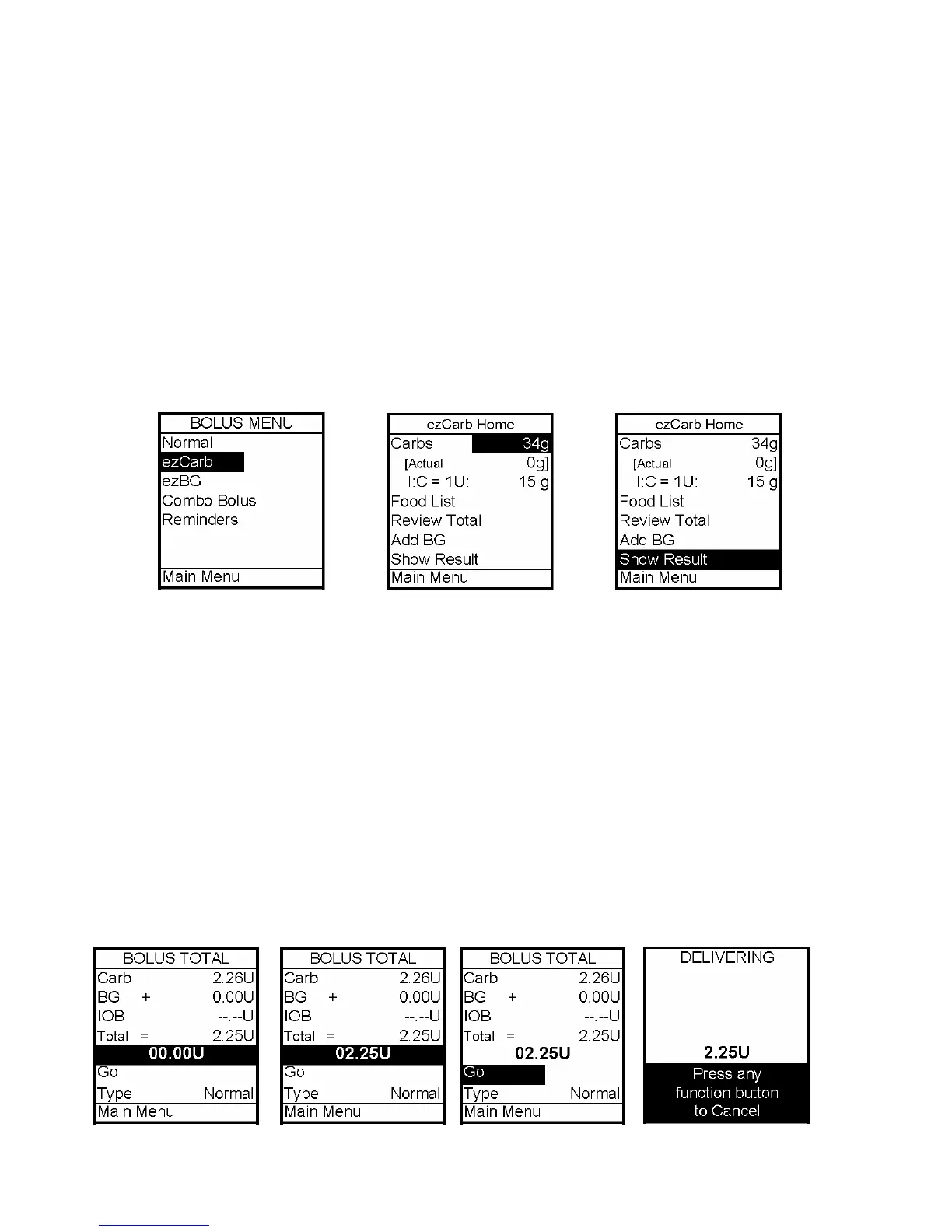
1. From the Bolus Menu, scroll to ezCarb. Press OK. The ezCarb Home screen is
displayed.
2. The cursor will flash on the Carbs field to indicate that you can edit the total number of
carbs eaten. Use the Up/Down arrows to enter the number of carbs. Press OK. Add BG is
highlighted. (See next section, Adding a BG Bolus to ezCarb.)
Note: The max limit for ezCarb Total is 999g. If your meal total is more than 999g, the pump
display will show the actual total. However, the ezCarb Home screen will use the max number
for the calculator.
3. Check that the grams of carb entered and your insulin to carb (I:C) ratio at the top of
the screen are correct.
a. If the entries are correct, scroll to Show Result. Press OK and go to Step 5.
b. If not correct, scroll up to highlight the field and press OK to activate Edit
Mode. Use Up/Down arrows to enter your I:C ratio and/or change the carb entry.
Press OK.
4. Scroll down to Show Result. Press OK.
5. The Bolus Total screen is displayed. The bolus amount field is highlighted and flashing
to indicate you can enter the total amount as shown or adjust as needed. Enter your bolus
amount. Press OK.
6. Go is highlighted. If you wish to give a Normal Bolus, press OK to deliver.
12



 To Next Page