Page 29
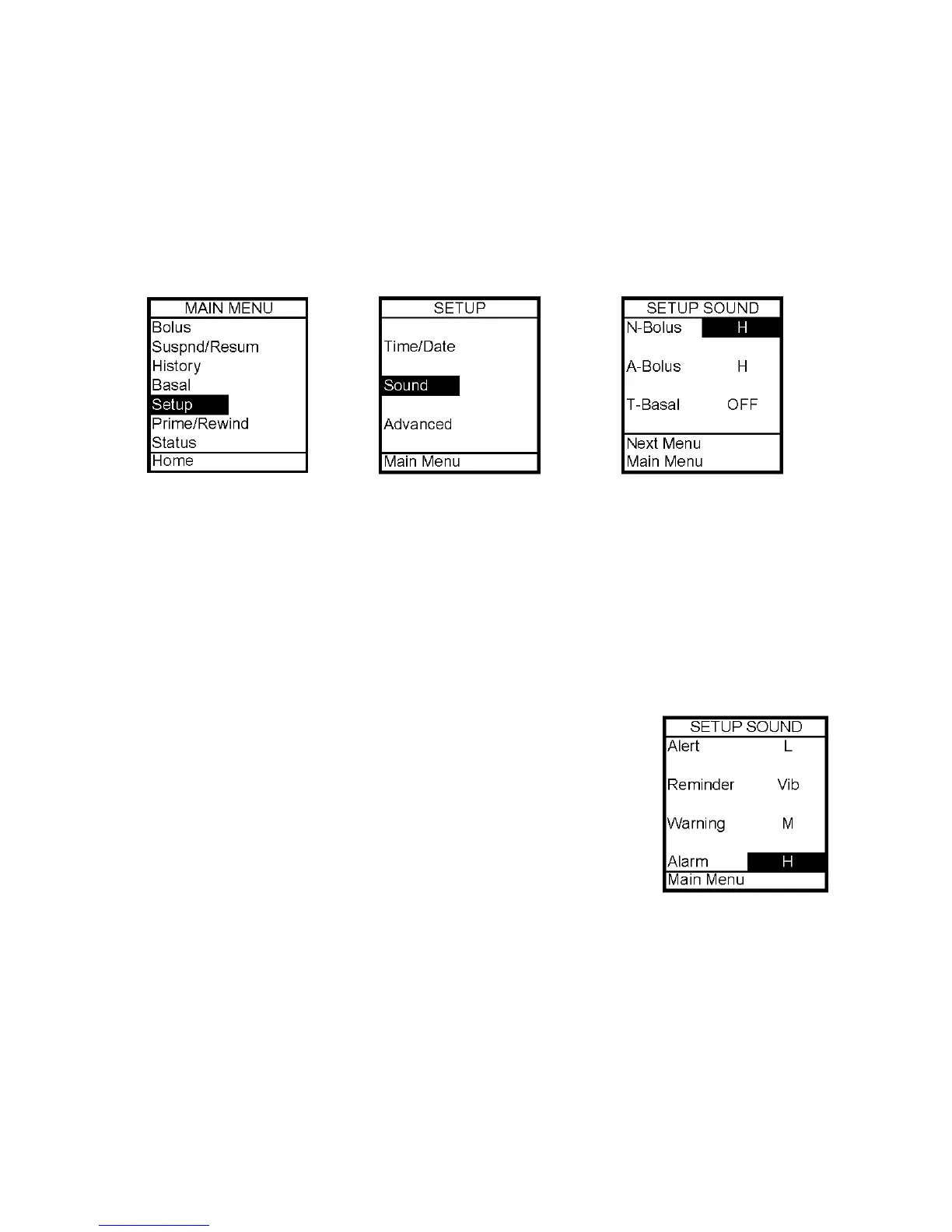
Normal Bolus Sound
Audio Bolus Sound (OFF is not an option for this sound setting)
Temp Basal Sound
These are the options from the first Setup Sound Menu. They can be set to one of the
following: Vibrate, Low volume, Medium volume, High volume or can be shut off
completely. For safety reasons, some of the alerts cannot be turned off.
Alert Sound
Reminder Sound
Warning Sound (OFF is not an option for this sound setting)
Alarm Sound (OFF is not an option for this sound setting)
These are the options from the second Setup Sound Menu. They can be set to one of the
following: Vibrate, Low volume, Medium volume or High volume. For safety reasons, some
of these alerts cannot be turned off.
Unless otherwise recommended by your healthcare professional, vibrate mode should not be
used during sleep. If you are a very sound sleeper, set the alarm volume to high before
going to bed.
1. From the Main Menu, scroll to Setup. Press the OK button.
2. Scroll to Sound. Press the OK button.
3. Use the Up/Down arrows to scroll to your selection. Press the
OK button.
4. The cursor will flash to indicate you can edit the selection. Use
Up/Down arrows to change to desired setting. Press the OK button
to confirm.
5. Repeat for remaining selections.
6. Scroll to Next Menu to access second Setup Sound Menu or scroll to Main Menu when
finished to return to the Setup Menu.
5



 To Next Page