Page 38
Note: You do not have to Suspend the pump to edit an active program. When you select Edit
from the Basal Menu, your 2020 automatically suspends delivery. When you exit the Edit
mode, the active program delivery automatically resumes.
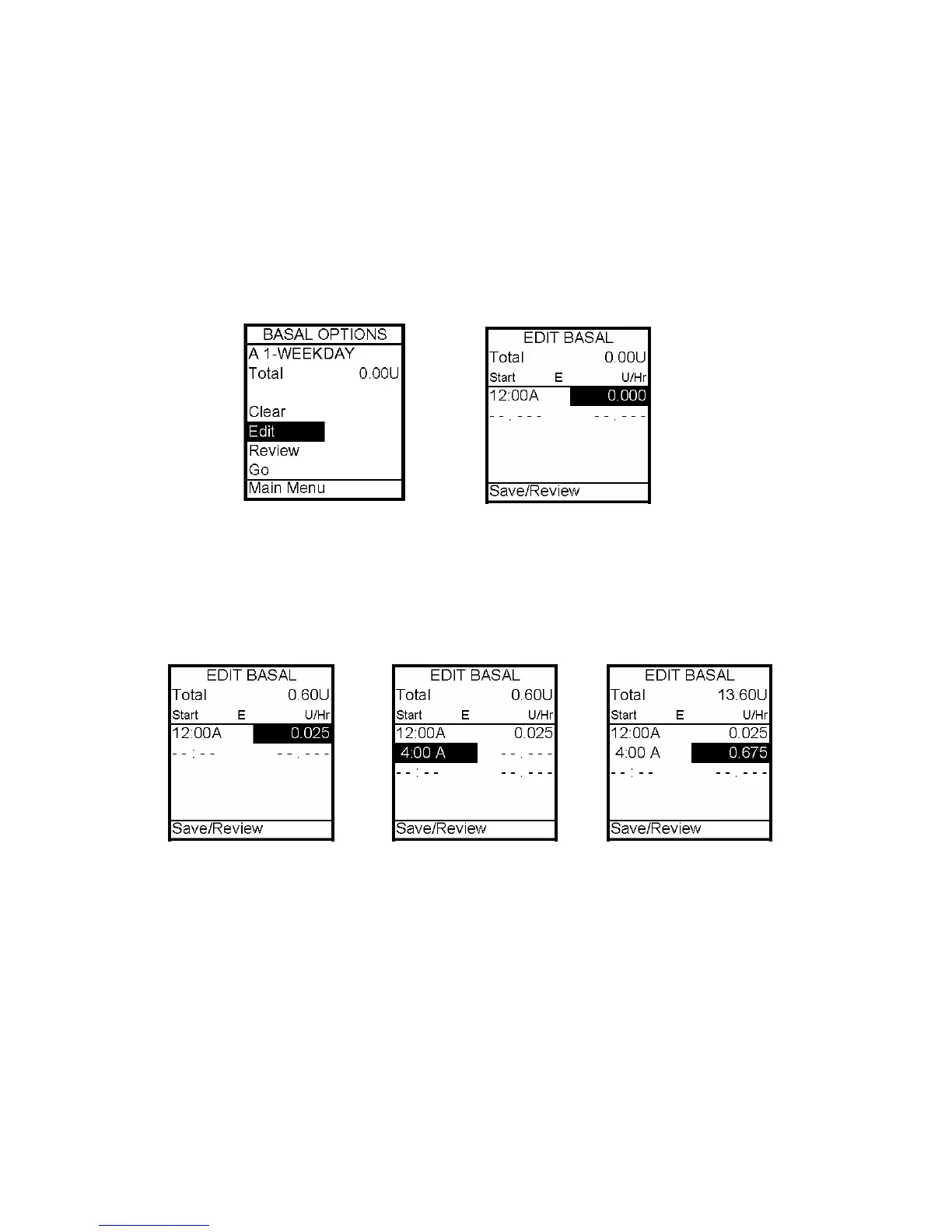
4. The Basal Options screen is displayed. Edit is highlighted. Press the OK button. From
the Edit Basal screen, you can edit the basal segments of the selected program.
5. Scroll to the desired U/hr field. Press OK to activate Edit mode (indicated by flashing
cursor).
6. Use Up/Down arrows to set desired basal rate. Press OK to confirm and exit Edit mode
for this field.
7. Scroll down to select the next Start time field. Press the OK button to activate Edit
mode (indicated by flashing cursor).
Note: The next available empty basal segment will appear automatically as you program the
previous segment. If the next empty basal segment does not appear, you have programmed
all 12 possible segments.
8. Change next Start time field as desired, press the OK button to exit Edit mode.
Segments can start on the hour or half hour.
Note: The 24 hour Total changes automatically as you change U/hr settings.
9. Continue until basal segments have been set as recommended by your healthcare team.
7



 To Next Page