Instrument Notifications and Troubleshooting A-7 System Recovery
MS2090A UG PN: 10580-00444 Rev. U A-21
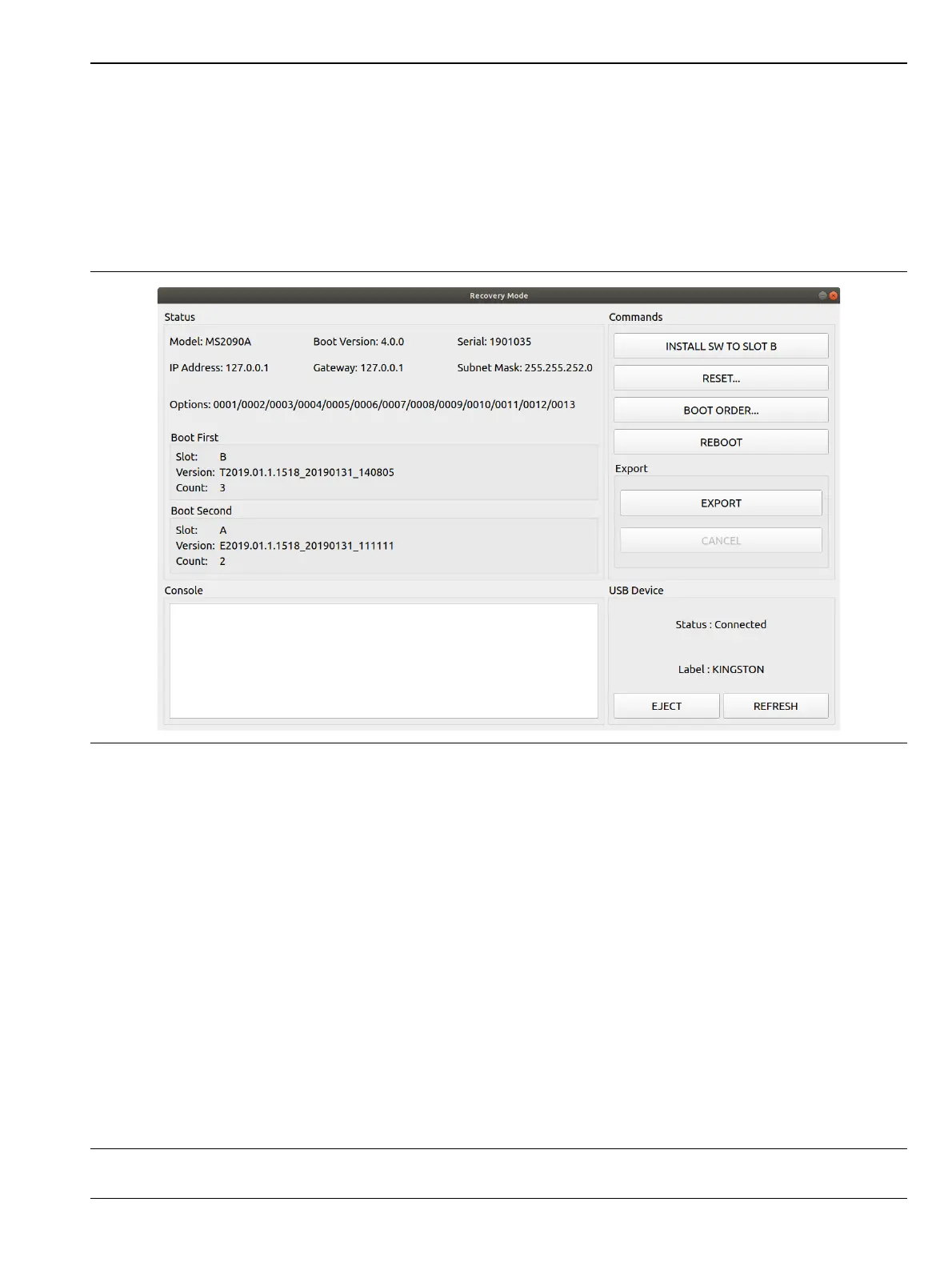
The Recovery Mode menu (Figure A-2) shows instrument information and provides a variety of recovery
options in ascending invasive order:
1. Select REBOOT to reboot the instrument without any further action.
2. Save all internal user files and logs by inserting a USB device and press the EXPORT button.
3. Refer to “Reset” on page A-22 for information about various reset options.
4. Refer to “Boot Order” on page A-22 to select a different boot order.
5. Refer to “Install SW to SLOT X” on page A-23 to reload or update the system software.
Status: Shows the Model, Boot Version, Serial Number of the MS2090A, IP Address, Gateway, Subnet Mask.
Options: Shows the Options currently installed.
Boot First: Shows the Slot, Version, and Count in the Boot First position.
Boot Second: Shows the Slot, Version, and Count in the Boot Second position.
Console: Provides a readout of the reboot activity.
Commands: Choose the command method to restart the instrument:
• INSTALL SOFTWARE TO SLOT B: Indicates which slot will be overwritten as described in “Install SW to
SLOT X”
• RESET: Provides the RESET dialog as shown in “Reset” on page A-22.
• BOOT ORDER: Provides the Boot Order dialog as shown in “Boot Order” on page A-22.
• REBOOT: Reboots the instrument.
Export: Select EXPORT to save all internal user files and logs to a USB device. Select CANCEL to cancel the
export. The saved files can be copied back to internal memory by using the file management menus.
USB Device: This section provides:
• Status: The USB memory device is connected or unconnected.
• Label: The Manufacturer of the USB memory device.
• EJECT: Select to eject and remove the USB memory device.
• REFRESH: Select to reconnect to the USB memory device.
Figure A-2. Recovery Mode













 To Next Page