SH-300
User’s Manual Software Part
Page 53 of 103
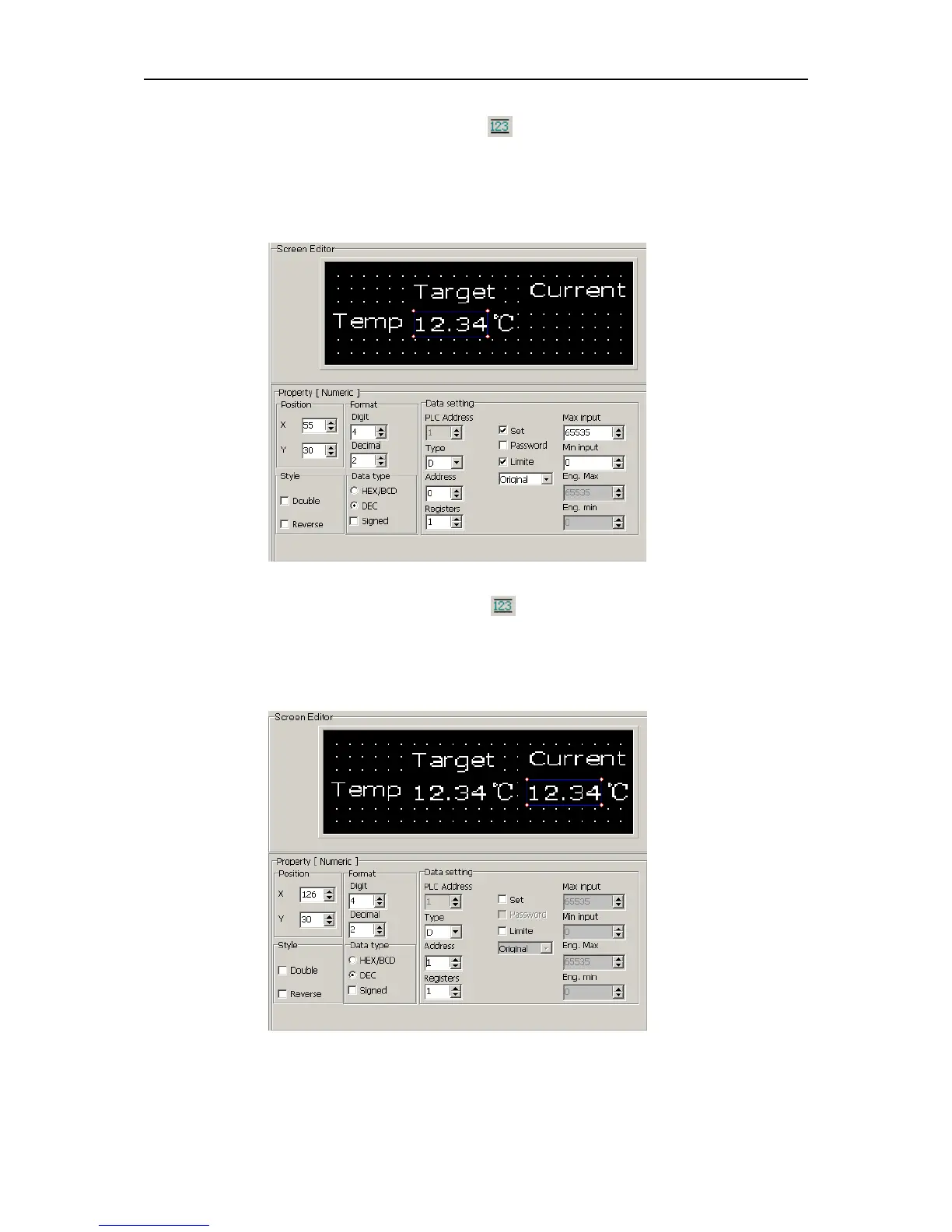
Select “Register” under “Object” menu or click in the tool bar. Move the mouse to proper
place under “Target” and click the left key of the mouse to confirm. Then set the parameter of
the register, Address=D0, Digits=4, Decimal=2, Mode=Dec. Select “Set” and “Limit” check box.
Then place the text “℃” on its right as shown in the following diagram:
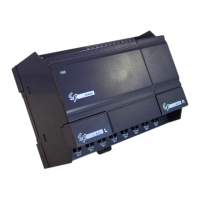
Select “Register” under “Object” menu or click in the tool bar. Move the mouse to proper
place under “Current” and click the left key of the mouse to confirm. Then set the parameter of
the register, Address=D1, Digits=4, Decimal=2, Mode=Dec. Don’t select the “Set” check box.
Then place the text “℃” on its right as shown in the following diagram:
4. Make Screen 3 “State Monitoring”
As stated above, create the Screen 3. The input the text “Heating Unit 1”, “Heating Unit 2”,
“Heating Unit 3” in proper place in the screen as in the following diagram:


 To Next Page