58 CHAPTER 6 - Controls and use
FlexiBowl® - Models 200 - 350 - 500 - 650 - 800
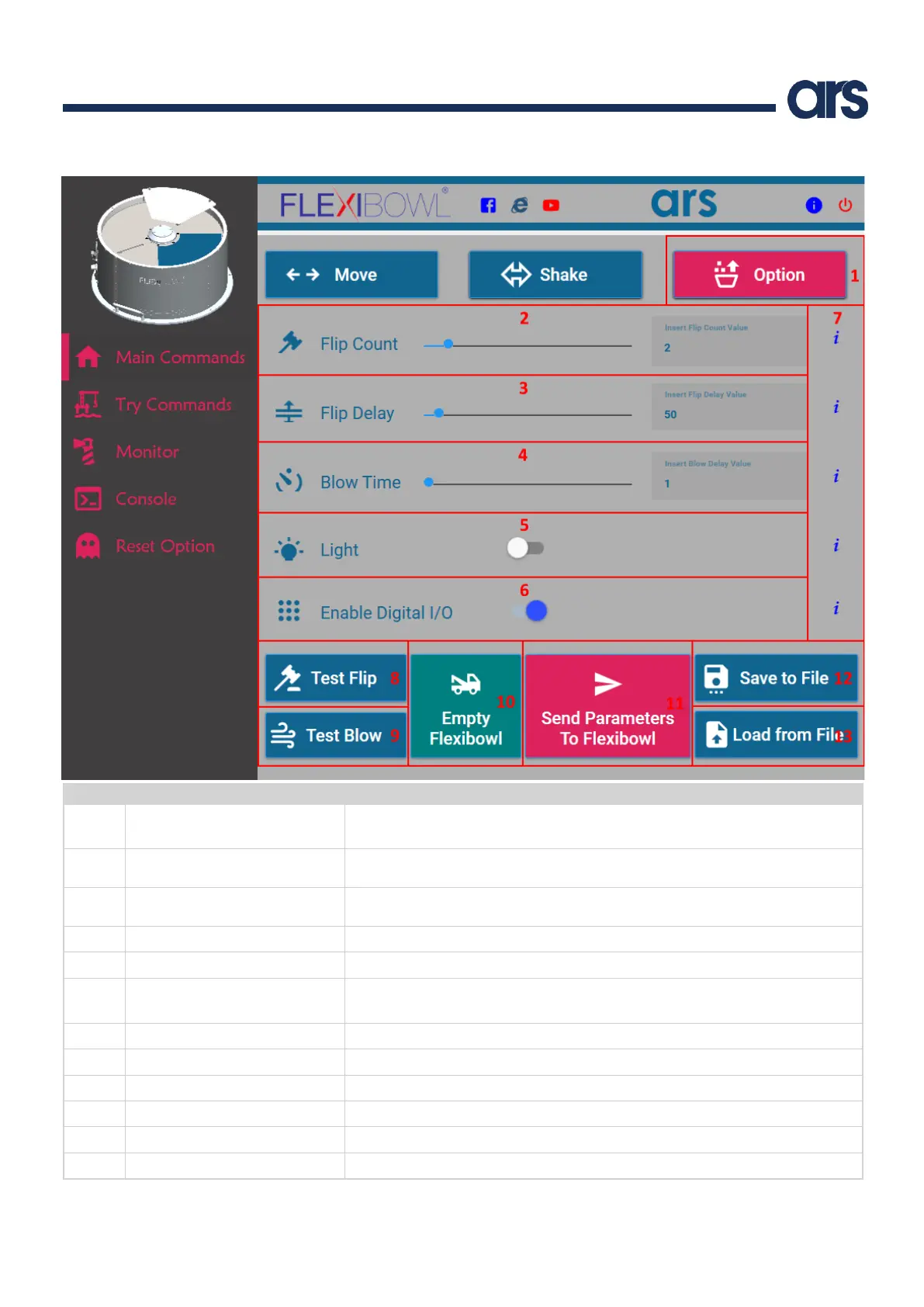
It shows the main window regarding the Flexibowl® general options (Flip, Blow,
Backlight, etc.)
Number of ON/OFF cycles that the Flip will perform at each subsequent Flip
command.
Time, in milliseconds, between an ON and an OFF of the Flip at each subsequent
Flip command.
Air Blow time, in milliseconds.
Turn the backlight on/off.
Enable the option to command the Flexibowl® via I/O.
Note: The Flexibowl® must be restarted to apply.
It performs a Flip command with the selected parameters.
It performs an Air Blow command with the selected parameters.
Information regarding the parameter.
Send Parameters To Flexibowl®
It saves the command parameters set in the Flexibowl® user interface.
It saves the command parameters set in the Flexibowl® user interface in a file.
It loads the command parameters from a previously saved file.



 To Next Page