EasyManua.ls Logo

ARS Flexibowl 200 - IP Address Recovery

Default Icon
96 pages
Print Icon
To Next Page IconTo Next Page
To Previous Page IconTo Previous Page
Loading...
CHAPTER 6 - Controls and use 53
Instructions for use and warnings
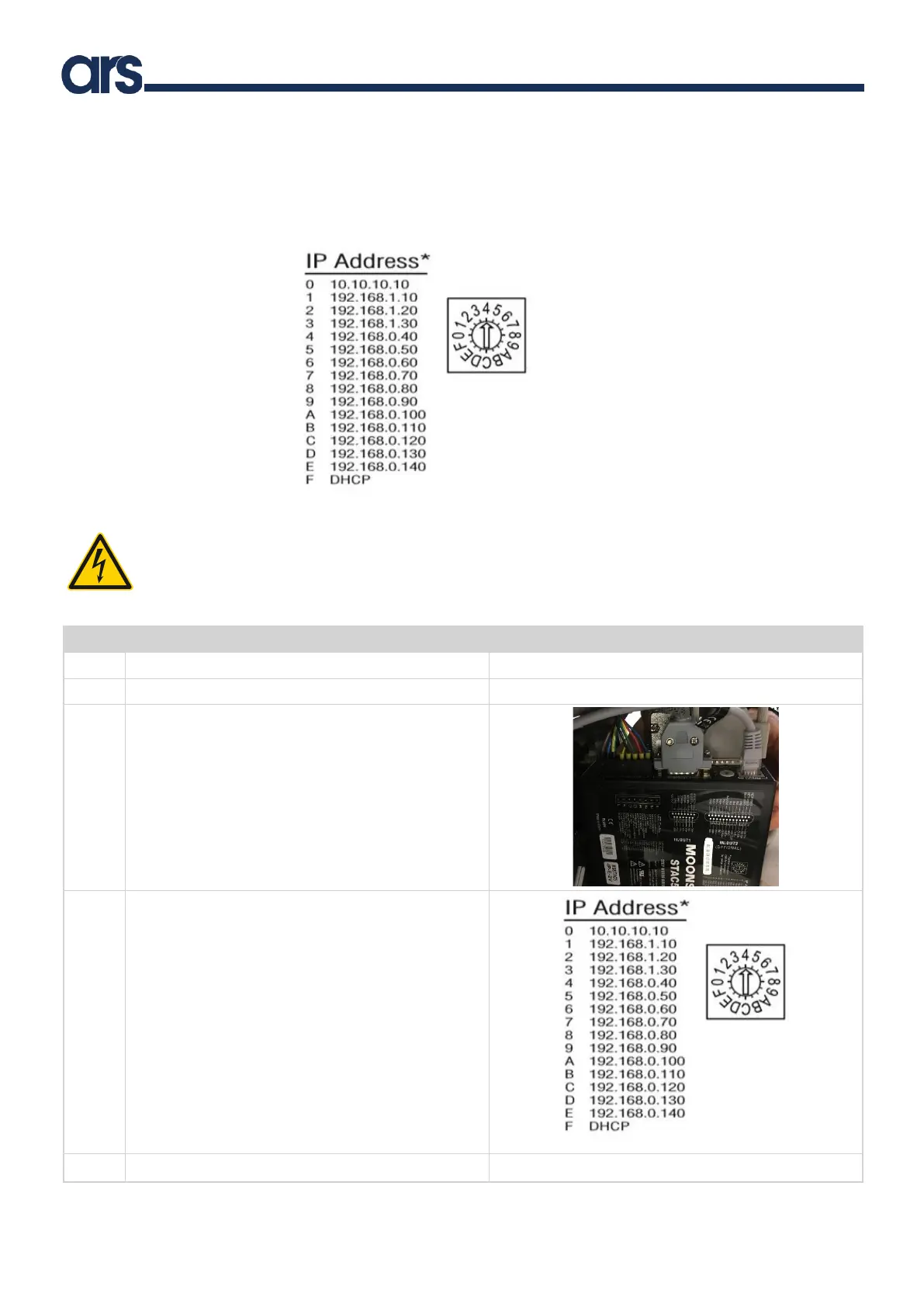
6.2.3 IP address recovery
If the IP address is lost, you can use the driver’s rotary dip switch to interface again with the Flexibowl®. See picture below:
CAUTION! Disconnect the power supply before performing the following procedure
For the Flexibowl® 200 and 350, follow the instructions below to place the dip switch in a different position from the current one:
Step
Action
Picture
1
Unplug the power cable in the control panel
2
Remove the Flexibowl® covers
3
Identify the driver
4
Use a flat screwdriver to select the position of the
correct dip switch
5
Reassemble all components

Table of Contents