EasyManua.ls Logo

ARS Flexibowl 200 - Reset Option

Default Icon
96 pages
Print Icon
To Next Page IconTo Next Page
To Previous Page IconTo Previous Page
Loading...
64 CHAPTER 6 - Controls and use
FlexiBowl® - Models 200 - 350 - 500 - 650 - 800
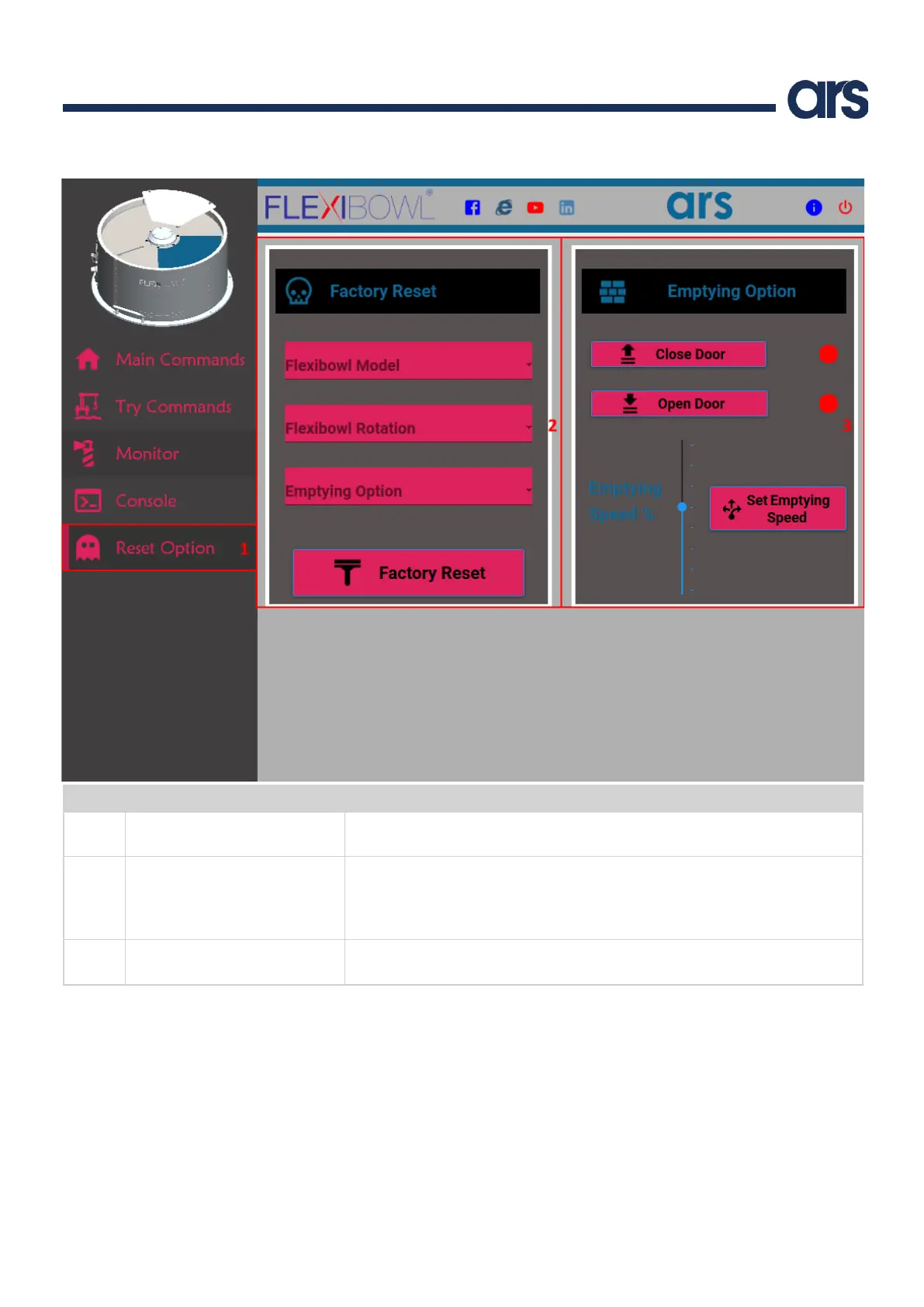
6.2.7 Reset Option
Pos.
Elemento
Descrizione
1
Reset Option
It is used to reset the Flexibowl® at factory default status and commands the empty
door manually.
2
Facttory Reset
It resets the Flexibowl® at factory default status. Before pressing the Factory Reset
button you have to select the Flexibowl® model (Flexibowl Model), if the Flexibowl® is
clockwise or counterclockwise (Flexibowl Rotation) and if the Quick Emptying Option is
present
3
Empetying Option
It is used to command the Quick Emptying Door manually. It’s also possible see
the status of the opening and closing Door sensors and set the Emptying speed.

Table of Contents