4-1
TotalAlert Innity™ HTM Medical Gas Notication System
4107 9016 60.01
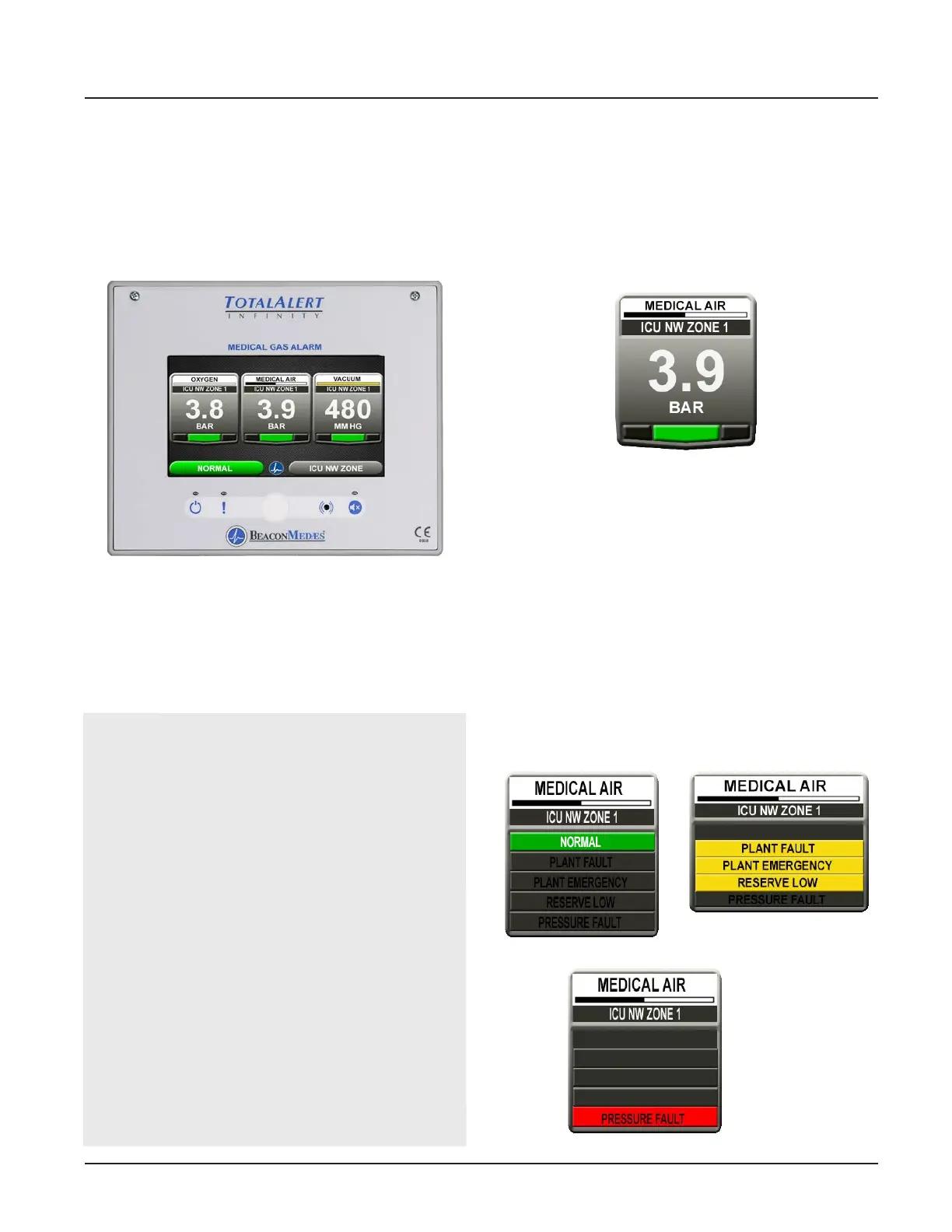
Figure 1: Area Alarm Main Screen
4.1.1 Main Screen
The rst screen that users see on a congured unit is
the MAIN screen. The MAIN screen is the main view for
the alarm and shows the pressure status of all of the
gases or source signals the alarm is monitoring.
4.0 Operation
4.1 Overview
The TotalAlert Innity™ Medical Gas Notication
System is a touchscreen gas pressure and system
monitoring alarm created for ease of use.
NOTES:
The main screen will appear dierent depending
on whether the alarm panel is congured as an
Area, Central or Combination.
An Area alarm main screen will show gas
pressure badges, a central alarm main screen will
show source badges, and a combiantion alarm
main screen will show both gas badges and source
badges.
To provide an aesthetic display and maintain
consistency in accordance with recognized and
established medical gas service sequencing, it is
recommended that displays are positioned in the
following order on each alarm panel starting with
the left hand column:
- Medical Oxygen
- Nitrous Oxide
- Oxygen/Nitrous Oxide Mix (50/50)
- Medical Air 400 kPa
- Medical Air 700 kPa
- Medical Vacuum
4.1.2 Gas Badge
Every gas monitored by the alarm will have a gas badge
which will show the following information:
• Gas being monitored
• Location where gas is being used
• Gas pressure value
• Gas pressure status (Low, Normal, or High)
4.1.3 Source Signals
Every source signal monitored by the alarm will display
the following information once congured:
• Equipment being monitored
• Location of the source equipment
• Signal being monitored
• When all conditions are normal it will show
“NORMAL” in green (Figure 4.3). If the conditions are
out of normal range, it will show yellow (warning).
During a pressure fault condition it will show
“PRESSURE FAULT” in red and the normal message
will disappear (Figure 4.4).
Each source badge can show the status of up to 4
signals.
Figure 2: Gas Badge
Figure 3: Source signal status
Normal
Warning
Pressure Fault



 To Next Page