4-2
TotalAlert Innity™ HTM Medical Gas Notication System
4107 9016 60.01
4.1.4 Toolbar
Running from left to right across the bottom of the
MAIN screen is the toolbar. The Normal toolbar is
available when the alarm is operating in normal status
and shows:
NOTE:
The Normal toolbar will automatically reappear
when all faults are resolved.
Icons on the toolbar:
1. Home button. This icon button toggles to the MAIN
screen.
2. Alarm button. This icon button toggles to the
ACTIVE ALARM screen.
3. Conguration button. This icon button toggles to
the CONFIGURATION screen.
4. Information button. This icon button toggles to the
INFORMATION screen.
5. History button. This icon button toggles to the
HISTORY screen.
The button that corresponds to the screen currently in
use will be blue.
Alarm Button (Red)
Figure 7: Fault Status
4.1.5 Fault Status
If a gas sensor is measuring above or below the alarm
level, the high or low pressure indicator on the gas
badge will ash for the gas pressure out of range.
If a gas sensor becomes disconnected or shorted, both
high and low indicators for that gas will ash and an
error code and message will be displayed.
If a congured source signal becomes an open circuit,
the source badge and the signal status will change
from green to blinking red.
The Icon toolbar will appear, and the Alarm button will
be ashing red. By default the screen will change to the
Active Alarm Screen.
Users can touch any ashing red light to go to the
ACTIVE ALARM screen.
Figure 6: Icon Toolbar
Home Button Information Button
History Button
Conguration
Button
Alarm
Button
Alarm Status (normal)
Home
Button
Location of Panel
Figure 5: Normal Toolbar
To switch to the Icon toolbar, touch the HOME button.
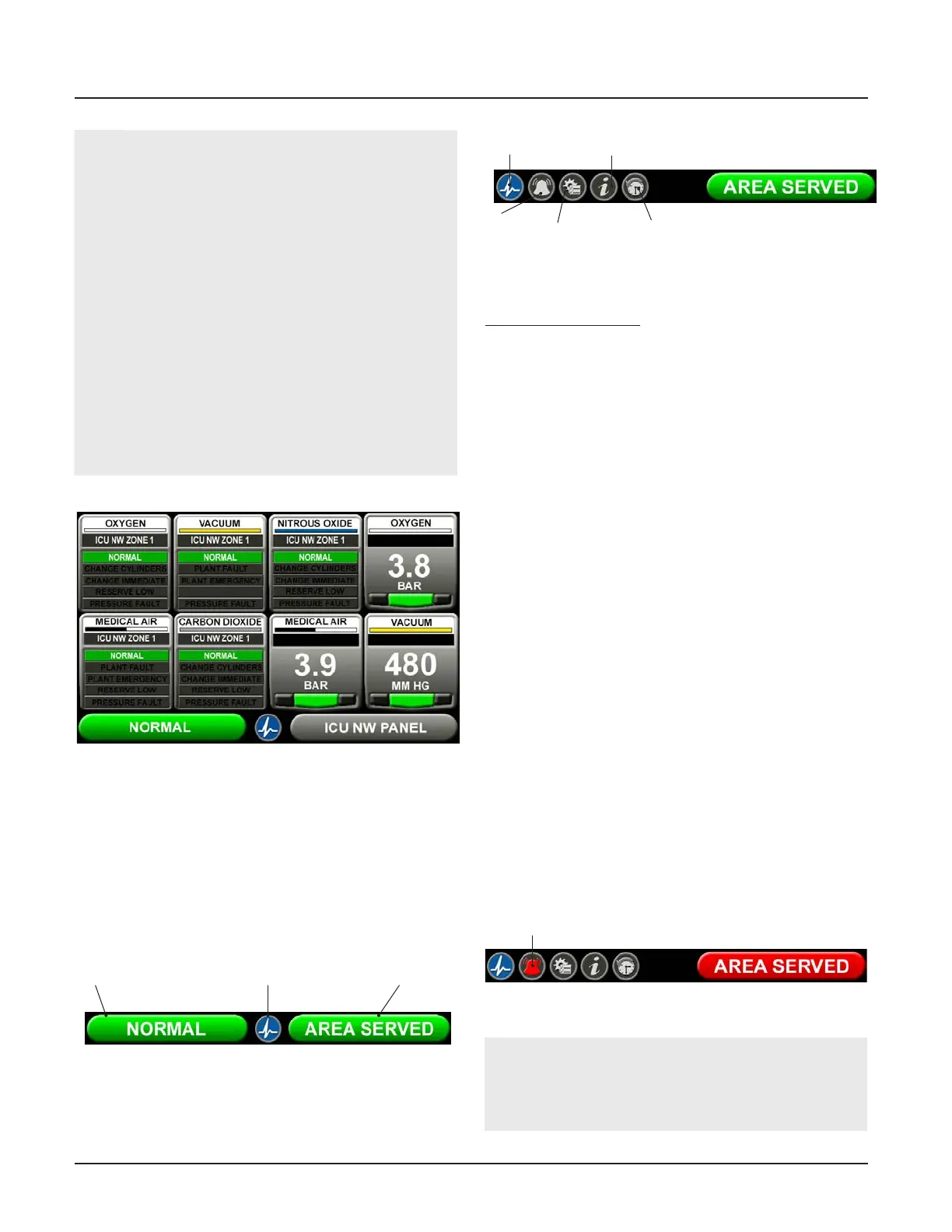
Figure 4: Combination Alarm Screen
NOTES:
To provide an aesthetic display and maintain
consistency in accordance with recognized and
established medical gas service sequencing, it is
recommended that displays are positioned in the
following order on each alarm panel starting with
the left hand column:
- Medical Oxygen (cryogenic and manifolds)
- Nitrous Oxide (manifolds)
- Oxygen/Nitrous Oxide mix 50/50 (manifolds)
- Medical Air 400kPa (plant and manifolds)
- Medical Air/Surgical Air 700kPa (plant and mani-
folds)
- Medical Vacuum (plant)
- AGS (simplex or duplex)
- Helium/Oxygen mixture
- Point alarms (as required)



 To Next Page