4-20
TotalAlert Innity™ HTM Medical Gas Notication System
4107 9016 60.01
Figure 70: Combination Alarm Main Screen
NOTE:
See the end of this section for information on the
Miscellaneous Tab. See Section 4.6 for information
on the Active Alarm Opt Tab.
4.5 Setting up a Combination
Alarm
The TotalAlert Innity
™
combination alarm combines
the functionality of a Area alarm and a central alarm. It
monitors two things:
• Gases and their pressures.
• Source equipment.
4.5.1 Initial Setup of an Uncongured
Combination Alarm
To begin setup of the alarm, rst pull the battery tab
located on the back of the front panel to activate
battery backup of the alarm.
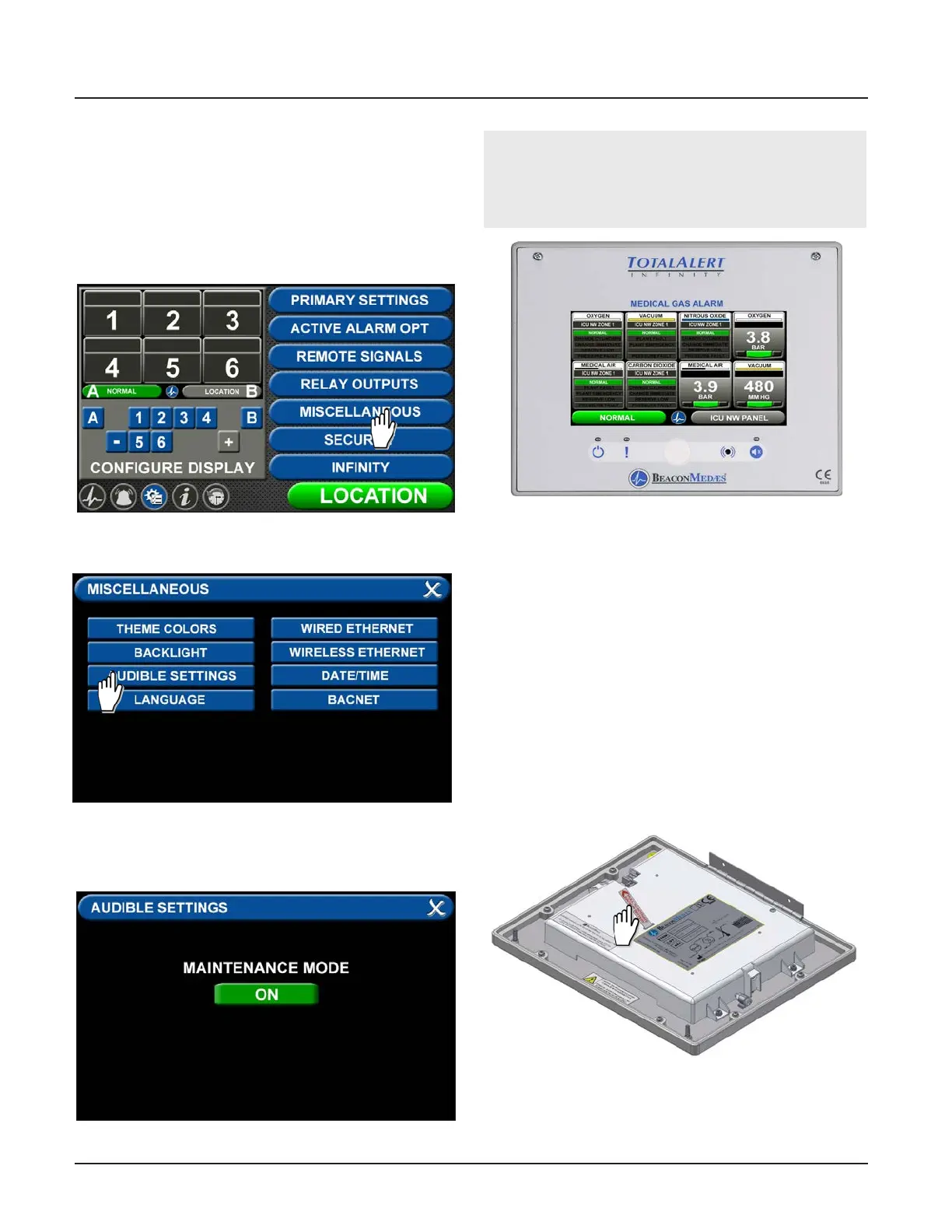
4.4.3 Maintenance Mode Setup
To ensure the audible warning does not sound while
setting up the alarm, the MAINTENANCE MUTE function
can be activated.
Touch the MISCELLANEOUS tab in the conguration
menu.
Figure 67: Miscellaneous Tab
Touch the AUDIBLE SETTINGS tab.
Press the tab to turn maintenance mode on. Exit the
screens to return to the conguration screen.
Figure 68: Audible Settings Tab
Figure 69: Maintenance Mode ON
Figure 71: Battery Pull Tab



 To Next Page