4-38
TotalAlert Innity™ HTM Medical Gas Notication System
4107 9016 60.01
Wired Ethernet Settings
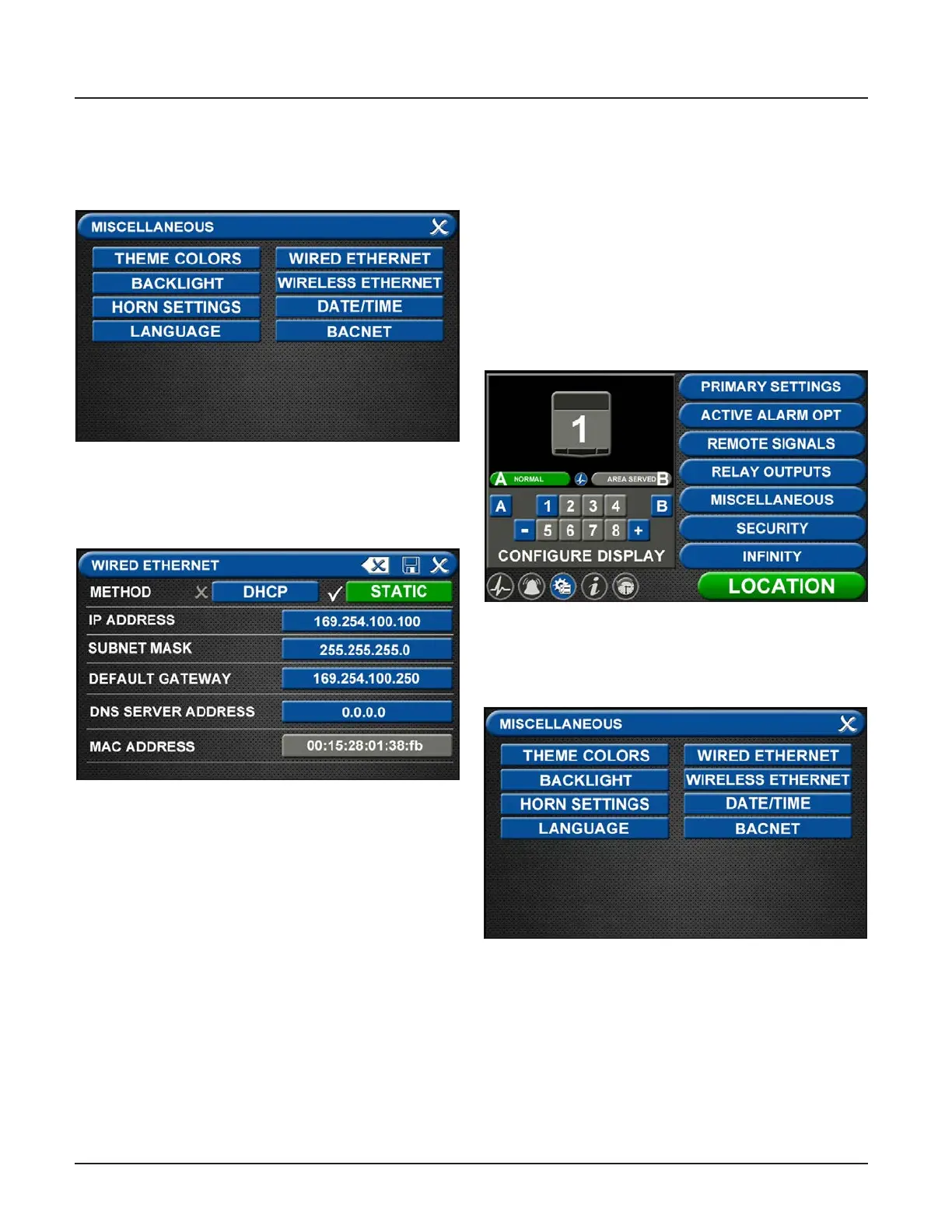
On the Miscellaneous screen, touch the WIRED
ETHERNET tab (Figure 4.113).
Figure 127: Miscellaneous Screen
The WIRED ETHERNET screen allows for
customization of the Ethernet settings. All of the tabs
on this screen are set to default status.
Figure 128: Wired Ethernet Screen
• The alarm IP Address defaults to Static method. To
select the DHCP method, touch the DHCP tab.
• To change the IP Address, touch the IP Address tab.
Using the keyboard, enter a new IP address.
• To change the Subnet Mask, touch the Subnet
Mask tab. Using the keyboard, enter a new Subnet
Mask address.
• To change the Default Gateway, touch the Default
Gateway tab. Using the keyboard, enter a new
Default Gateway.
• To change the DSN Server Address, touch the DSN
Server Address tab. Using the keyboard, enter a
new DSN Server Address.
4.7.4 BACnet Set-Up
The TotalAlert Innity™ alarms employ the TCP/IP
family of protocols for communication and each device
has a unique IP address. The alarm utilizes a built-in
Ethernet connection for BACnet transmission of signals
to a Building Automation System. The TotalAlert
Innity™ alarm panel conforms to the BACnet protocol
and includes a Protocol Implementation Conformance
Statement (PICS).
• Touch the MISCELLANEOUS tab located on the
conguration screen.
Figure 129: Conguration Screen
• Touch the BACNET tab to access the BACNET
control screen.
Figure 130: Miscellaneous Screen
• To allow BACnet communication, touch the BACnet
ON tab.
• To add the name, touch the DEVICE NAME tab and
enter the name through the on screen keyboard.



 To Next Page