4-26
TotalAlert Innity™ HTM Medical Gas Notication System
4107 9016 60.01
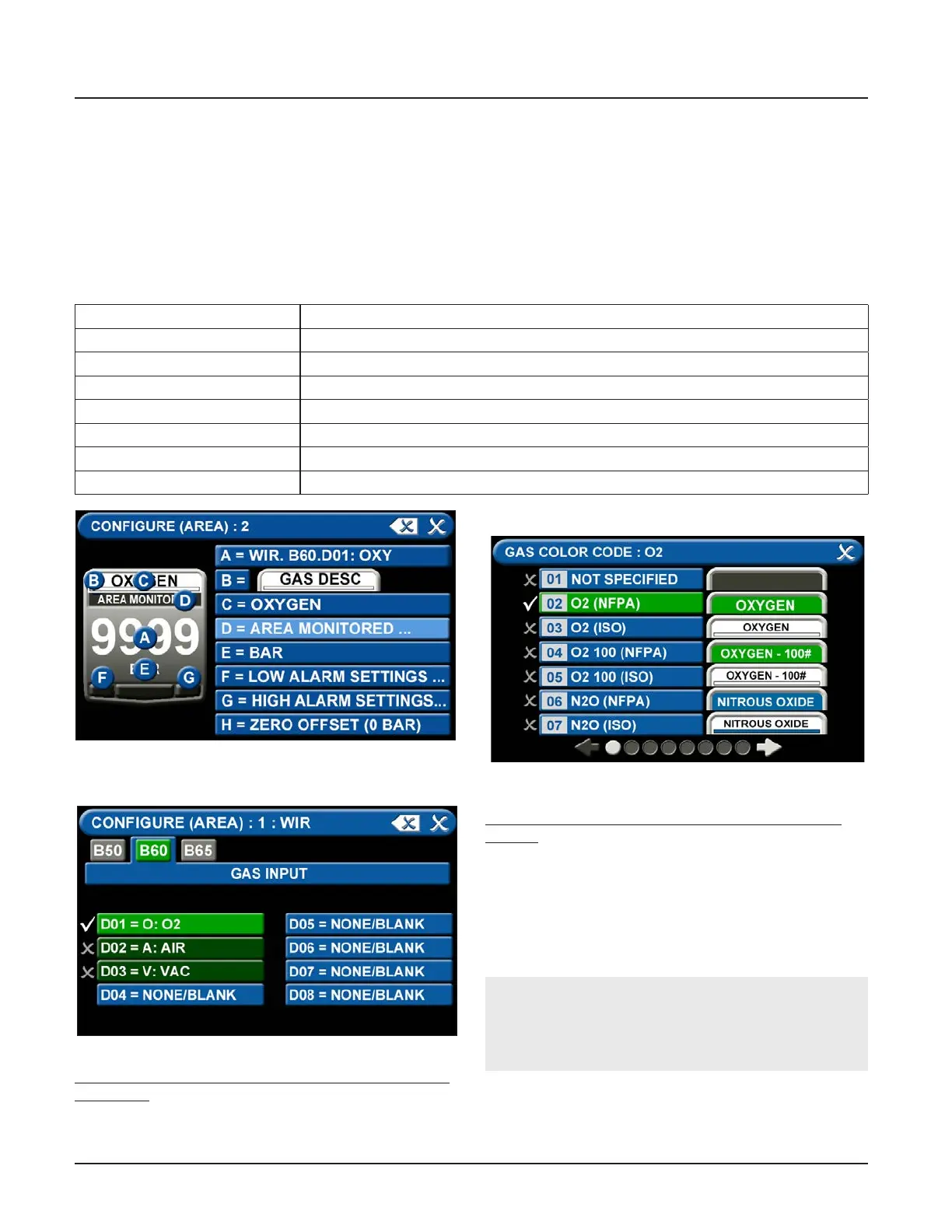
Figure 89: Conguring Gas Badges
A = [GAS INPUT] To change which wired input should be shown on the badge
B = GAS DESC To change color codes based on standard and country
C = [GAS NAME] To label the gas
D = AREA MONITORED To edit the location label for a specic gas
E = [UNITS OF MEASURE] To change the displayed unit of measure for the pressure/vacuum
F = LOW ALARM SETTINGS To adjust the value that indicates that the pressure is low
G = HIGH ALARM SETTINGS To adjust the value that indicates that the pressure is high
H = ZERO OFFSET To make small adjustments to the displayed pressure based on user preference
Figure 90: [Gas Input] Tab
Figure 91: Gas Color Code Screen
NOTE:
If the alarm default is correct, touch the X button
in the upper right to close the screen.
4.5.2 Conguring Gas ID Badges
The TotalAlert Innity™ Area alarm is designed to allow
conguration of eight gas badges using the B60 board.
To congure the rst badge to custom settings, touch
the [1] button in the numeric display of the congura-
tion screen (Figure 4.83).
Eight tabs are used for conguration (Figure 4.89). Tabs
are listed in alphabetical order.
A = [Gas Input] Tab
To change which wired sensor should be displayed on
that badge:
1. Touch the tab for the appropriate wired gas sensor.
2. Touch the Save button to close the screen.
B = Gas Desc Tab
To change color codes based on your standard and
country:
1. Scroll through the codes using the right and left
arrows at the bottom of the screen.
2. Touch the tab for the appropriate code.
3. Touch the Save button when you see a check
beside your selection.



 To Next Page