4-39
TotalAlert Innity™ HTM Medical Gas Notication System
4107 9016 60.01
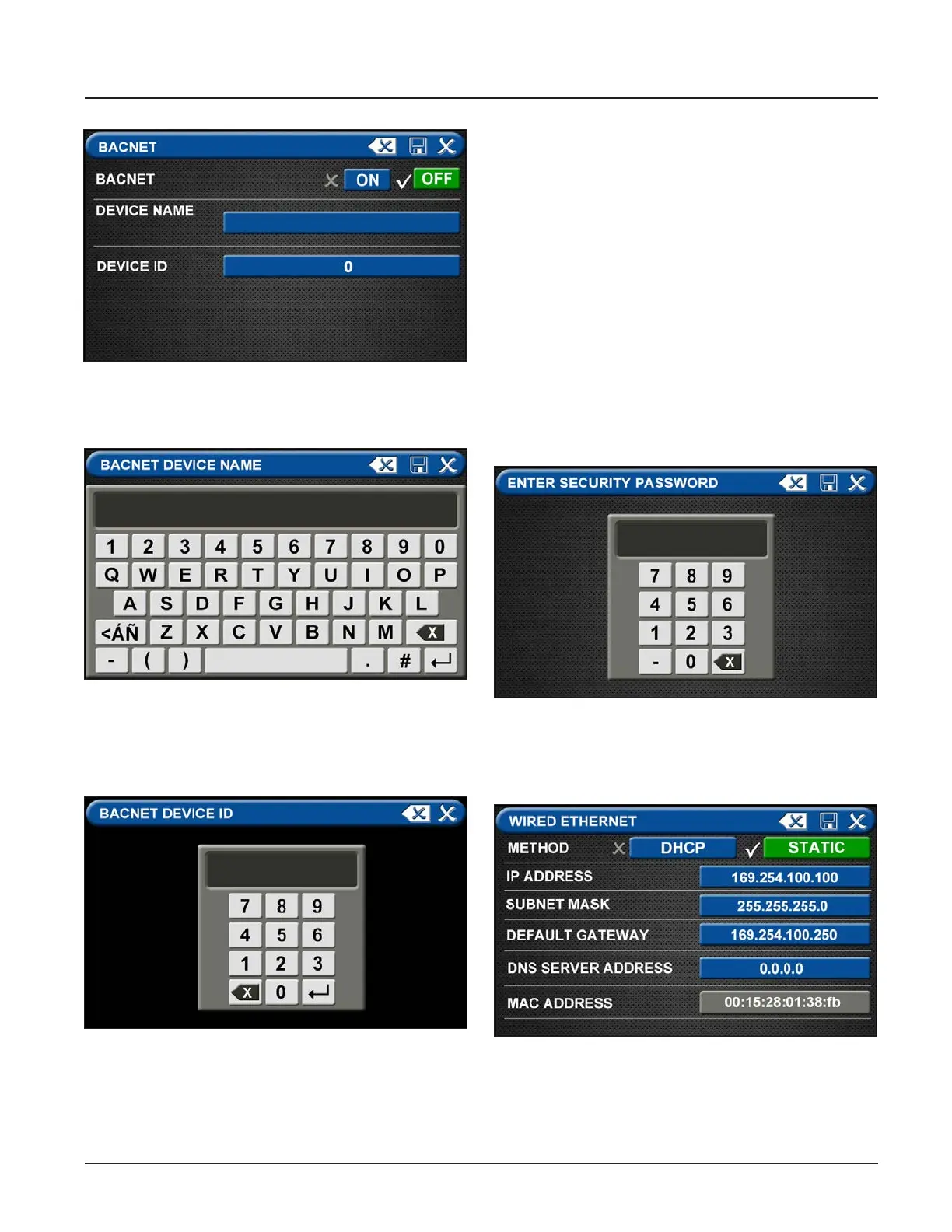
Figure 131: BACnet Screen
• Save the BACnet device name by touching the save
button located in the top right corner of the screen.
Figure 132: BACnet Device Name
• To add the ID, touch the DEVICE ID tab and enter
the ID number provided by the Building
Management System administrator.
Figure 133: BACnet Device ID
• Save settings.
• Touch the X in the top right corner to exit out of the
BACnet setup screen.
4.7.5 “Mirroring” Two Alarm Panels
Each alarm panel has an Ethernet port on the back of
the front panel assembly. By connecting the alarm to
the hospital network, via Ethernet, or directly cabling it
to another alarm panel, signals and gas pressures can
be pulled from one panel and displayed on another
panel
An category 5 CROSS OVER cable is required for con-
necting alarm panels directly to each other. Otherwise,
standard cabling can be used with a facility’s Ethernet
hub or switch to connect panels.
Setup of alarm to be “mirrored”
Start on the Conguration screen.
• Enter Security Password
Figure 134: Security Password
• Touch the MISCELLANEOUS tab located on the
setup screen
Figure 135: Wired Ethernet Control Screen



 To Next Page