4-47
TotalAlert Innity™ HTM Medical Gas Notication System
4107 9016 60.01
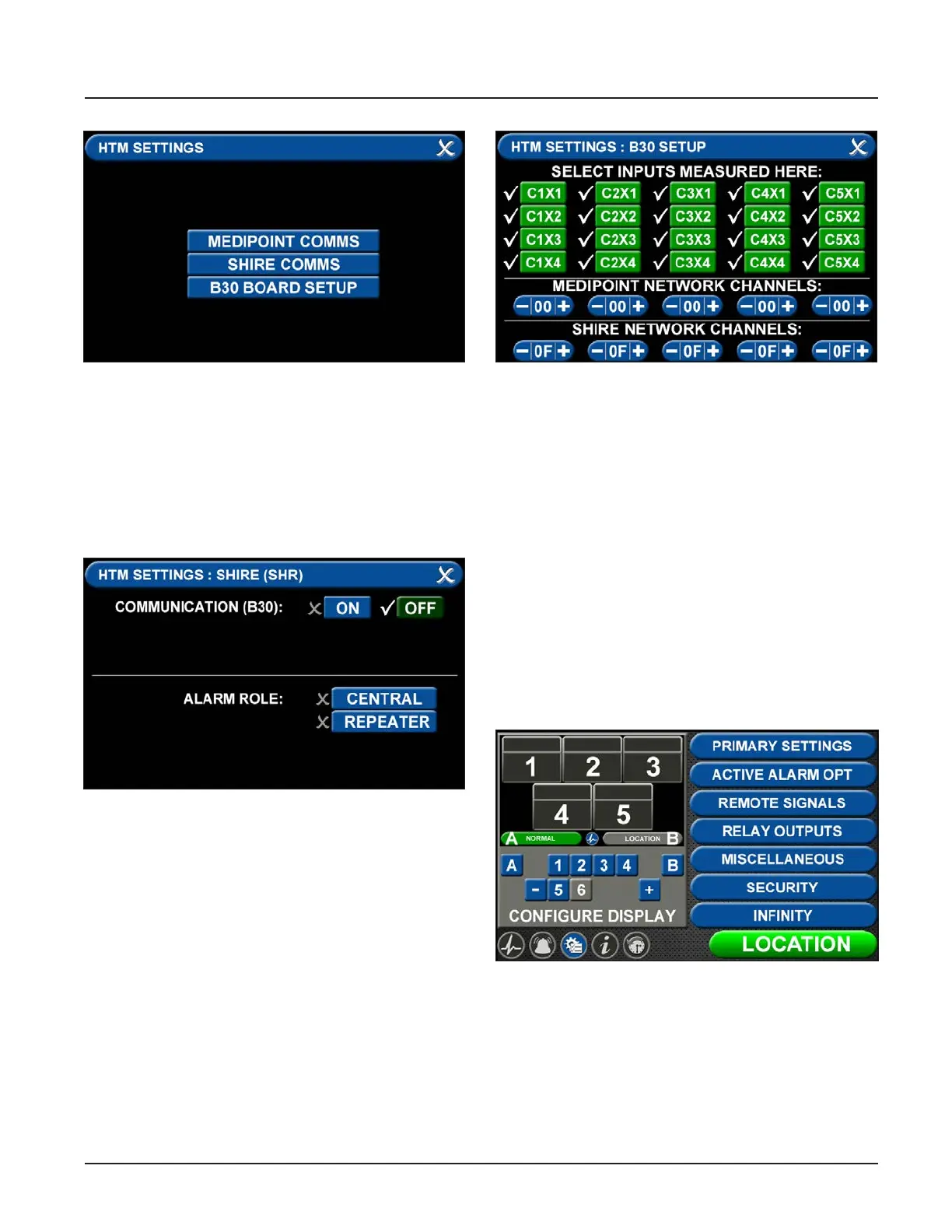
Figure 166: Shire Network Setup
• Communication (B30) can be toggled OFF or ON by
pressing the correlating tabs. Alarm Role can also
be dened by selecting the CENTRAL or REPEATER
tabs. On a Shire network you select one device to
be the central, and all other devices on the shire
network are repeaters.
• Press save icon to complete setup.
Figure 167: Shire Network Setup
• To transmit and recieve signals, the HTM Settings
tab has to be initialized (Figure 166).
• Press the B30 BOARD SETUP tab (Figure 167).
Figure 168: Shire Network Setup
• Select the inputs for signals that will be wired
locally to the alarm.
• Individual tabs can be toggled o and on by adding
or eliminating the check mark by the inputs where
you are landing the wires on the B30 board. Also, if
you are transmitting SHIRE signals, set the appro-
priate network channels by pressing the + or – tab
to the correct setting.
• Press save icon to complete setup.
4.8.5 Shire Network Gas Badge Setup
To setup gas badges to communicate on the SHIRE
network:
• Go to conguration screen and select the gas
badge.
Figure 169: Conguration Screen
• Touch ALARM POINT tab to congure gas badge



 To Next Page