4-29
TotalAlert Innity™ HTM Medical Gas Notication System
4107 9016 60.01
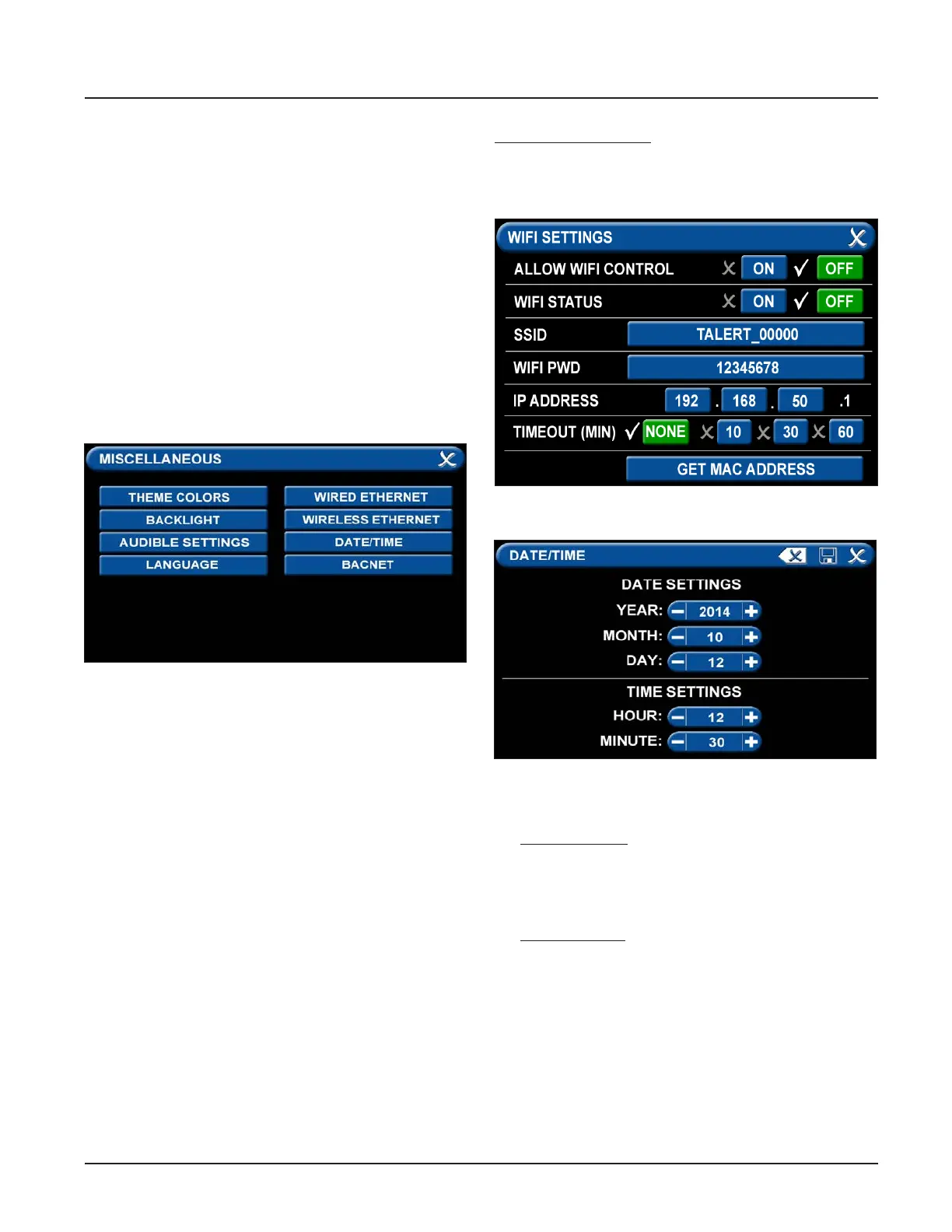
4.5.4 Miscellaneous Tab
Users can customize certain aspects of the TotalAlert
Innity™ Alarm’s appearance and functionality. One
aspect of changing the Alarms appearance is that the
users can select between English, Spanish, and French
by touching the “LANGUAGE” tab and choosing the
coorisponding language. See section 9.0 for all other
non-latin languages to be setup.
Also, to preserve the life of the LED display, the Tota-
lAlert Innity™ Alarm allows for the user to adjust the
time that the display backlight will remain on with no
motion detected
.
• Touch the BACKLIGHT tab.
• Then select 5 to 60 minutes, or Never tab.
• Save setting by pressing the Save icon.
Two other functions that can be adjusted are the WIFI
settings and the date and time settings.
• Touch the MISCELLANEOUS tab.
• Wireless Ethernet Settings Tab
The WIRELESS ETHERNET SETTINGS screen allows for
customization of the WIFI settings. All of the tabs on
this screen are set to default status.
• Touch the WIRELESS ETHERNET tab.
• To turn the WIFI on, touch the WIFI STATUS / ON
tab.
• To change the WIFI password—STRONGLY
RECOMMENDED—touch the WIFI PWD tab.
Using the keyboard, enter a new password.
Touch the Save button to close and return to the
WIFI SETTINGS screen.
• To add the WIFI settings to the INFORMATION
screen, touch the ALLOW WIFI CONTROL / ON tab.
Touch the Save button.
• The INFORMATION screen will now display a WIFI
tab.
The WIFI screen shows:
• WIFI status
• SSID
• IP address
• Date/Time Settings Tab
For DATE SETTINGS, use the plus and minus signs to
adjust the:
• Year
• Month
• Day
For TIME SETTINGS, use the plus and minus signs to
adjust the 24-hour clock:
• Hour
• Minute
Figure 99: WIFI Settings Screen
Figure 100: Date/Time Settings Screen
Figure 98: Miscellaneous Screen



 To Next Page