4-5
TotalAlert Innity™ HTM Medical Gas Notication System
4107 9016 60.01
4.2 Alarm Conguration
To set up or change the conguration of an alarm,
start on the CONFIGURATION screen. Users are always
prompted to enter the password when accessing this
screen.
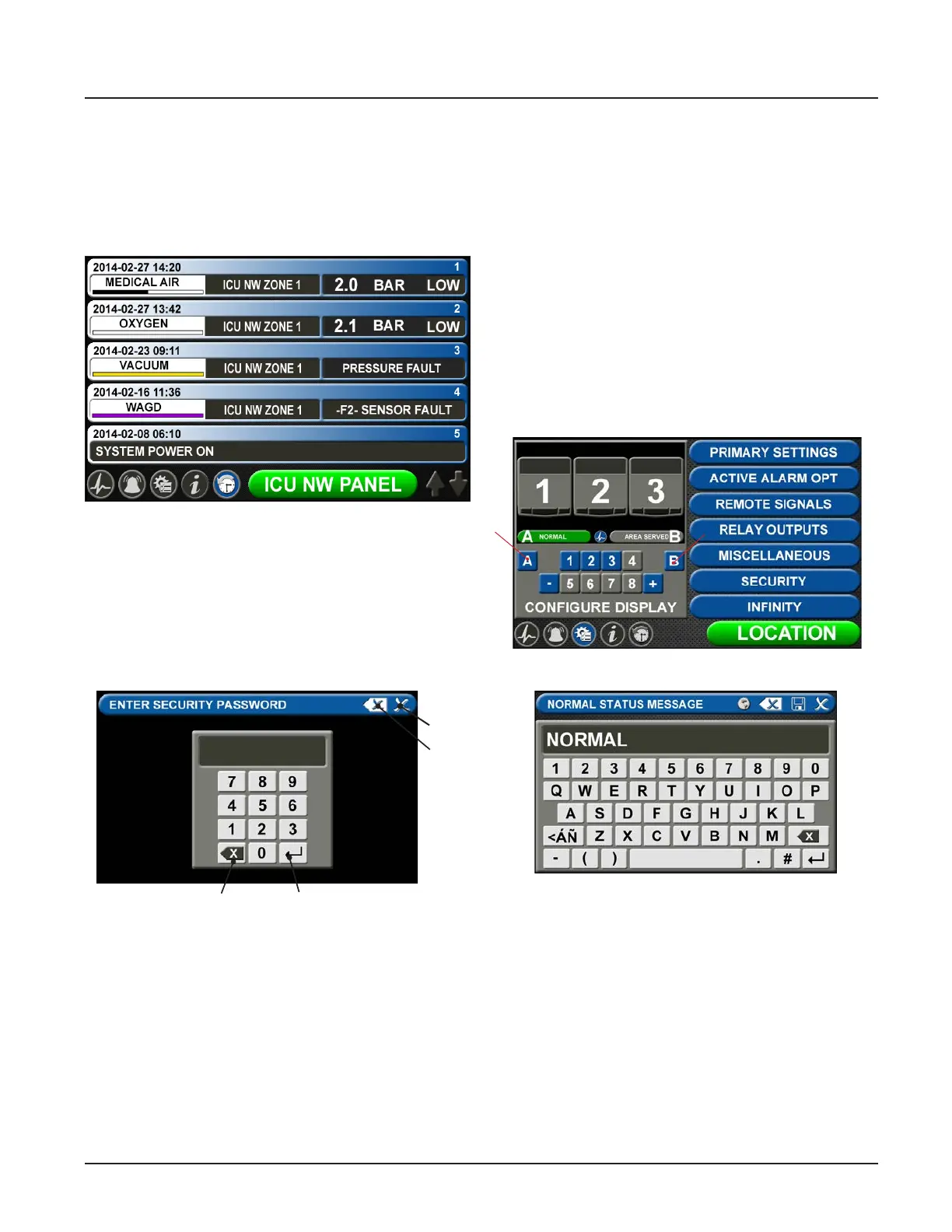
Figure 16: Password entry on
Conguration screen
EnterBackspace
Close
Clear all
entered
text
Figure 17: Conguration Screen
Figure 15: History Screen
History Screen
To view up to 100 alarm events on screen, touch the
history button located on the icon toolbar. User can
easily scroll to view the events by touching up/down
arrows in the bottom right corner of the screen.
Type the default password (121212), and touch the
Enter button. You will be prompted to change the pass-
word if you have not done so previously.
The CONFIGURATION screen displays.
Normal Status Message/Panel ID
Description
The TotalAlert Innity™ alarm allows for customization
of certain labels and messages.
Normal Status Message
To change the message that is communicated when
the alarm is operating in normal status:
1. Touch the [A] button that is located to the left of
the numeric display (Figure 4.17).
Figure 18: Normal Status Message screen
2. Touch the Erase button on the keyboard to delete
the existing message.
3. Enter the new word or message.
4. Touch the Save button.



 To Next Page