4-40
TotalAlert Innity™ HTM Medical Gas Notication System
4107 9016 60.01
• Touch Wired Ethernet tab to access the Wired
Ethernet control screen (Section 4.7.3).
• Conguration of the Wired Ethernet settings to be
performed by facility’s IT specialist. Settings for the
IP Address, Subnet Mask, Default Gateway, and
DNS Server Address to conform to facility’s net-
work.
• Touch the Save button to close and return to the
MISCELLANEOUS Screen.
• Exit the MISCELLANEOUS screen and return to the
Conguration screen.
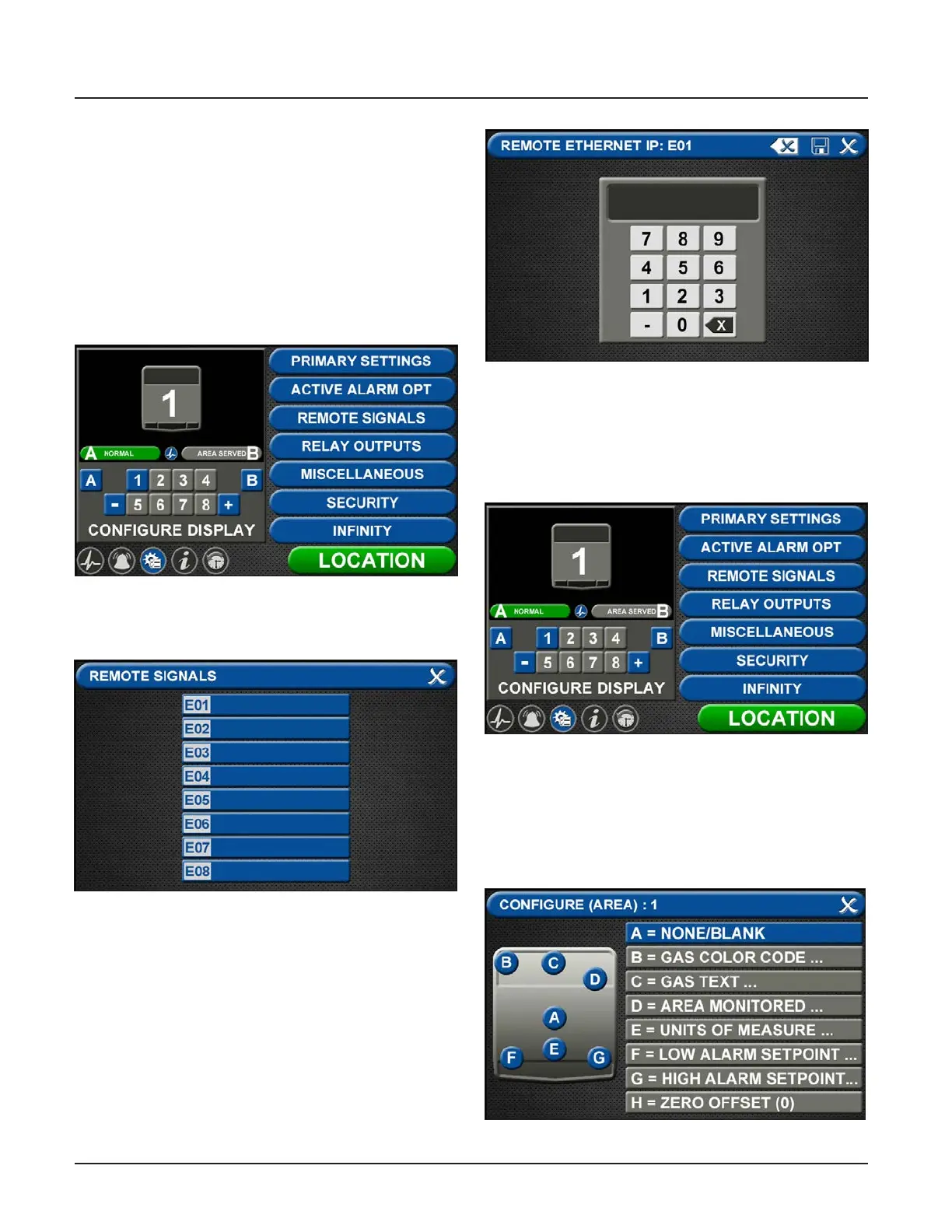
Figure 136: Conguration Screen
• Touch the REMOTE SIGNALS tab.
Each alarm panel can mirror signals and pressures
from up to 8 remote alarm panels.
• Touch the E01 tab.
• Enter the Remote Ethernet IP address of the alarm
panel to be mirrored.
• Touch the save button.
Figure 137: Remote Signals Screen
Figure 138: Remote Ethernet IP Address
On the alarm panel that will display the
mirrored signal or pressure:
Gas Badge
• Go to Conguration screen
Figure 139: Conguration Screen
• Add new badge to be mirrored by touching the [+]
key.
• Touch the badge number to be congured.
• On the CONFIGURE (AREA) screen, touch A=None/
Blank tab to set up badge.
Figure 140: Congure Area Screen



 To Next Page