4-15
TotalAlert Innity™ HTM Medical Gas Notication System
4107 9016 60.01
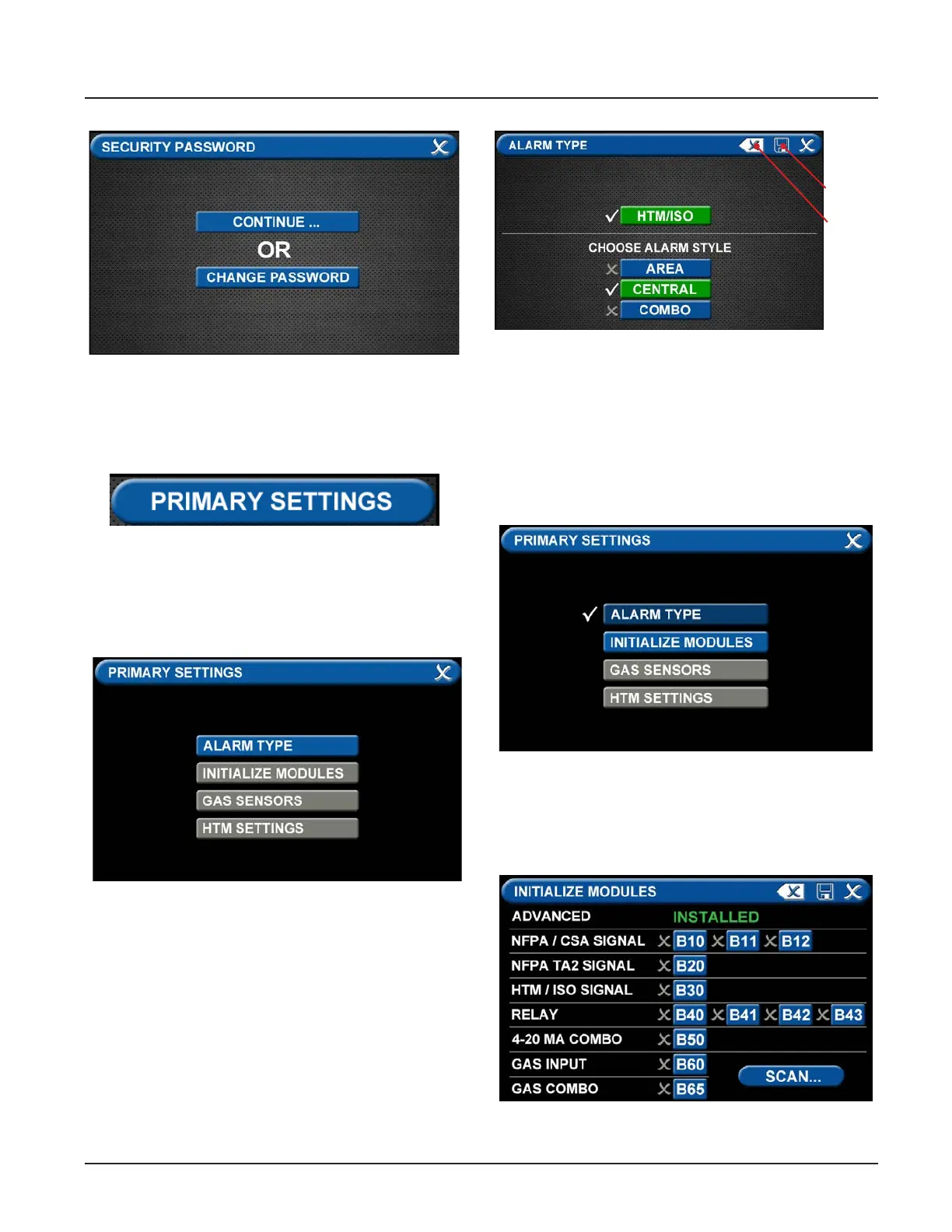
Primary Settings Tab
The PRIMARY SETTINGS tab allows you to select the
alarm type and initialize boards.
Figure 48: Changing the Security Password
Figure 49: Alarm Type Tab
• Touch the PRIMARY SETTINGS tab.
Alarm Type Tab
The ALARM TYPE screen denes which type of alarm
will be displayed and drives later setup functions.
• Touch the ALARM TYPE tab.
Figure 50: Choosing Code and Alarm Styles
Save
Erase
Figure 52: Initialize Modules Screen
Figure 51: Initialize Modules Tab
• Touch the Save button when you see checks beside
your selections to close the screen and return to
the PRIMARY SETTINGS screen.
Note: To clear your selections, touch the Erase button.
Initialize Modules Tab
The PRIMARY SETTINGS screen will now display with
ALARM TYPE checked and INITIALIZE MODULES active.
• Touch the INITIALIZE MODULES tab.
The INITIALIZE MODULES screen is used to set up the
boards that are installed. The boards function as the
input/output hardware of the alarm.
• Choose a code style based on code requirements.
• Touch the Central tab.



 To Next Page