4-31
TotalAlert Innity™ HTM Medical Gas Notication System
4107 9016 60.01
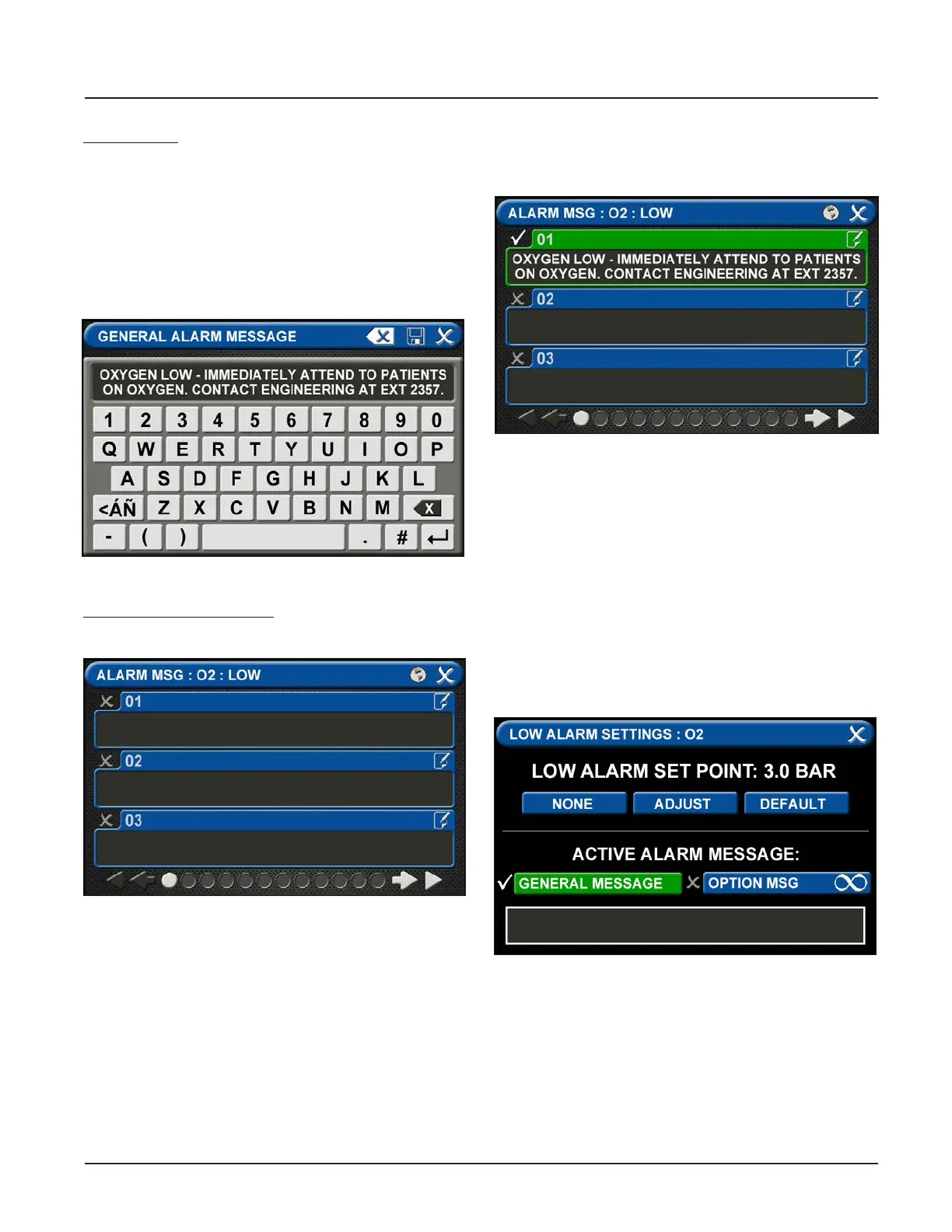
Figure 105: General Alarm Message Screen
Figure 106: Alarm Messages Screen
Keyboard tips:
• Touch the [<ÁÑ] to toggle to symbols. Touch the
[1AZ] key to toggle back to letters and numbers.
• As text is entered, the letters will decrease in
size. This feature helps to accommodate a longer
message.
• To add a second line of text, use the Enter button.
• Touch the Save button to close and return to the
ACTIVE ALARM OPT screen
To add specic instructions:
• Touch the OPTIONAL ALARM MESSAGE tab.
Figure 107: Optional Alarm Message
• Touch the 01 tab. Enter the instruction. Touch the
[<ÁÑ] to toggle to symbols. Touch the [1AZ] key to
toggle back to letters and numbers.
Figure 108: Low Alarm Settings
• Touch the Save button to close.
• Repeat to add additional instructions.
• Touch the X button to close and return to the
ALARM MESSAGES screen.
• Touch the X button to close and return to the
ACTIVE ALARM OPT screen.
• To tie an optional alarm message, or specic
instruction, to a set point, go to the LOW ALARM
SETTINGS screen or the HIGH ALARM SETTINGS
screen for that gas.
• Touch the OPTION MSG tab.



 To Next Page