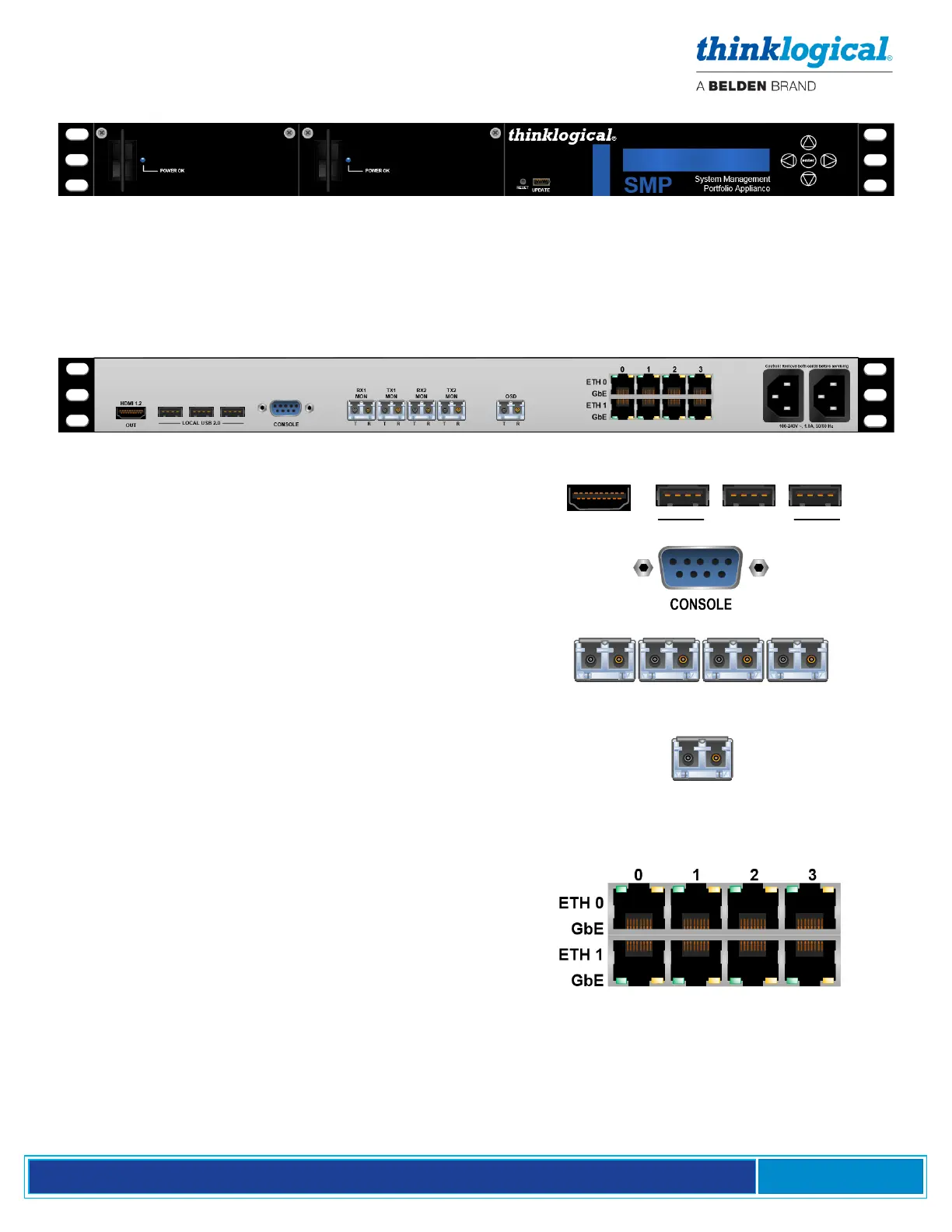
THE FRONT PANEL
SMP Appliance, front panel (see Part Numbers, Appendix A, pg. 65)
• LCD and navigation buttons for device configuration and download.
• USB-mini B connector for Thinklogical firmware updates.
• Dual redundant hot-swappable, load-sharing 120W power supplies, replaceable from the front
panel.
THE REAR PANEL
SMP Appliance back panel
• The Appliance can be viewed and controlled locally via
an HDMI 1.2 video Port and either of three USB 2.0
Ports (keyboard, mouse and download).
• The DB9 Serial Console Port connects directly to the
processor and can be used for software debug.
• Monitoring ports for Dashboard and Overlay. For
MON functions only and not required for other
operations. SFP ports are LC-type.
• The OSD provides a fiber-optic output that can be
routed to any KVM extender. The OSD port provides
access to the unit’s desktop. Used for initial set-up and
installation. Thinklogical recommends NOT connecting
the OSD to the Matrix Switch during normal operation.
• The SMP Appliance provides two separate internal
10/100/1000 gigabit Ethernet interfaces:
Eth0 is used for connecting to a site’s enterprise
network.
Eth1 is reserved for a “private” LAN, which includes
the Matrix Switches’ Controller Cards. RJ-45
connector LEDs indicate the mode of operation (1G
orange, 100M green, or 10M yellow) with blinking
as an indication of activity.
• SMP2 Eth1 default IP address 192.168.13.9:60090)
• DASHBOARD Eth1 default IP address 192.168.13.9:60083



 To Next Page