The SAVE Button
When making changes, click on the SAVE button in the upper right corner
to preserve changes. Click .CANCEL to disregard changes.
The DSTS (Destinations) Tab
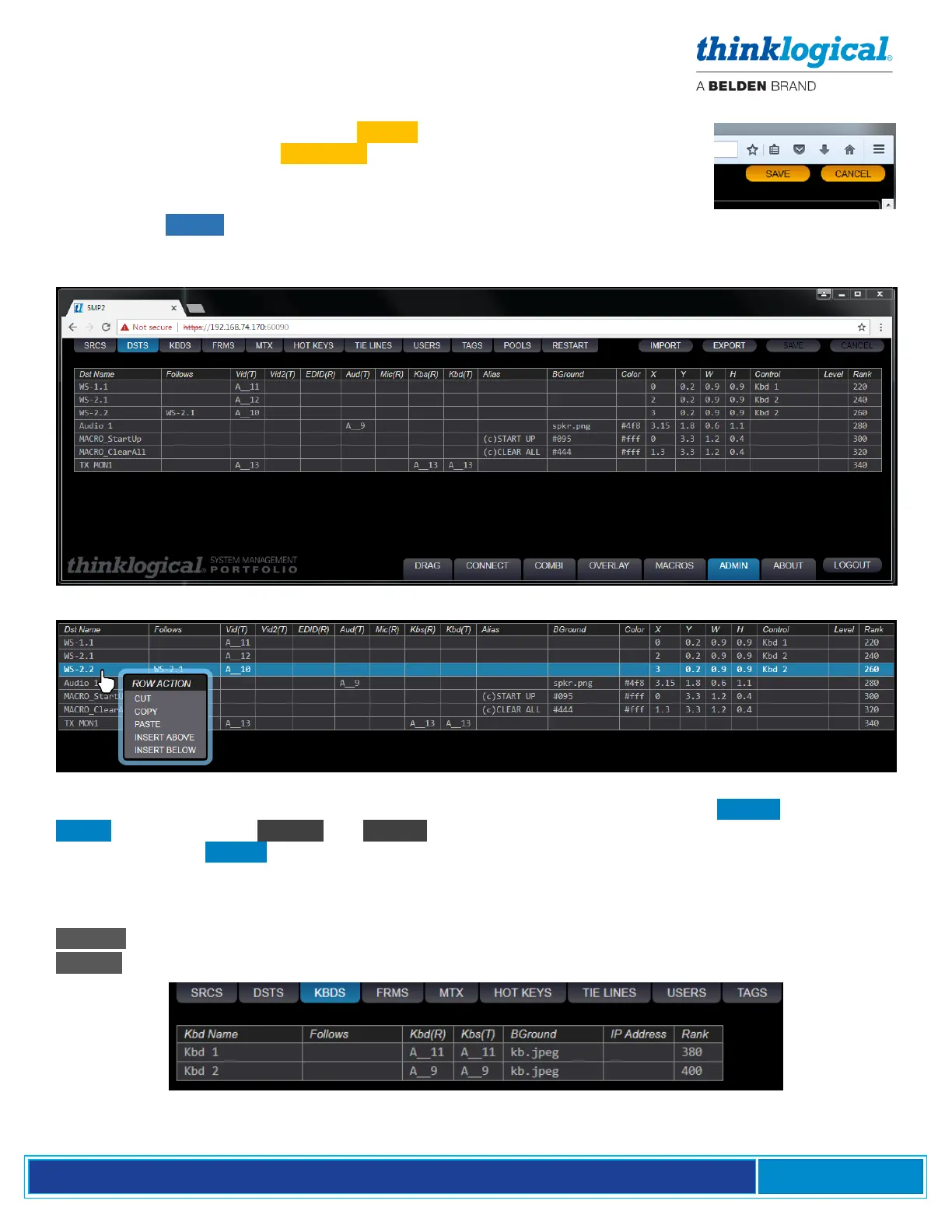
Note that the DSTS tab lists the Destinations (as shown in the diagrams on pgs. 7 and 14), two Macros
and TX MON1. The Destination rows include the Port Numbers for the fiber-optic cable connection
points on the Matrix Switch (A__11, A__12, etc.).
In most Tabs, users may right-click on a row and use the drop-down menu to make modifications to the
list, such as adding or deleting rows, etc. Keyboards are not configured in the DSTS Tab. Use the
KBDS Tab, below. (The Kbs(R) and Kbs(T) columns are only used by the Monitor feature. Keyboards
are defined in the KBDS Tab.)
The KBDS (Keyboards) Tab
This tab defines where an active keyboard is located.
.Kbd(R) =data from kybd/mouse to PC (Rx to Tx), fiber L2 or K2 (data backchannels)
.Kbs(T) =status from PC to kybd/mouse (Tx to Rx), fiber L1 (video/data) or K1 (USB HID data)



 To Next Page