Experienced administrators may select the EDIT Tab and a window will open with separate tables
for editing sources, destinations, keyboards, etc. (previous page). It displays the Source and
Destination names, along with the various modifiable parameters. Use the mouse wheel or the scroll
bar at the right to scroll through the edit menus.
Warning! Edit is for experienced administrators only! While making edits in the EDIT
TAB, clicking SAVE or moving to another tab will cause the uncompleted edits to be
saved, which may render some or all functions inoperable.
Modify the Backgrounds
The top-most window, Frame Name Frm Name , allows changes to the dimensions and colors of the
Destination dstsBG and Source srcsBG windows by entering new values in any field. Xoff and Yoff
controls the position of the windows. W and H control the width and height of the windows. Xscale
and Yscale control the size of the field that the icons in each window will occupy.
Users can modify the background colors BGround , the text colors Color , and the border colors
Border behind the Destination dstsBG (destinations Back Ground) and Source srcsBG (sources
Back Ground) windows by entering new values in any of these fields. Refer to an RGB Color Table for
more on the numeric codes.
Modify the Icons
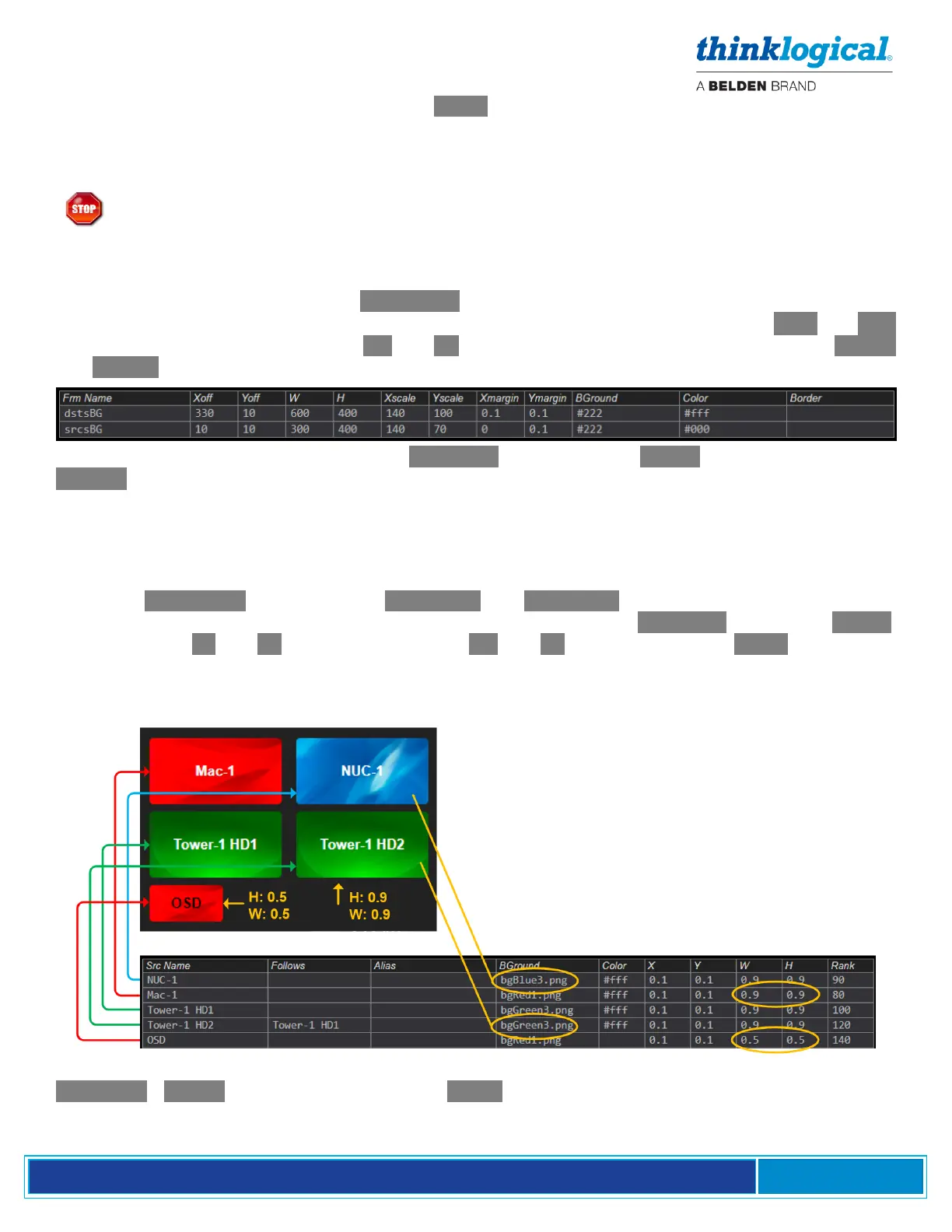
Below the Frm Name window are the Src Name and Dst Name Edit windows. Using the icons in
the Source window as an example, note that the background colors BGround , text colors Color ,
relative position X and Y , and icon dimensions W and H are specified in the EDIT fields below.
(A fifth source icon, OSD, has been added to this example to demonstrate how the width and height
settings modify the displayed icon.) Icon backgrounds can be an HTTP color description, such as #0f0
(green), or an image saved as a .jpg or .png file to opt/tl/smp2/public/images (case sensative).
Sources can be re-ordered in the table and in the page layout by clicking on the column headers
.BGround. , Color. , etc. At the far right is the Rank column which allows complete control over the
order. Sources with smaller rank values will appear on the page layout before sources with greater rank
values, when the Rank column header is selected.



 To Next Page